Improved query replica synchronization in Azure Analysis Services is in preview
Azure Updates
Published
Status
Timeline
- January 2020Preview
Product
Tag
Category
Description
A new Azure Analysis Services setting (in preview) improves performance and consistency of query-replica synchronization in scale-out environments. Query scale-out distributes client queries across one or more query replicas, reducing response times for high concurrency workloads. Query-replica synchronization replicates data to query-replica databases.
By default, query replicas are re-hydrated in full (not incrementally), which happens in stages. They are detached and attached two at a time (assuming there are at least three replicas) to ensure that at least one replica is kept online for queries at any given time. Clients may need to reconnect to one of the online replicas while this process is taking place.
With the new ReplicaSyncMode setting, it’s now possible to specify query replica synchronization in parallel. The optimized query-replica synchronization also provides these benefits:
- All replicas are synchronized in parallel, significantly reducing synchronization time.
- Since all replicas are synchronized in parallel, data across replicas are more likely to be consistent during the synchronization process.
- Because databases are kept online on all replicas throughout the synchronization process, clients don't need to reconnect.
- The in-memory cache is updated incrementally with only the changed data, which can be much faster than fully rehydrating the model.
As an example of the benefit of optimized synchronization, the product team conducted tests on a database roughly 84 GB in size on an S8v2 with 3 replicas. The sync took about 2 minutes for an incremental sync versus 5 minutes for a non-incremental sync. For the same database on an S8v2 with 7 replicas, while the time for an incremental sync remained unchanged, the time for a non-incremental sync jumped to 11 minutes.
Possible values for ReplicaSyncMode are:
- 1 (default): full replica database rehydration in stages.
- 2: optimized synchronization in parallel.
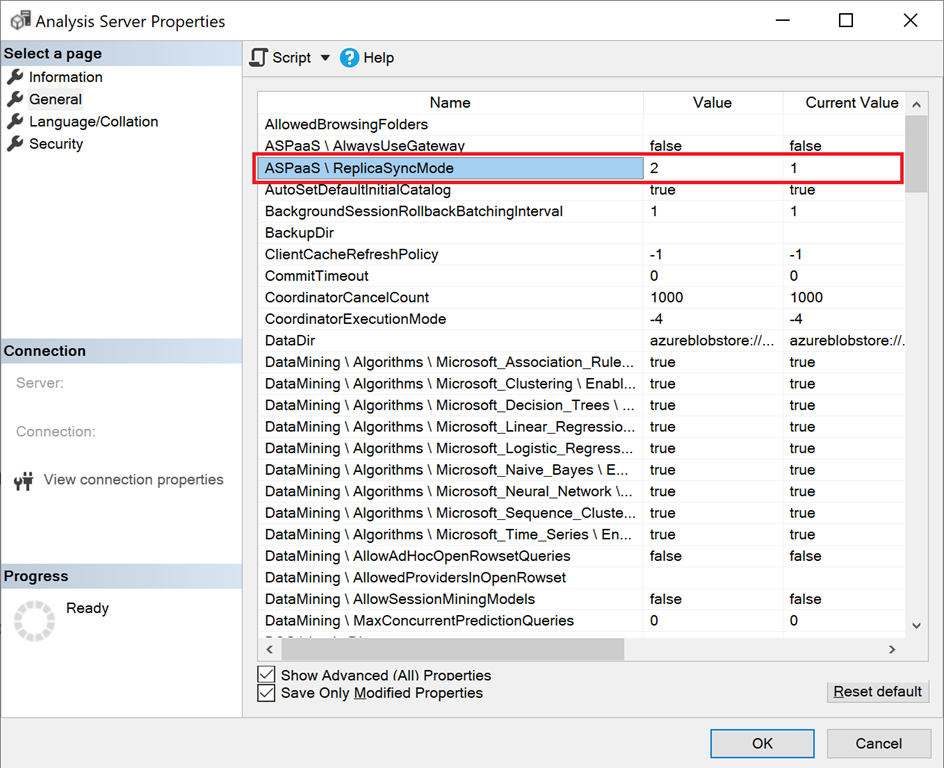
If you set ReplicaSyncMode=2, additional memory may be consumed by the query replicas, depending on how much of the cache needs to be updated. To keep the database online and available for queries, the operation can require up to double the memory on the replica, depending on how much of the data has changed. This is because both the old and new segments are kept in memory simultaneously. Replica nodes have the same memory allocation as the primary node. Since there’s normally extra memory on the primary node for refresh operations, it’s unlikely that the replicas would run out of memory. Additionally, a common scenario is that the database is incrementally updated on the primary node, so there shouldn’t be a need for double the memory. If the sync operation encounters an “out of memory” error message, it will retry using the default technique (attach/detach two at a time).
Learn more about query scale-out in Azure Analysis Services.