Metadata at Sep 22, 2025
Last Updated
Published Sep 18, 2025
Service
Tag
MC1155311 - Viva Engage: Agents in Viva Engage communities Public Preview
Message Center
What changed since this version
Updated September 22, 2025:July 9, 2026: We have updated the contenttimeline. Thank you for your patience.
Introduction
Agent in Viva Engage communities are now available in Public Preview. Community admins can add agents to communities to enhance knowledge sharing by draftinghelp draft answers to questions without best or verified answers based on community content.content and add context to posts by answering follow up questions using the community's conversations and SharePoint site and library.Shortly after public preview begins, we'll be enhancing agents in communities with SharePoint groundingWe’re now adding the option for community admins to improve the accuracy and relevance of AI-generated answers. This update allows the agent to use content fromspecify additional SharePoint sites outside the community as grounding sources. The agent will only use sites that community admins select, and it drafts answers from items that community members can access, helping ensure responsesview (Read).
We are contextually grounded and backedalso adding a new capability: tagging by trusted sources. Agents in communities will only draft answers with content that allcommunity members. Tagging by community members have access to. Youenables Microsoft 365 copilot-licensed users to @-mention the community agent in the comments and replies of threads with follow up questions and requests to add context to posts. When tagged, the community agent will reply in the post. Tagging by community members will be enabled by default, but can set up yourbe disabled by community admins in the agent with before SharePoint grounding is available and add it later.settings.
When this will happen:
- Agents in communities Public Preview:
Begins September 18th, expected to be complete by late Septemberavailable now - SharePoint Grounding on Community site and library Public Preview (Worldwide):
Begins late September 2025,available now - Grounding on SharePoint sites and libraries outside the community and tagging by community members Public Preview (worldwide): SharePoint grounding has been completed, while tagging by community members remains in Private preview with expected release to
complete by early October 2025Public Preview still end of July 2026. - General Availability (Worldwide):
Begins late January 2026, expectedWe expect to start rolling in September 2026 and complete rollout bylate February 2026end of September 2026.
- Who is affected: Viva Engage community admins and members with Microsoft 365 Copilot licenses; Global and Engage admins managing Viva Engage networks
- What will happen:
- During Public Preview:
- Admins can opt their network into the preview via the Engage admin center: Engage admin center > Tenant Settings > Enable Community Agent Public Preview.
Figure i. Add agent to community
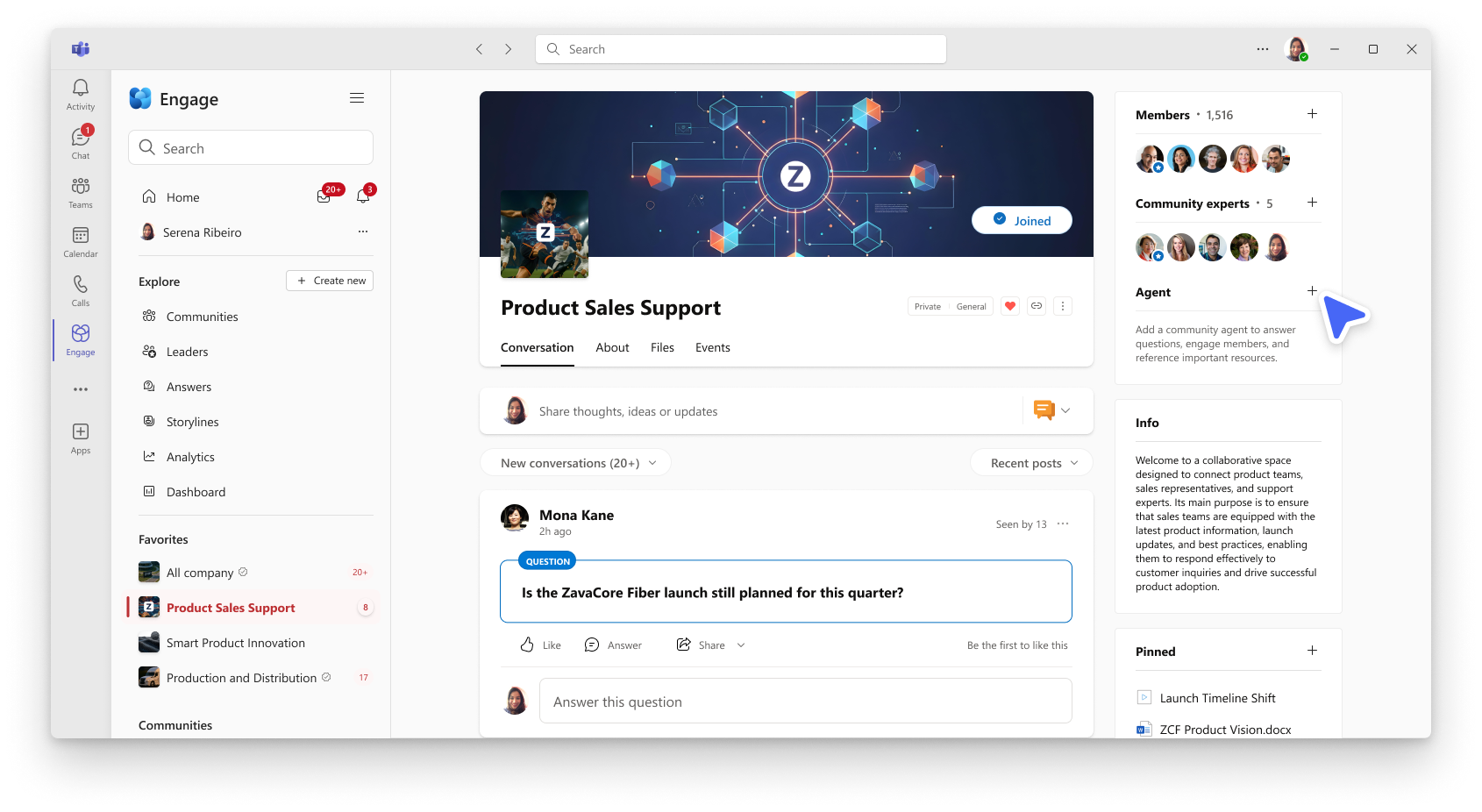
The agent will proactively draft answers to unanswered questions using past conversations.
By default, the agent posts answers automatically.
Admins can configure whether the agent posts answers automatically or only after approval.approval and if tagging by community members is enabled.
Figure ii. Configure the agent to require answer review before postingagent's capabilities and knowledge sources
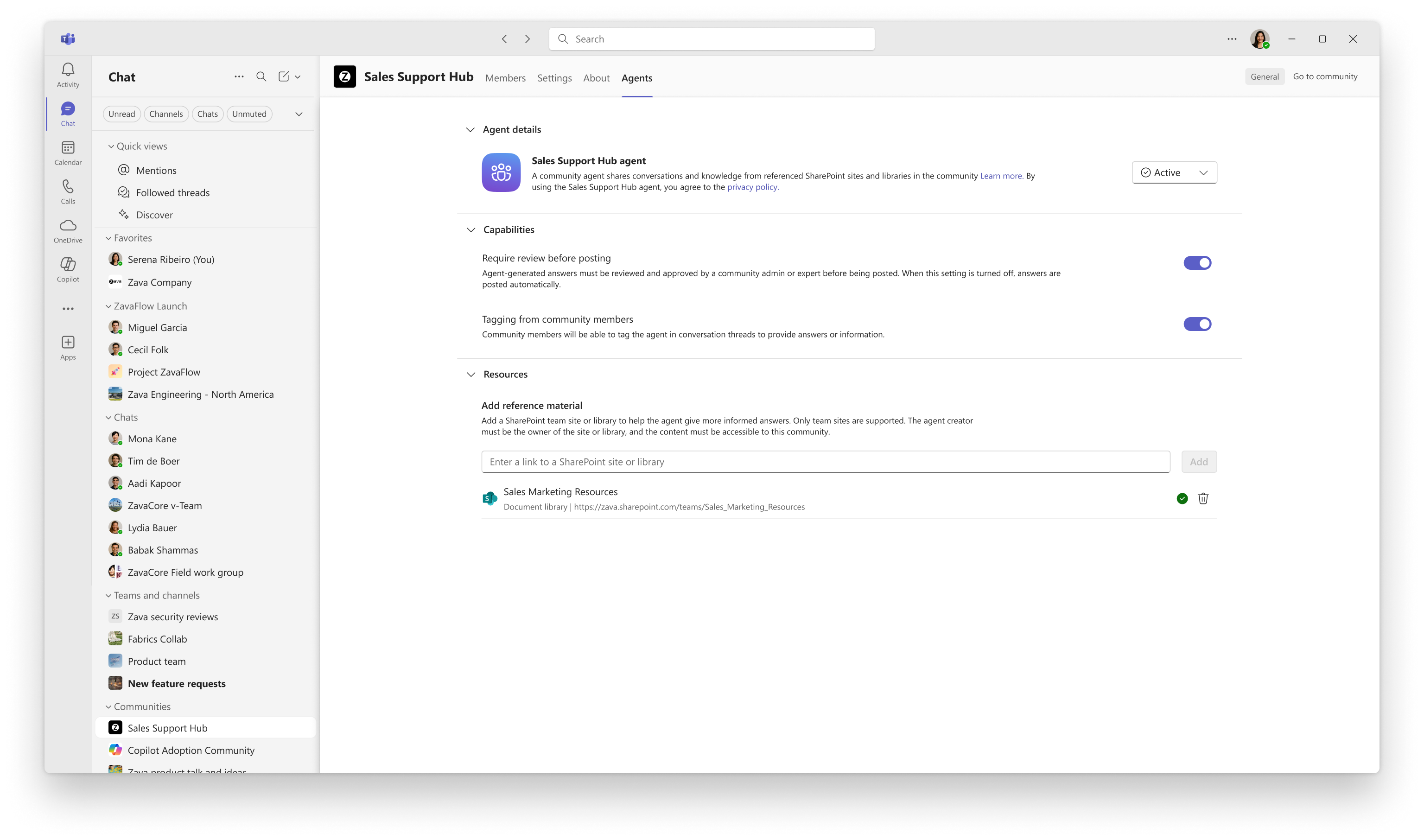
Grounding on SharePoint sites outside the community
- Community admins can add SharePoint sites and libraries outside the community as additional grounding sources (for sites/libraries they administer).
- When an admin adds a site or library, they’ll be prompted to grant the community’s Microsoft 365 group Read access if it doesn’t already have permission.
- The agent only drafts answers using content that all community members can view (Read).
- By default, the agent uses the community’s SharePoint site and library. Any sites outside the community are optional and add to (not replace) the default grounding.
If Require review is enabled, admins and designated experts will be notified when the agent drafts an answer. They can approve, edit, or dismiss the response.
Figure iii. Community admins and experts can review agent suggestions
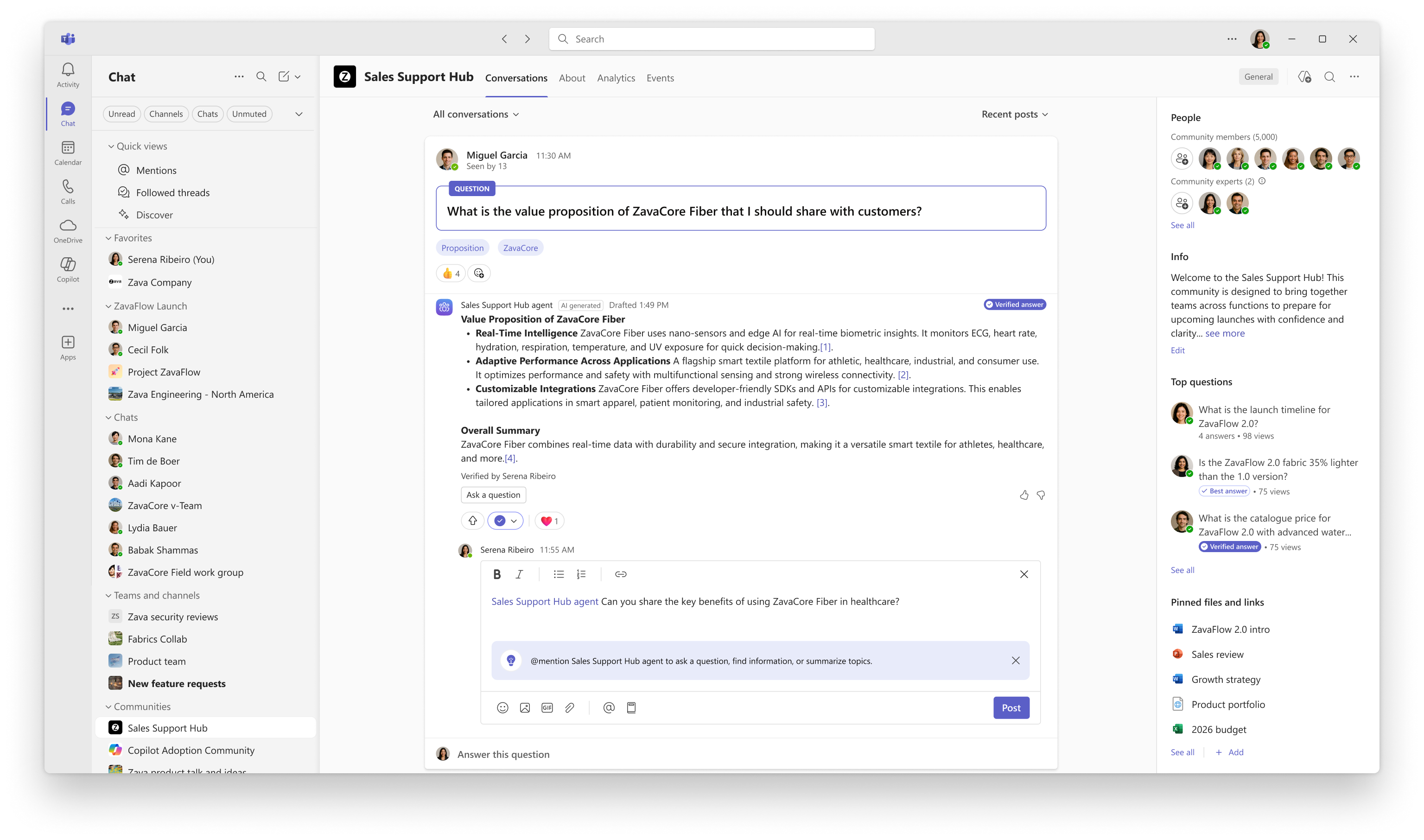
If tagging by community members is enabled, then community members can @-mention the agent in messages.
Coming soon (General Availability):
The agent will only use content that all community members can access.
Admins must be owners of the SharePoint sites they wish to configure.
Admins can add additional SharePoint sites to expand the agent’s grounding knowledge.
The agent will be grounded by default on the community’s SharePoint site.
Community members can tag the community agent in community posts.
All Microsoft 365 Copilot licensed users will have access to the Community Agent by default.
The Community Agent Public Preview toggle will be retired.
What you can do to prepare:- If participating in preview:
- Opt your network into the preview via the Engage admin center
- Communicate this change to helpdesk staff.
- Update internal documentation that references Viva Engage Community Agent behavior or setup.
- No action is required at GA; the feature will be on by default.
Learn more: Set up and manage agents in Viva Engage communities | Microsoft Learn
Compliance considerations:
| Consideration | Explanation |
|---|---|
| Uses customer data | The agent accesses SharePoint content to generate answers. Only content accessible to all community members is used. |
| Introduces AI/ML agent capabilities | The agent uses generative AI to draft responses based on SharePoint content. |
| Admin control available | (Optional) Community admins can configure which SharePoint sites are used for grounding. Admin must be site owner. |
| User interaction with generative AI | End users receive AI-generated answers grounded in community conversations and SharePoint content |
| Can be controlled through Entra ID group membership | Admin access and site ownership can be managed via Entra ID group membership. |
Snapshot from Sep 22, 2025
Updated September 22, 2025: We have updated the content Thank you for your patience.
Introduction
Agent in Viva Engage communities are now available in Public Preview. Community admins can add agents to communities to enhance knowledge sharing by drafting answers to questions without best or verified answers based on community content.
Shortly after public preview begins, we'll be enhancing agents in communities with SharePoint grounding to improve the accuracy and relevance of AI-generated answers. This update allows the agent to use content from SharePoint sites that community members can access, helping ensure responses are contextually grounded and backed by trusted sources. Agents in communities will only draft answers with content that all community members have access to. You can set up your agent with before SharePoint grounding is available and add it later.
When this will happen:
- Agents in communities Public Preview: Begins September 18th, expected to be complete by late September
- SharePoint Grounding Public Preview (Worldwide): Begins late September 2025, expected to complete by early October 2025
- General Availability (Worldwide): Begins late January 2026, expected to complete by late February 2026
- Who is affected: Viva Engage community admins with Microsoft 365 Copilot licenses; Global and Engage admins managing Viva Engage networks
- What will happen:
- During Public Preview:
- Admins can opt their network into the preview via the Engage admin center: Engage admin center > Tenant Settings > Enable Community Agent Public Preview.
Figure i. Add agent to community
The agent will proactively draft answers to unanswered questions using past conversations.
By default, the agent posts answers automatically.
Admins can configure whether the agent posts answers automatically or only after approval.
Figure ii. Configure the agent to require answer review before posting
If Require review is enabled, admins and designated experts will be notified when the agent drafts an answer. They can approve, edit, or dismiss the response.
Figure iii. Community admins and experts can review agent suggestions
Coming soon (General Availability):
The agent will only use content that all community members can access.
Admins must be owners of the SharePoint sites they wish to configure.
Admins can add additional SharePoint sites to expand the agent’s grounding knowledge.
The agent will be grounded by default on the community’s SharePoint site.
All Microsoft 365 Copilot licensed users will have access to the Community Agent by default.
The Community Agent Public Preview toggle will be retired.
What you can do to prepare:- If participating in preview:
- Opt your network into the preview via the Engage admin center
- Communicate this change to helpdesk staff.
- Update internal documentation that references Viva Engage Community Agent behavior or setup.
- No action is required at GA; the feature will be on by default.
Learn more: Set up and manage agents in Viva Engage communities | Microsoft Learn
Compliance considerations:
| Consideration | Explanation |
|---|---|
| Uses customer data | The agent accesses SharePoint content to generate answers. Only content accessible to all community members is used. |
| Introduces AI/ML agent capabilities | The agent uses generative AI to draft responses based on SharePoint content. |
| Admin control available | (Optional) Community admins can configure which SharePoint sites are used for grounding. Admin must be site owner. |
| User interaction with generative AI | End users receive AI-generated answers grounded in community conversations and SharePoint content |
| Can be controlled through Entra ID group membership | Admin access and site ownership can be managed via Entra ID group membership. |