MC1183611 - Consult and merge into a meeting or group call via Dual-Tone Multi-Frequency (DTMF)

Service

Microsoft Teams

Last Updated

Dec 3, 2025

Published Nov 7, 2025

Tag

Updated message
New feature
User impact

Platforms

Desktop
Mac

Summary

Microsoft Teams will enable consulting and merging PSTN callers into meetings via DTMF navigation through IVR systems. Rolling out February 2026, this feature requires no admin action, is enabled by default, and allows users to dial and merge external participants seamlessly during meetings.

More information

Updated December 3, 2025: We have updated the timeline. Thank you for your patience. 

Introduction

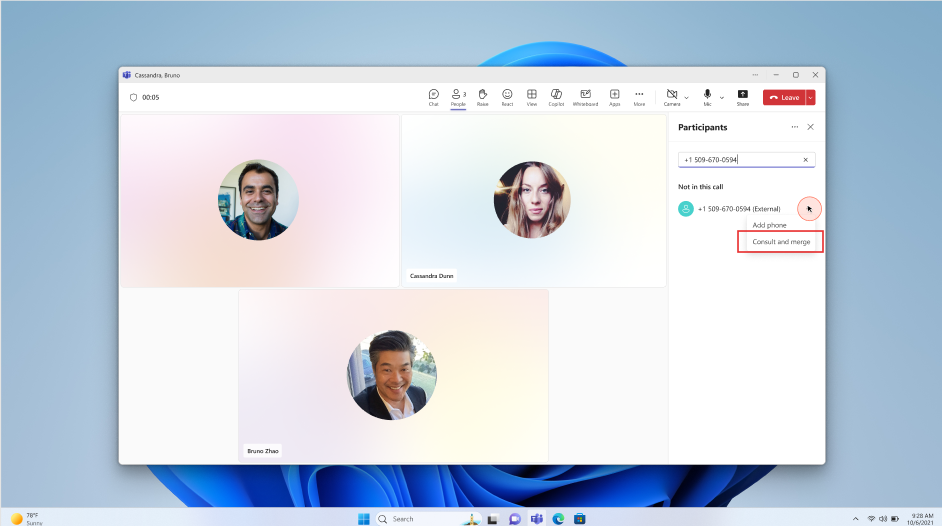
To improve collaboration and streamline meeting workflows, Microsoft Teams is introducing the ability to consult and merge Public Switched Telephone Network (PSTN) callers into active meetings—even when those callers are behind auto-attendants or Interactive Voice Response (IVR) systems that require Dual-Tone Multi-Frequency (DTMF) navigation. This enhancement allows users to reach subject matter experts via dial-in and seamlessly bring them into the broader conversation.

user settings

This message is associated with Microsoft 365 Roadmap ID 518218.

When this will happen:
  • Targeted Release: Rolling out early February 2026 (previously early January), expected to complete by mid-February 2026 (previously mid-January).
  • General Availability:  Rolling out mid-February 2026 (previously early January), expected to complete by end of February 2026 (previously mid-January).

How this affects your organization:

  • Who is affected: All Microsoft Teams users who initiate or manage meetings with PSTN participants. Administrators overseeing Teams meeting policies and call configurations.
  • What will happen:
    • Users can consult with PSTN or Voice over Internet Protocol (VoIP) participants via the Participants panel.
    • A new interface will allow users to access a dialpad to navigate IVR systems and auto-attendants using DTMF tones.
    • Once the external party is reached, users can merge them into the ongoing meeting.
    • No changes to existing administrator policies; feature is enabled by default.

What you can do to prepare:

  • No administrator action is required for this rollout.
  • If your organization uses custom training or helpdesk documentation, consider updating it to reflect this new capability.
  • Before rollout, we will update this post with new documentation.

Compliance considerations:

No compliance considerations identified, review as appropriate for your organization.