Updated August 14, 2026: We have updated this post as a reminder. We’re ready to begin the General Availability (GA) rollout of the new SharePoint experience on June 15, with deployment continuing over the subsequent months. Based on feedback from users in the preview program, we are simplifying item-keeping experiences across SharePoint and aligning on a single Favorites gesture that is consistent with the rest of Microsoft 365.
As part of this change:
- Followed Sites will become Favorite Sites.
- Saved for Later for pages and news posts will become Favorites.
This is a naming and experience update that will be reflected across all SharePoint surfaces where these experiences appear, providing a more consistent and streamlined experience for users across Microsoft 365. Existing followed sites and saved content will be preserved and automatically transition to the Favorites experience.
Additionally, as previously communicated, we are retiring Featured Links and encouraging customers to use modern alternatives such as Global Navigation, which can be configured to surface important organizational resources and destinations.
Previous update: We began the Targeted Release (TR) rollout on May 5, with an expected ramp to 100% TR by the end of the week. All customers and users in the TR program will automatically receive the new SharePoint experience, with no option to opt out at either the tenant or user level.
- We recommend that customers explore the experience ahead of TR to ensure readiness.
- For users and tenants already opted in via EAP or Public Preview, we will preserve their current state, their experience as of Monday will remain unchanged.
Introduction
We are introducing a new SharePoint experience that includes a redesigned SharePoint app bar, a refreshed SharePoint start page for finding sites, content, and news, and support for AI-assisted creation, management, and discovery features. The new experience applies to all SharePoint users. Some capabilities in this experience use AI. Access to those capabilities requires a Microsoft 365 Copilot license.
This message is associated with Microsoft 365 Roadmap ID 547732.
Before the new experience rolls out broadly, it will be available as a public preview. During the preview period, administrators can enable the experience for their tenant to evaluate the changes and prepare users. When enabled during preview, the experience applies to all users in the tenant. Users may opt out of the new experience during the preview period.
When the public preview ends, Targeted Release rollout will begin, followed by General Availability (GA). Starting with Targeted Release, the new SharePoint experience will automatically apply to all tenants and users. Any tenant-level preview settings or individual user opt-outs from the preview period will be overridden, and no controls will remain. We recommend customers try the experience ahead of TR to be better prepared.
When this will happen
- Public Preview: Rolling out in early March 2026; expected completion by late April 2026.
- Targeted Release: Rolling out in early May 2026 (previously late April); expected completion by mid-May 2026 (previously June).
- General Availability (Worldwide, GCC, GCC High, DoD): Rolling out in mid-June 2026 (previously early May); expected completion by mid to late September 2026 (previously mid-July).
Note - the late September timeline pertains primarily to GCC, GCC High and DoD tenants.
How this affects your organization
Who is affected
- All SharePoint users
- Users with a Microsoft 365 Copilot license will have access to AI capabilities included in this experience.
What will happen
When the new experience is enabled—either during preview or as part of the Targeted Release and General Availability (GA) rollout—users will see an updated SharePoint app bar that introduces entry points for discovering content, publishing communications, and building SharePoint solutions.
The updated app bar includes:
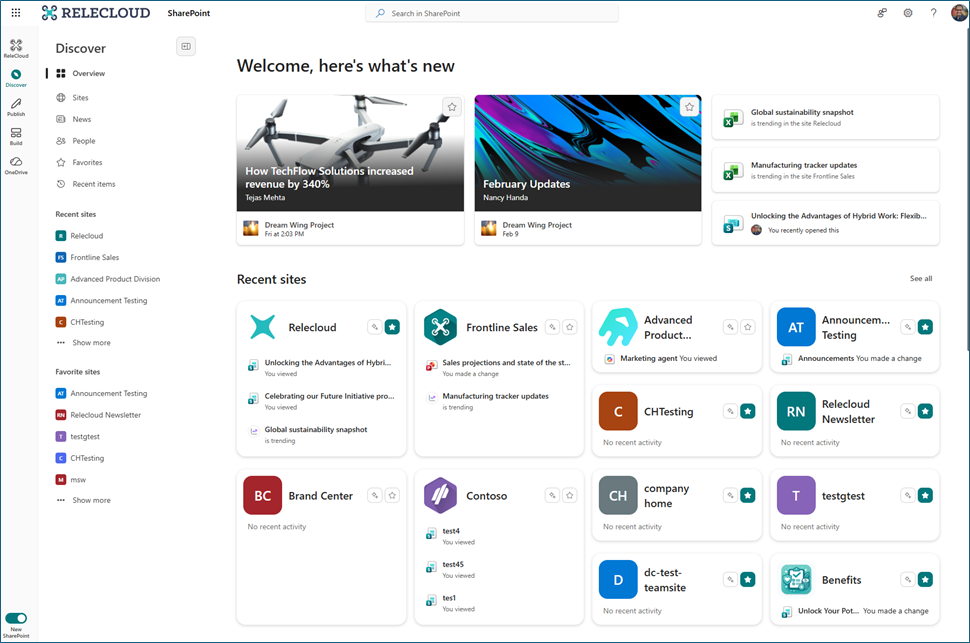
Discover
A refreshed start experience to find relevant sites, content, and news.
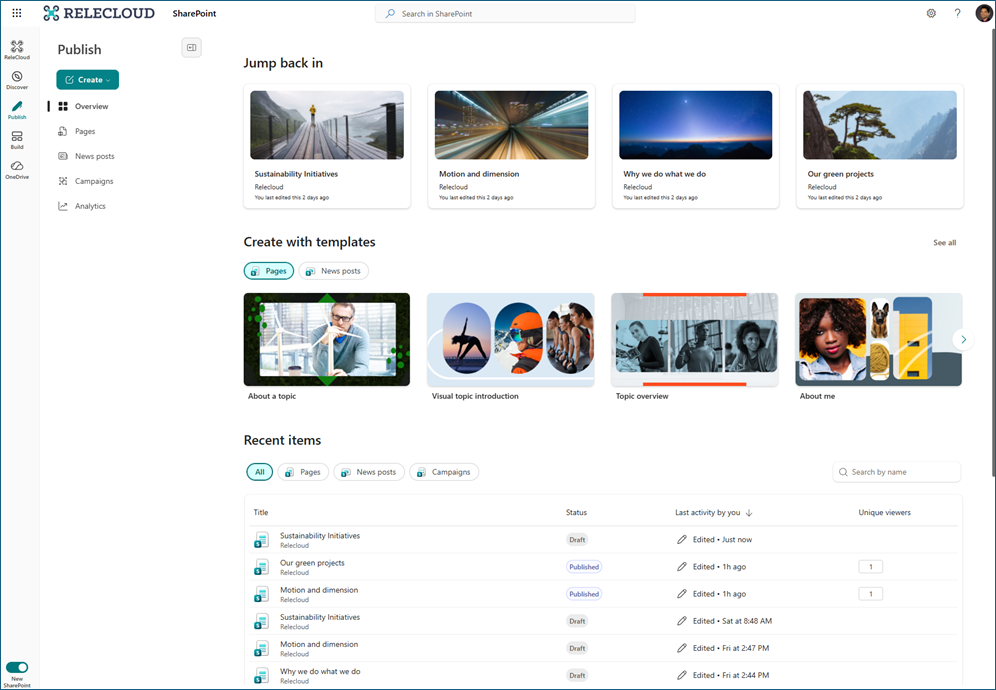
Publish
A unified publishing hub that brings together pages, news, and campaign-style communications powered by Amplify.
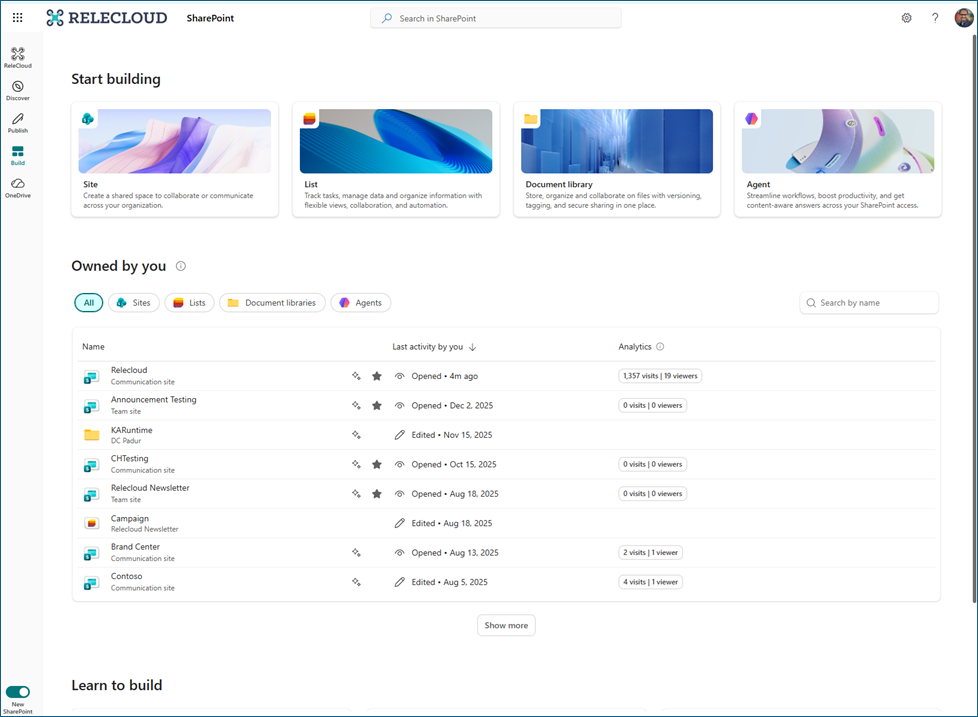
Build
A centralized place where makers can create and manage SharePoint sites, lists, libraries, and AI-powered agents from a single surface.
The app bar will also include:
- OneDrive – Provides quick access to files.
- Home – Appears when a Home site with global navigation is configured in the tenant.
Additional updates include:
- Updated page, news, library, and list experiences with improved content visibility
- Neutral theming applied across SharePoint product surfaces (site-level branding remains unchanged)
What you can do to prepare
Compliance considerations
No compliance considerations identified. Review as appropriate for your organization.