MC1268933 - Viva Engage: Pinned resources and related communities in Teams for iOS

Message Center

Summary

Viva Engage in Microsoft Teams for iOS will add pinned resources and related communities by late July 2026, aligning with other platforms. This feature, enabled by default, improves content access without requiring admin changes. Organizations should inform users and community admins to prepare.

Last Updated

May 5, 2026

Published Apr 2, 2026

View version history

Service

Microsoft Viva

Tag

Updated message
Feature update
User impact
Admin impact

Platforms

iOS

More information
Updated May 5, 2026: We have updated the timeline. Thank you for your patience. 

Introduction

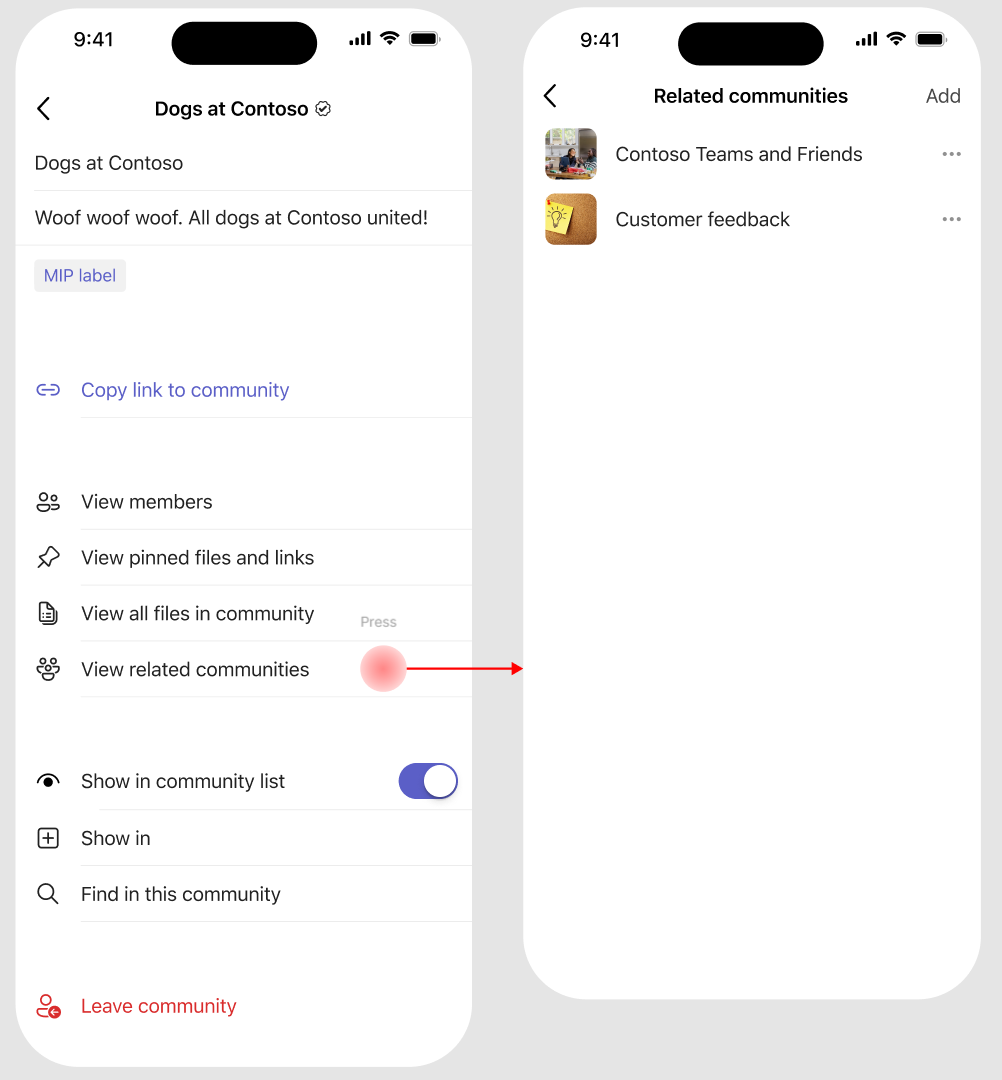
We're improving the Viva Engage experience in Microsoft Teams for iOS by bringing pinned resources and related communities into the Teams mobile app. Pinned resources highlight important links and files within a community, while related communities help users discover other relevant Viva Engage communities. These are two separate features that work together to improve information access and community discovery.

This update aligns the iOS experience with Engage on the web, the Engage mobile app, and Teams for Android, helping users discover important content and related communities more easily—especially those who rely on Teams on iOS as their primary communication tool.

This message is associated with Roadmap ID 559107.

When this will happen:

  • General Availability (Worldwide): Rollout begins in late May 2026 (previously early May) and is expected to complete by late July 2026 (previously early June).

How this affects your organization:

Who is affected:

  • Users who access Viva Engage communities in Microsoft Teams on iOS
  • Community admins who manage Viva Engage communities

What will happen:

  • Users will see pinned resources for a community directly within Teams on iOS.
  • Users will see related communities surfaced within the community experience.
  • user settings

  • The experience will match what is already available in the Viva Engage mobile app, Viva Engage on the web, and Teams for Android.
  • The feature is enabled by default.
  • There are no changes to existing admin policies or configurations.

What you can do to prepare:

No admin action is required.

  • Communicate this update to end users who use Teams on iOS.
  • Encourage Viva Engage community admins to review pinned resources and related communities.
  • Update internal documentation or helpdesk guidance, if applicable.

Compliance considerations:

No compliance considerations identified, review as appropriate for your organization.

Version history

3 versions tracked

Updated 2 times since Apr 2, 2026. Microsoft Message Center only ever shows the current version; this archive preserves the history.

Compare any two versions

From
To
  1. May 5, 2026 · 05:35 PMLatest · v3

    Changed: Body, End date

  2. Apr 30, 2026 · 09:29 PMv2

    Changed: Body, Tags, End date

  3. Apr 2, 2026 · 09:02 PMOriginal · v1

    Changed: Initial version