MC1287365 - Microsoft 365 Copilot: Change in accessing additional agents in Excel

Message Center

Summary

The rollout of the updated Microsoft 365 Copilot feature in Excel, allowing access to additional agents via the "…" menu, is paused. Users can still use chat-only Copilot without changes. No admin action is needed; inform support teams and update documentation accordingly.

Last Updated

May 1, 2026

Published Apr 21, 2026

View version history

Service

Microsoft 365 apps

Tag

Updated message
New feature
User impact
Admin impact

More information
Updated May 1, 2026: We have paused rollout of this feature at this time. We will communicate via Message center when we are ready to proceed. We apologize for any inconvenience. 

Introduction

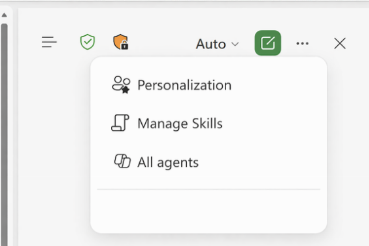
We are updating the Chat-only Copilot experience in Excel to better align with the editing experience. As part of this update, users who want to access additional Copilot agents (such as Researcher or Analyst) can do so by selecting the “…” menu in the header and choosing M365 Copilot.

When this will happen

  • General Availability (Worldwide): We will communicate via Message center when we are ready to proceed.

How this affects your organization

Who is affected

All Excel users with Microsoft 365 Copilot licenses

What will happen

  • Users can continue to use the chat‑only Copilot experience in Excel to ask questions, analyze data, and receive insights without modifying workbook content.
  • However, users who want to access additional Copilot agents (such as Researcher or Analyst) can do so by selecting the "…" menu in the Excel header and choosing M365 Copilot:

  • Existing Microsoft 365 Copilot licensing and policy controls are respected.
  • There is no change to workbook editing behavior or data permissions.

What you can do to prepare

No admin action is required.

  • Inform helpdesk and support teams about the new access path to Microsoft 365 Copilot from Excel.
  • Update internal documentation or training materials that describe Copilot experiences in Excel.
  • Review Microsoft 365 Copilot documentation if you want to understand available agents and licensing requirements.

Learn more: Edit with Copilot in Excel | Microsoft Support

Compliance considerations

No compliance considerations identified. Review as appropriate for your organization.

Version history

2 versions tracked

Updated 1 time since Apr 21, 2026. Microsoft Message Center only ever shows the current version; this archive preserves the history.

Compare any two versions

From
To
  1. May 1, 2026 · 06:01 PMLatest · v2

    Changed: Body, Tags, End date

  2. Apr 21, 2026 · 10:49 PMOriginal · v1

    Changed: Initial version