Updated August 17, 2026: We have updated the timeline. Thank you for your patience.
Introduction
Microsoft Teams is introducing support for displaying digital signage on idle Teams panel devices. This capability extends existing digital signage scenarios already available on Teams Rooms front-of-room displays, helping organizations deliver consistent branding and communications across shared spaces.
Admins can configure digital signage at both the tenant-wide and device-specific level through the Teams Rooms Pro Management portal. This feature supports select third-party providers such as Appspace and XOGO, and is available with Teams Rooms Pro or Teams Shared Spaces licenses.
This message is associated with Microsoft 365 Roadmap ID 558852.
When this will happen:
- General Availability (Worldwide): Rollout will begin in early August 2026 (previously early July) and is expected to complete by late August 2026 (previously mid-August).
How this affects your organization:
Who is affected:
- Admins managing Microsoft Teams Rooms and Teams panels
- Organizations using or planning to use digital signage in shared spaces
- Environments with Teams Rooms Pro or Teams Shared Spaces licenses
What will happen:
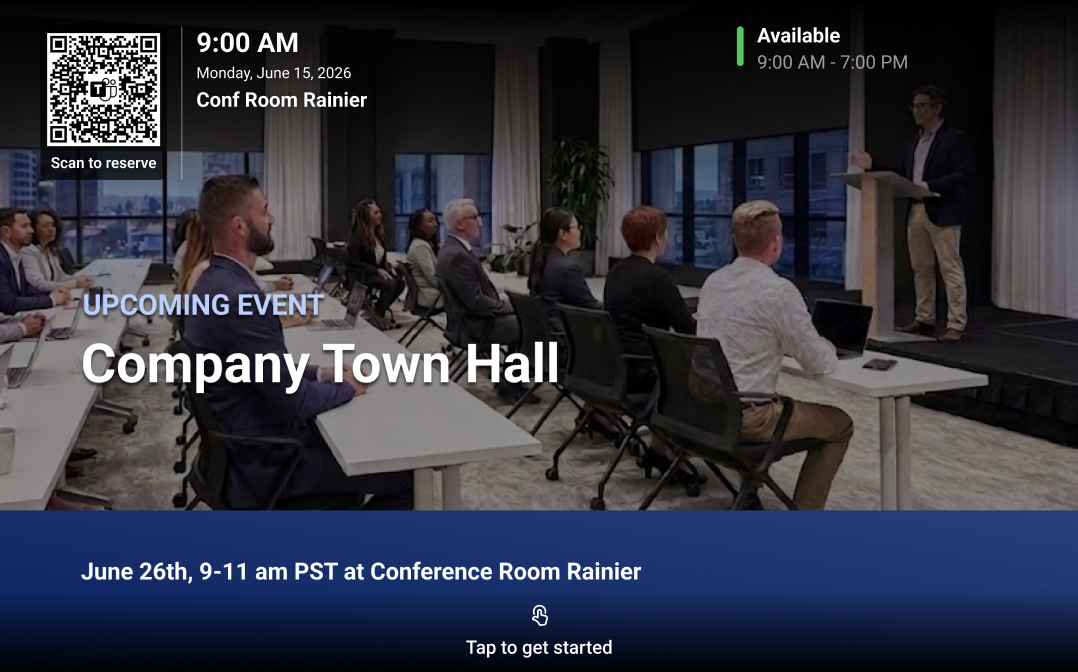
- Teams panels can support digital signage when idle.
Screenshot 1: Example of digital signage on a Teams panel:
- Admins can configure signage per device or device group. They can also configure default signage settings for the tenant.
- Configuration will be available in Teams Rooms Pro Management portal > Settings > Digital signage.
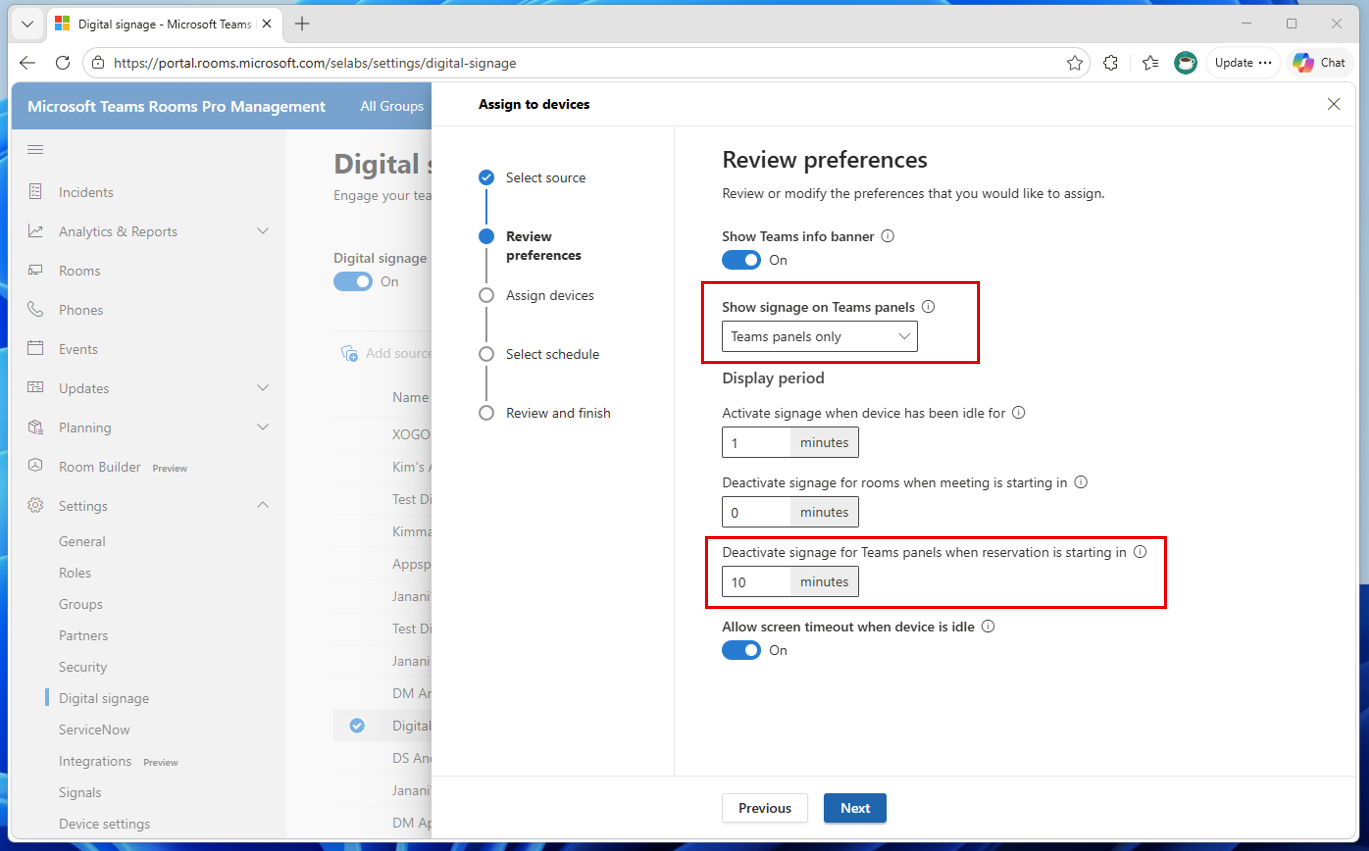
Screenshot 2: Example settings for configuring a digital signage source for Teams Panels specifically:
- Supported 3rd party providers include Appspace and XOGO.
- Available with Teams Rooms Pro or Teams Shared Spaces licenses.
- Feature is available by default for admins to configure.
- No user impact unless enabled.
What you can do to prepare:
No immediate action is required before rollout.
To prepare or take advantage of this feature:
- Review your current digital signage strategy for Teams Rooms and shared spaces.
- Plan content optimized for Teams panels:
- Recommended resolution: 1280 × 800
- Use separate digital signage sources for Teams panels and front-of-room displays:
- Teams panels have smaller displays than front-of-room screens.
- Content designed for larger displays may not render well on panels.
- Configure signage settings when available:
- Navigate to Teams Rooms Pro Management portal > Settings > Digital signage.
- Consider using separate signage content sources for:
- Front-of-room displays, and
- Teams panels (due to smaller screen size).
- To set up a digital signage source specifically for Teams panels, when assigning a signage source to devices, choose the Teams panels only option on the preference setting Show signage on Teams panels.
- Validate compatibility with supported partners (for example, Appspace or XOGO).
- Notify facilities or communications teams responsible for signage.
Learn more: Configure digital signage on Teams Rooms | Microsoft Learn (will be updated before rollout)
Compliance considerations:
| Compliance consideration | Explanation |
| Does the change add any integration to 3rd party software products? | Integrates with current third-party digital signage providers (Appspace, XOGO)
|
| Does the change include an admin control, and can it be controlled through Entra ID group membership? | Admin-controlled via Teams Rooms Pro Management portal |