Updated September 18, 2026: We have updated the timeline. Thank you for your patience.
What and Why:
Microsoft Purview Endpoint Data Loss Prevention (DLP) is improving how file extension conditions are configured to help ensure policies are accurate, reliable, and efficient. By limiting file extension selection to supported, scannable file types, this update reduces misconfiguration risk and improves enforcement consistency across endpoints while maintaining existing protection coverage.
This change aligns Endpoint DLP configuration with supported enforcement capabilities and helps admins create policies that behave as expected.
This message is associated with Microsoft 365 Roadmap ID 562993.
Rollout Schedule:
General Availability (Worldwide): We will begin rolling out in mid-December 2026 (previously mid-September) and expect to complete by end of December 2026 (previously end of September).
Impact on Your Organization:
Who is affected:
- Microsoft 365 administrators managing Microsoft Purview Endpoint DLP device policies.
Platforms/Services:
- Microsoft Purview
- Endpoint Data Loss Prevention
- Supported Windows endpoints
What will happen:
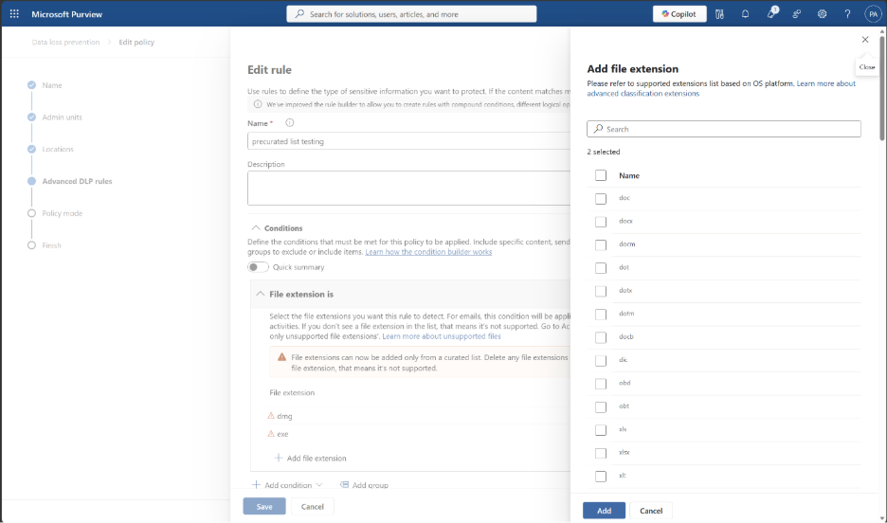
- Endpoint DLP now includes a pre‑curated list of supported file extensions for the File extension condition.
- Only file types that are supported and can be scanned appear in the picker.
- Free‑form text entry for file extensions is no longer available.
- Existing policies continue to enforce as they do today unless edited.
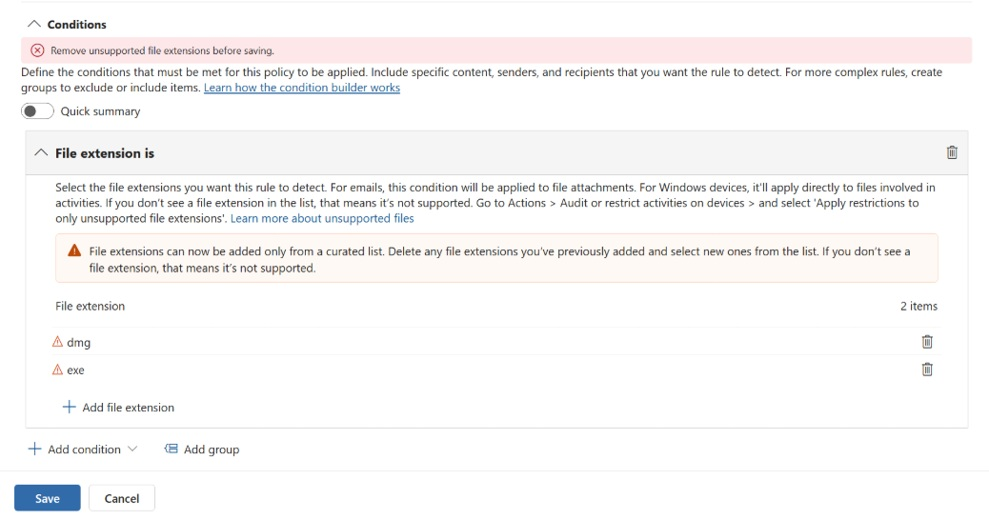
- If an edited policy contains unsupported file extensions, those entries must be removed before the policy can be saved.
- To maintain coverage for unsupported or non‑scannable file types, use the Apply restrictions to only unsupported file extensions feature. Learn more: Help protect against sharing of a defined set of unsupported files.
- Your overall protection posture does not change with this update.
Screenshot 1: Add file extension options:
Screenshot 2: Unsupported file extension warning in Microsoft Purview policy settings:
Action Required / Recommendations:
- No action required if you are not modifying existing policies.
- If you plan to edit or create a policy:
- Review your current file extension list.
- Keep supported file extensions.
- Remove unsupported file extensions and use Apply restrictions to only unsupported file extensions feature instead.
- Use the curated list when adding new supported file types.
Learn more:
Compliance considerations:
No compliance considerations identified, review as appropriate for your organization.