Metadata at Jun 8, 2026
Published
Service
Tag
Platforms
MC1384420 - Microsoft Purview | Endpoint Data Loss Prevention - Ability to protect files stored in the excluded folders in Windows
Message Center
What changed since this version
Updated September 14, 2026: We have updated the timeline. Thank you for your patience.
What and Why:
Microsoft Purview Endpoint Data Loss Prevention (DLP) is introducing the ability to protect sensitive files even when they reside in commonly excluded Windows folders such as AppData directories and temporary folders. Previously, files stored in these excluded paths were not subjected to Endpoint DLP policy enforcement. With this update, policy checks will apply during key egress actions, including copying, printing, saving to network shares, and uploading to cloud services, helping reduce the risk of sensitive data leaving your organization from these user-writable locations.
This message is associated with Microsoft 365 Roadmap ID 562992.
Rollout Schedule:
General Availability (Worldwide): We will begin rolling out in early Julymid-December 2026(previously mid-September) and expect to complete by early Julyend of December 2026 (previously end of September).
How this will affect your organization:
Who is affected: Admins and users in organizations that use Microsoft Purview Endpoint Data Loss Prevention (DLP) on Windows devices
Platforms:
- Microsoft Purview compliance portal
- Windows endpoints supported by Microsoft Purview Endpoint DLP
- Microsoft Defender anti-malware client version 4.18.26051 or later required
What will happen:
With this update, admins can extend
Endpoint DLP protection to files stored in excluded Windows folders (for
example, %AppData% and temporary directories) during egress activities.
- Users in audit mode can continue their actions, which will be logged for review.
- Users in block mode will be prevented from performing restricted actions (for example, copying to removable media, uploading to cloud services, or printing)
- If both audit and block policies apply to a user, block takes precedence
This change improves protection coverage by addressing scenarios where sensitive data in excluded paths may have previously gone unmonitored.
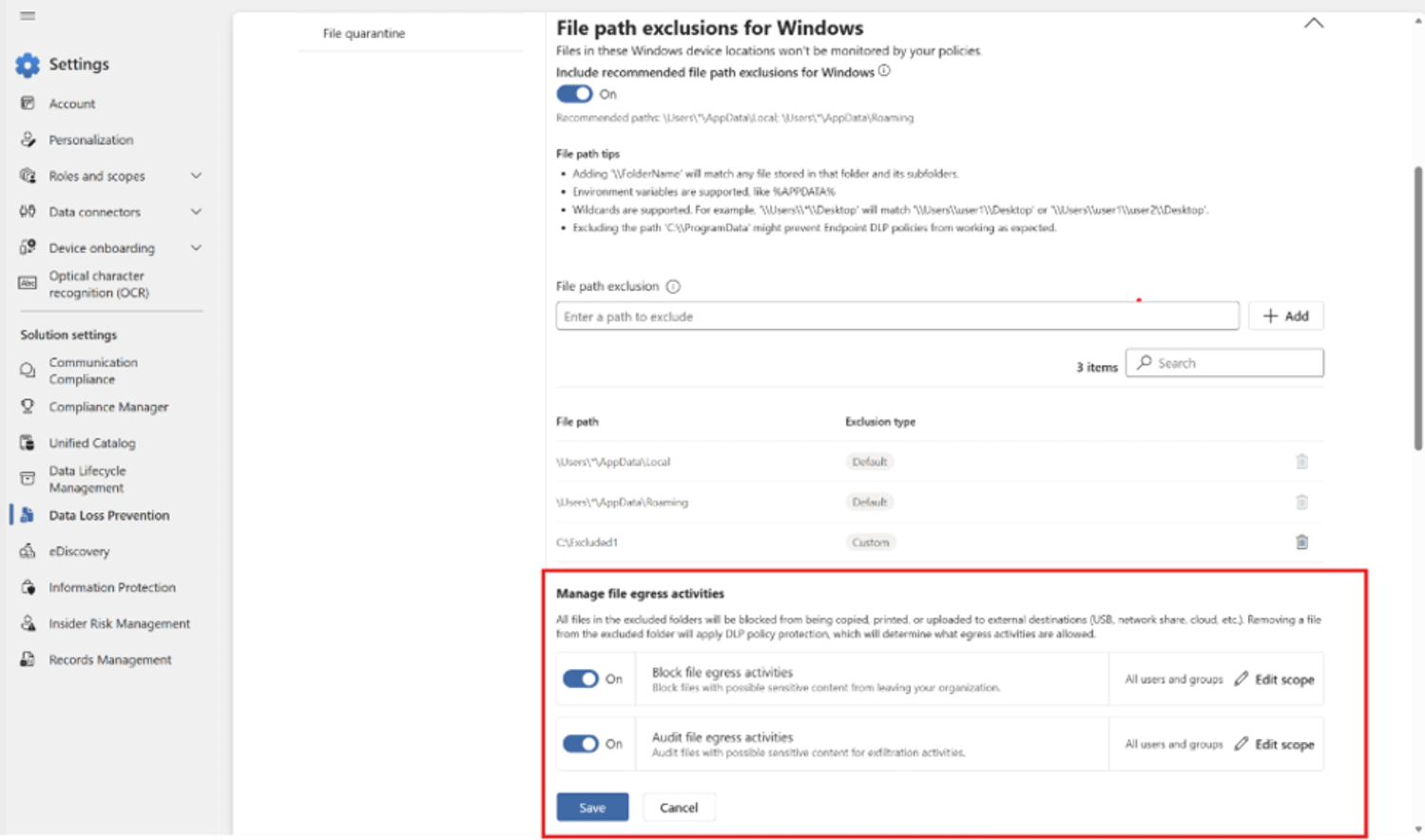
Screenshot: Endpoint DLP settings for excluded Windows folders and file egress activities:
Action Required / Recommendations:
- Before enabling this feature, you must first deploy anti-malware Client version 4.18.26051 or later
- Review excluded folder paths: Identify which excluded paths (such as AppData and temporary directories) contain or could contain sensitive files and should be added to the protected exclusion paths list.
- Stage your rollout: Start with an audit-mode pilot to assess impact before enabling enforcement.
- Update DLP policies: Extend existing Endpoint DLP policies to cover protected excluded folders where applicable.
- Educate users and support teams: Inform them of expected behavior changes, including potentially blocked actions such as copy, print, or upload operations.
Compliance considerations:
| Compliance consideration | Explanation |
|---|---|
| Admin control | Admins must review excluded Windows folder paths and update Endpoint DLP policies to enable protection for files stored in excluded folders. |
| User impact | Users may experience blocked actions such as copying to removable media, printing, saving to network shares, or uploading to cloud services when interacting with sensitive files stored in protected excluded folders. |
| Policy changes | Organizations may need to extend existing Endpoint DLP policies to include protected excluded folders. |
| User training | Organizations should educate users and support teams about new enforcement behavior and potential blocked actions. |
| Monitoring/Auditing | Audit mode logging will capture user actions involving sensitive files in protected excluded paths for review and analysis. |
| Prerequisite dependency | Devices must run anti-malware client version 4.18.26051 or later before enabling this feature. |
| Security/Compliance impact | This update expands Endpoint DLP protection coverage to previously excluded Windows folder locations, helping reduce the risk of sensitive data exfiltration. |
| Rollout risk assessment | Organizations may want to pilot the feature in audit mode before enabling enforcement to assess operational impact. |
Snapshot from Jun 8, 2026
What and Why:
Microsoft Purview Endpoint Data Loss Prevention (DLP) is introducing the ability to protect sensitive files even when they reside in commonly excluded Windows folders such as AppData directories and temporary folders. Previously, files stored in these excluded paths were not subjected to Endpoint DLP policy enforcement. With this update, policy checks will apply during key egress actions, including copying, printing, saving to network shares, and uploading to cloud services, helping reduce the risk of sensitive data leaving your organization from these user-writable locations.
This message is associated with Microsoft 365 Roadmap ID 562992.
Rollout Schedule:
General Availability (Worldwide): We will begin rolling out in early July 2026 and expect to complete by early July 2026.
How this will affect your organization:
Who is affected: Admins and users in organizations that use Microsoft Purview Endpoint Data Loss Prevention (DLP) on Windows devices
Platforms:
- Microsoft Purview compliance portal
- Windows endpoints supported by Microsoft Purview Endpoint DLP
- Microsoft Defender anti-malware client version 4.18.26051 or later required
What will happen:
With this update, admins can extend
Endpoint DLP protection to files stored in excluded Windows folders (for
example, %AppData% and temporary directories) during egress activities.
- Users in audit mode can continue their actions, which will be logged for review.
- Users in block mode will be prevented from performing restricted actions (for example, copying to removable media, uploading to cloud services, or printing)
- If both audit and block policies apply to a user, block takes precedence
This change improves protection coverage by addressing scenarios where sensitive data in excluded paths may have previously gone unmonitored.
Screenshot: Endpoint DLP settings for excluded Windows folders and file egress activities:
Action Required / Recommendations:
- Before enabling this feature, you must first deploy anti-malware Client version 4.18.26051 or later
- Review excluded folder paths: Identify which excluded paths (such as AppData and temporary directories) contain or could contain sensitive files and should be added to the protected exclusion paths list.
- Stage your rollout: Start with an audit-mode pilot to assess impact before enabling enforcement.
- Update DLP policies: Extend existing Endpoint DLP policies to cover protected excluded folders where applicable.
- Educate users and support teams: Inform them of expected behavior changes, including potentially blocked actions such as copy, print, or upload operations.
Compliance considerations:
| Compliance consideration | Explanation |
|---|---|
| Admin control | Admins must review excluded Windows folder paths and update Endpoint DLP policies to enable protection for files stored in excluded folders. |
| User impact | Users may experience blocked actions such as copying to removable media, printing, saving to network shares, or uploading to cloud services when interacting with sensitive files stored in protected excluded folders. |
| Policy changes | Organizations may need to extend existing Endpoint DLP policies to include protected excluded folders. |
| User training | Organizations should educate users and support teams about new enforcement behavior and potential blocked actions. |
| Monitoring/Auditing | Audit mode logging will capture user actions involving sensitive files in protected excluded paths for review and analysis. |
| Prerequisite dependency | Devices must run anti-malware client version 4.18.26051 or later before enabling this feature. |
| Security/Compliance impact | This update expands Endpoint DLP protection coverage to previously excluded Windows folder locations, helping reduce the risk of sensitive data exfiltration. |
| Rollout risk assessment | Organizations may want to pilot the feature in audit mode before enabling enforcement to assess operational impact. |