Updated September 14, 2026: We have updated the timeline. Thank you for your patience.
What and Why:
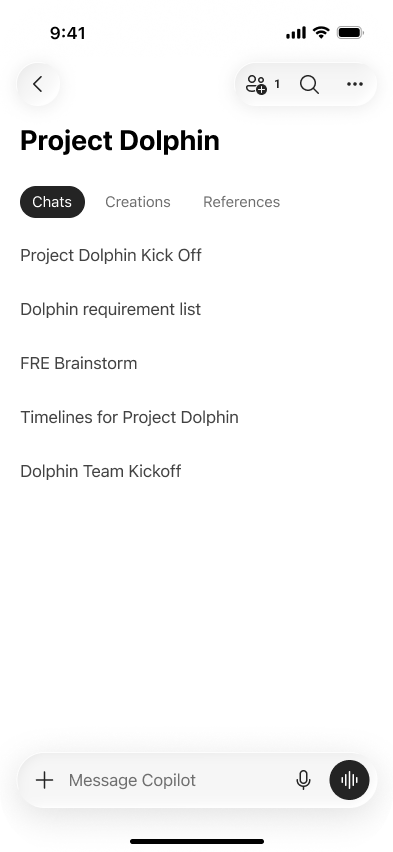
We’re updating the Notebooks experience in the Microsoft 365 Copilot app to help users keep project work organized across conversations. Notebooks bring chats, generated content, and reference materials together in a lightweight, persistent workspace so users can stay in context and move work forward. This update supports personal and team productivity by making it easier to continue work across Microsoft 365 Copilot and OneNote. The existing Notebooks experience in OneNote remains unchanged.
This message is associated with Microsoft 365 Roadmap ID 566318.
Rollout Schedule:
General Availability Worldwide: Rollout will begin in late September 2026 (previously late August) and is expected to be complete by early October 2026 (previously early September).
Impact on Your Organization:
Who is affected: Users with a Microsoft 365 Copilot license will see Notebooks in the Microsoft 365 Copilot app after rollout reaches your tenant.
Platforms/Services:
- Microsoft 365 Copilot app
- OneNote
- Microsoft 365 Copilot Notebooks
- Supported Microsoft 365 content created from Notebooks, including Word documents, PowerPoint presentations, Excel spreadsheets, Copilot Pages, and other supported objects
What will happen:
- Users with a Microsoft 365 Copilot license will see Notebooks in the Microsoft 365 Copilot app.
- The existing Copilot Notebooks entry point and existing Notebook data remain in place.
- Notebooks in OneNote are unchanged.
- Notebooks stay in sync between the Microsoft 365 Copilot app and OneNote.
- Users can open and continue working with Notebooks in either the Microsoft 365 Copilot app or OneNote.
- Content created from a Notebook, including Word documents, PowerPoint presentations, Excel spreadsheets, Copilot Pages, and other supported objects, remains associated with that Notebook.
Screenshot - Lightweight Notebook with Chats, Creations and References
Action Required/Recommendations:
No admin action is required.
We recommend that you:
- Inform helpdesk and support teams that licensed users may see Notebooks in the Microsoft 365 Copilot app beginning in late August 2026.
- Update internal user guidance if your organization documents Microsoft 365 Copilot or OneNote Notebooks experiences.
Compliance considerations:
| Consideration | Explanation |
| Does the change alter how existing customer data is processed, stored, or accessed? | The update makes existing Notebook data available through the Microsoft 365 Copilot app while keeping Notebooks in sync with OneNote. The post states that the existing entry point and existing Notebook data remain in place. |
| Does the change introduce or significantly modify AI/ML or agent capabilities that interact with or provide access to customer data? | The update expands the Notebooks experience in the Microsoft 365 Copilot app, where users can bring chats, generated content, and reference materials together in a persistent workspace. |
| Does the change provide end users any new way of interacting with generative AI? | Users with a Microsoft 365 Copilot license will see Notebooks in the Microsoft 365 Copilot app and can use Notebooks to work with chats, generated content, and reference materials. |