Metadata at Jul 9, 2026
Published
Service
Tag
Platforms
MC1422063 - OneDrive for Business: Improved Windows Desktop sync error messages for max path length
Message Center
What changed since this version
Updated September 18, 2026: We have updated the timeline. Thank you for your patience.
What and why
We are improving the OneDrive sync experience on Windows desktop to provide clearer, more actionable guidance when file and folder paths exceed the supported 520-character limit. The updated experience will show exactly how many characters a path exceeds the limit and will provide a guided flow to rename or move affected items so they can sync successfully.
This improvement addresses a common OneDrive sync issue by reducing user confusion, minimizing workflow disruption, and helping users resolve errors faster.
This update is associated with Microsoft 365 Roadmap ID 557563.
Rollout schedule
General Availability (Worldwide):Beginning by early October 2026
Beginninglate July 2026(previously mid-September) and expected to complete by end of October 2026 (previously mid-August 2026
Impact on your organization
Who is affected
- All users of the OneDrive sync client on Windows desktop
Platforms and services
- OneDrive for Business (Windows desktop sync client)
What will happen
Max path errors are one of the most commonly reported issues by OneDrive sync users. Currently, when a file or folder path exceeds the 520-character sync limit, the error message only states how many characters the path exceeds the limit and asks users to shorten it. In addition, File Explorer limitations may prevent users from renaming paths over 260 characters, and the sync client may stop syncing until the issue is resolved.
As part of this improved error experience, when users encounter max path errors, the sync client will continue running and users will be guided through a custom rename and move experience.
With this update:
- The sync client will continue running when users encounter max path errors
- Users will be guided through a custom rename and move experience to resolve issues directly
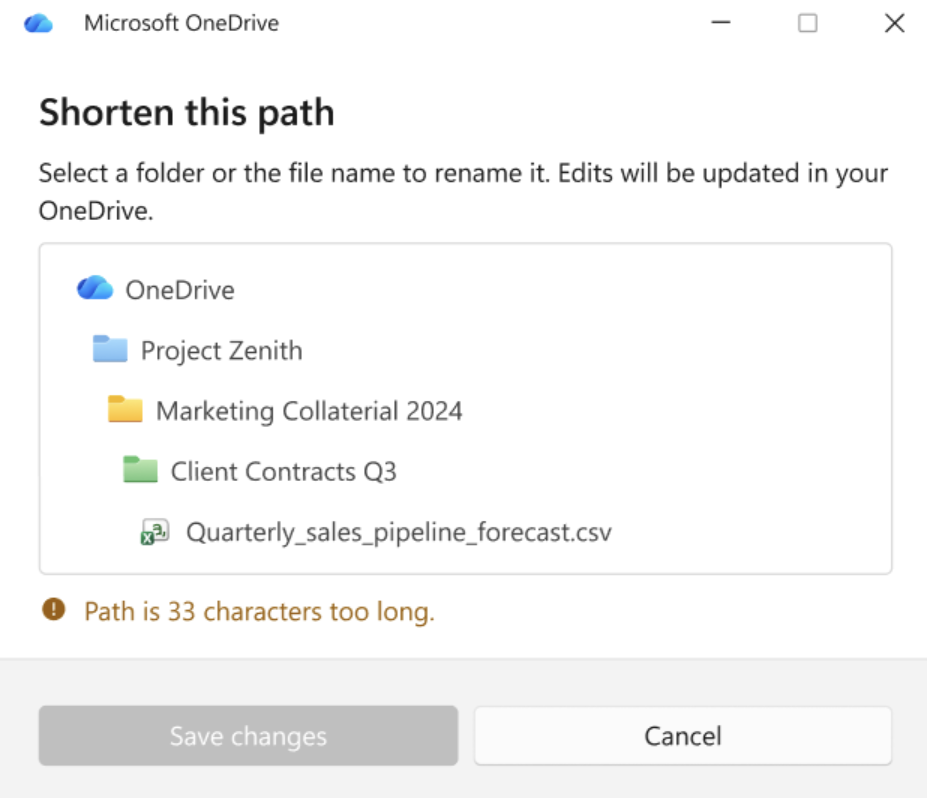
The rename experience will:
- Show the number of over-limit characters
- Highlight which items in the path can be renamed
- Allow renames even when the path exceeds 260 characters
Screenshot - Custom rename dialog
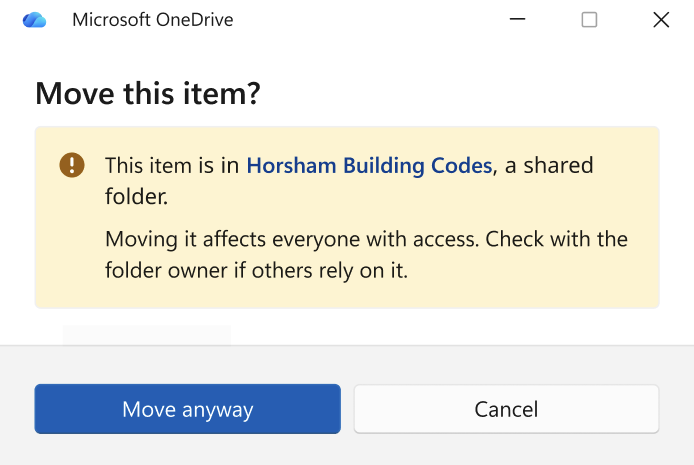
The move experience will:
- Show over-limit character counts in a guided interface
- Display warning dialogs for over-limit shared items in OneDrive
- Display warning dialogs for over-limit items in shortcuts
Screenshot - Example warning dialog for overlimit items in shortcuts
These enhancements are designed to reduce troubleshooting time and improve the overall sync experience.
Action required and recommendations
No admin action is required. This update will be automatically available through the OneDrive sync client.
You may want to:
- Inform your helpdesk and support teams about the improved error messages, as this update should reduce max-path-related support tickets.
- Update internal documentation for resolving OneDrive sync issues if applicable.
Learn more
- Fix paths that are too long to sync in OneDrive | Microsoft Support
- Restrictions and limitations in OneDrive and SharePoint | Microsoft Support
Compliance considerations
No compliance considerations identified. This update does not change how customer data is stored, processed, or accessed.
Snapshot from Jul 9, 2026
What and why
We are improving the OneDrive sync experience on Windows desktop to provide clearer, more actionable guidance when file and folder paths exceed the supported 520-character limit. The updated experience will show exactly how many characters a path exceeds the limit and will provide a guided flow to rename or move affected items so they can sync successfully.
This improvement addresses a common OneDrive sync issue by reducing user confusion, minimizing workflow disruption, and helping users resolve errors faster.
This update is associated with Microsoft 365 Roadmap ID 557563.
Rollout schedule
- General Availability (Worldwide): Beginning late July 2026 and expected to complete by mid-August 2026
Impact on your organization
Who is affected
- All users of the OneDrive sync client on Windows desktop
Platforms and services
- OneDrive for Business (Windows desktop sync client)
What will happen
Max path errors are one of the most commonly reported issues by OneDrive sync users. Currently, when a file or folder path exceeds the 520-character sync limit, the error message only states how many characters the path exceeds the limit and asks users to shorten it. In addition, File Explorer limitations may prevent users from renaming paths over 260 characters, and the sync client may stop syncing until the issue is resolved.
As part of this improved error experience, when users encounter max path errors, the sync client will continue running and users will be guided through a custom rename and move experience.
With this update:
- The sync client will continue running when users encounter max path errors
- Users will be guided through a custom rename and move experience to resolve issues directly
The rename experience will:
- Show the number of over-limit characters
- Highlight which items in the path can be renamed
- Allow renames even when the path exceeds 260 characters
The move experience will:
- Show over-limit character counts in a guided interface
- Display warning dialogs for over-limit shared items in OneDrive
- Display warning dialogs for over-limit items in shortcuts
These enhancements are designed to reduce troubleshooting time and improve the overall sync experience.
Action required and recommendations
No admin action is required. This update will be automatically available through the OneDrive sync client.
You may want to:
- Inform your helpdesk and support teams about the improved error messages, as this update should reduce max-path-related support tickets.
- Update internal documentation for resolving OneDrive sync issues if applicable.
Learn more
- Fix paths that are too long to sync in OneDrive | Microsoft Support
- Restrictions and limitations in OneDrive and SharePoint | Microsoft Support
Compliance considerations
No compliance considerations identified. This update does not change how customer data is stored, processed, or accessed.