What and why
We're introducing a consistent user message in Microsoft 365 Copilot when a Microsoft Purview Data Loss Prevention (DLP) policy prevents Copilot from accessing, processing, or returning content.
Previously, users could receive different messages depending on the policy scenario, which could make it difficult to understand why content was unavailable. With this update, users receive a standardized message indicating that content was restricted by an organizational policy. This helps improve transparency, reduces confusion, and reinforces that Copilot is enforcing your organization's configured data protection policies.
This experience applies to Microsoft Purview DLP protections for Microsoft 365 Copilot and Copilot Chat, including:
- Grounding DLP
- Prompt DLP
- External Email DLP
Rollout schedule
General Availability
- Worldwide: Available as of July 15, 2026
- GCC: Available as of July 20, 2026
- GCC High and DoD: Available as of July 23, 2026
Impact on your organization
Who is affected
- Organizations using Microsoft Purview DLP policies with Microsoft 365 Copilot or Copilot Chat
- Users who encounter content restricted by applicable DLP policies
Platforms and services
The unified message may appear in Microsoft 365 Copilot experiences powered by Microsoft 365 Chat orchestration, including:
- Microsoft 365 Copilot
- Microsoft 365 Copilot Chat
- Microsoft Teams Copilot experiences
- Outlook on the web Copilot experiences
- Microsoft Edge Copilot experiences
- Other Microsoft 365 Copilot chat experiences that use Microsoft 365 Chat orchestration
What will happen
When a configured Microsoft Purview DLP policy restricts Copilot from using content, users will see a consistent message indicating that access to some content was restricted by an organizational policy:
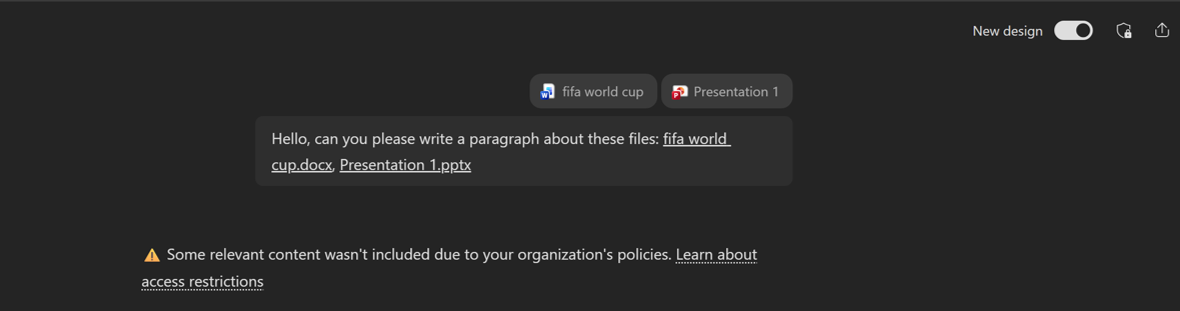
Examples include:
- Prompts containing sensitive information that DLP policies block from processing
- Prompts where DLP policies prevent external web search
- Files or emails excluded because of sensitivity label-based DLP policies
- External emails excluded from Copilot grounding by DLP policies
The message is displayed automatically and requires no additional configuration.
If applicable, users may also see a link that provides additional information about the policy restriction.
This change provides a more predictable user experience and helps users understand that content restrictions result from organizational policy enforcement rather than a Copilot service issue.
Action required and recommendations
No action is required.
We recommend that administrators:
- Review Microsoft Purview DLP policies that apply to Microsoft 365 Copilot.
- Update internal help desk guidance and user documentation so users understand that the message indicates policy enforcement rather than a Copilot service issue.
- Inform support teams that users may see this new standardized message when DLP policies restrict content.
Learn more
Compliance considerations
| Question | Answer |
| Does this change alter how existing customer data is processed, stored, or accessed? | Yes. When applicable Microsoft Purview DLP policies are configured, Microsoft 365 Copilot may be prevented from processing certain prompts, files, emails, or external email content. The change also introduces a standardized user message indicating that content was restricted by an organizational policy. |
| Does this change introduce or significantly modify AI, ML, or agent capabilities that interact with or provide access to customer data? | Yes. This update changes how Microsoft 365 Copilot communicates policy-enforced content restrictions within AI experiences. Users will receive a consistent message when DLP policies prevent Copilot from accessing or processing content. |
| Does this change modify Purview-related capabilities, including DLP? | Yes. The update affects the user experience associated with Microsoft Purview Data Loss Prevention enforcement in Microsoft 365 Copilot. Existing DLP protections remain unchanged, but users will now see a standardized message when DLP policies restrict content. |
| Does this change provide end users a new way to interact with generative AI? | Yes. Users will experience a new, standardized notification within Microsoft 365 Copilot chat experiences when DLP policies limit Copilot's ability to process or return content. |