What and why
We're introducing a new security reporting capability in Microsoft Teams that allows users to report suspicious group calls directly from their call history. This feature helps organizations identify and investigate potential scams, impersonation attempts, unwanted external calls, and other security concerns that occur during group calling experiences.
Reported call information can be reviewed by administrators in Microsoft Teams admin center and, when configured, in Microsoft Defender.
Rollout schedule
- Targeted Release: Beginning in early August 2026
- General Availability (Worldwide): Beginning in early October 2026
Impact on your organization
Who is affected
- Users who make or receive group calls in Microsoft Teams
- Teams administrators and security administrators responsible for investigating reported security concerns
Platforms and services
- Microsoft Teams for Windows
- Microsoft Teams for Mac
- Microsoft Teams for web
- Microsoft Teams admin center
- Microsoft Defender portal (when licensed and configured)
What will happen
- A new Report a call option will be available for group calls in Teams call history:
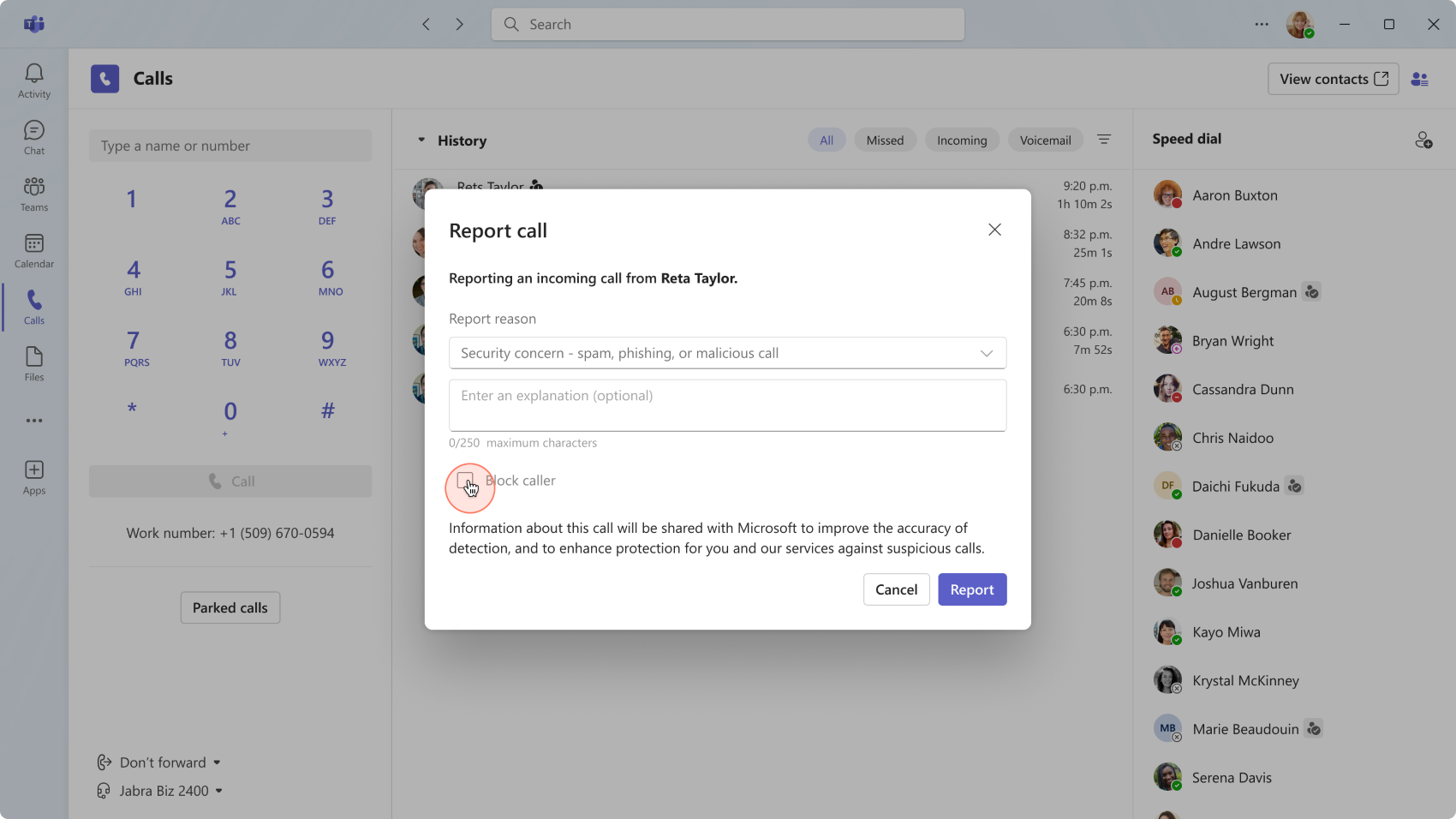
- Users can select More options (...) next to a group call and choose Report a call.
- Relevant call metadata and limited contextual information will be securely submitted to the organization and Microsoft for analysis.
- Security teams can review detailed reported call submissions in the Microsoft Defender portal when the organization has Microsoft Defender for Office 365 Plan 1, Microsoft Defender for Office 365 Plan 2, or Microsoft Defender XDR.
- Administrators can review user-reported security submissions in Teams admin center under Analytics & reports > Protection reports > User-reported security submissions.
- Administrators can investigate reported calls and take appropriate action based on organizational security processes.
- This feature is enabled by default in Teams clients.
Action required and recommendations
Review whether your organization wants to use Microsoft Defender for enhanced investigation capabilities.
Recommended actions:
- Verify that user reporting is enabled in the Microsoft Defender portal if you want detailed reported call submissions to appear there. Without this, detailed reported calls will not appear in the Defender portal.
- Review access permissions for security teams that will investigate reported submissions.
- Inform users about the new Report a call option and provide guidance on when it should be used, such as:
- Suspected scams
- Impersonation attempts
- Unwanted external calls
- Other suspicious calling activity
- Review reporting data in Teams admin center if your organization does not use Microsoft Defender.
Learn more
Compliance considerations
| Question | Answer |
| Does this change provide a new way for users, tenants, or subscriptions to communicate? | Yes. This change introduces a new user reporting capability within Microsoft Teams group call history, enabling users to submit security concern reports for group calls directly from the Teams client. |
| Does this change alter how existing customer data is processed, stored, or accessed? | Yes. When a user reports a group call, relevant call metadata and limited contextual information are shared with the organization and Microsoft for security investigation and analysis. |
| Does this change store new customer data? | Yes. User-submitted call reports, including associated metadata and contextual information, are stored and made available through the Microsoft Defender portal and Teams admin center reporting experiences. |
| Does this change alter how admins monitor, report on, or demonstrate compliance activities? | Yes. Administrators gain new reporting and investigation capabilities through the Microsoft Defender portal and Teams admin center, where user-reported security submissions can be reviewed and analyzed. |
| Does this change include an admin control? | Yes. Administrators can configure whether detailed Teams call reports are received and available in the Microsoft Defender portal by managing the Teams call reporting setting. |
| Can users enable or disable the feature themselves? | Yes. Users can choose whether to submit a report for a specific call by using the new Report a Call option in Teams call history. |