Metadata at Aug 5, 2026
Published
Service
Tag
Platforms
MC1447682 - Microsoft Teams: Enhanced live captions settings and right-side panel view
Message Center
What changed since this version
Updated September 22, 2026: We have updated the timeline. thank you for your patience.
What and why
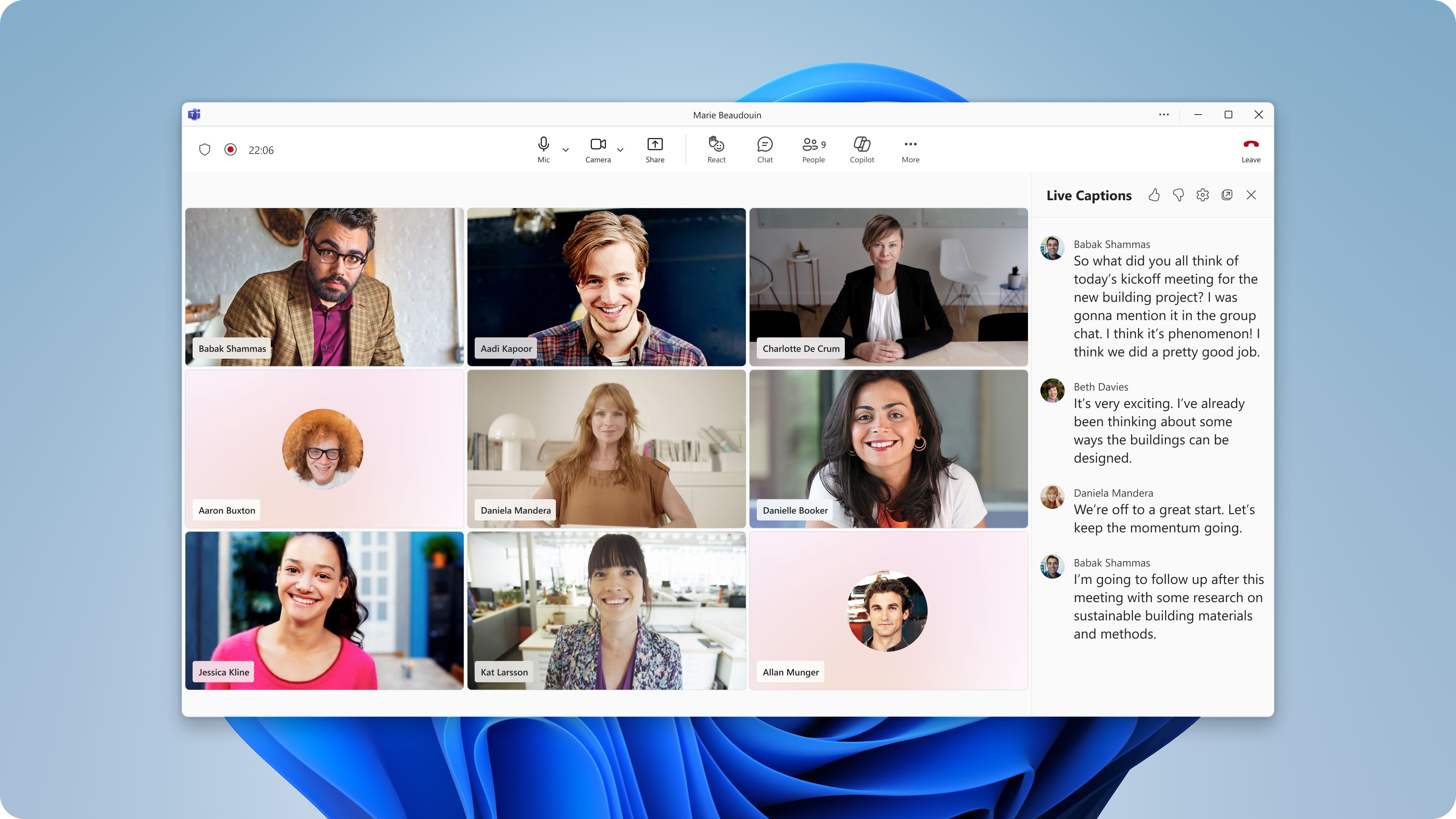
We're improving the live captions experience in Microsoft Teams to give users more flexibility when viewing captions and to simplify caption configuration during meetings. This update introduces a new right-side panel layout for live captions and consolidates caption settings into a single menu.
This message is associated with Microsoft 365 Roadmap ID 567462.
Rollout schedule
- Targeted Release: Beginning mid-August 2026 and expected to complete by late August 2026
- General Availability (Worldwide): Beginning mid-September 2026 and expected to complete by end of October 2026 (previously mid-
September 2026September) - General Availability (GCC, GCC High, DoD): Beginning mid-September 2026 and expected to complete by end of October 2026 (previously late
September 2026September)
Impact on your organization
Who is affected
- Teams meeting participants who use live captions, translated captions
- Organizations that have live captions, translated captions enabled through existing Teams policies and licensing
Platforms and services
- Microsoft Teams calls, meetings, and events
- Windows, Mac, and web clients where live captions are supported
What will happen
After rollout, users will be able to:
- Display live captions in a new right-side panel:
- Continue using existing top, bottom, and pop-out caption layouts.
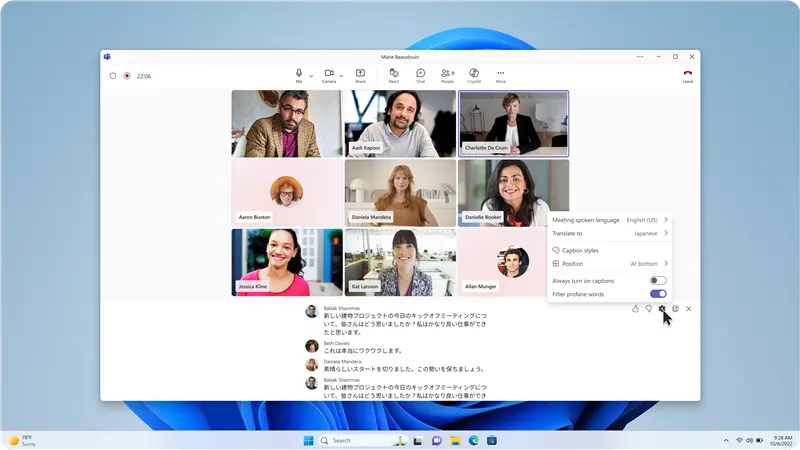
- Manage caption settings from a consolidated settings menu within the captions pane:
- Configure live captions to turn on automatically when they join meetings.
- Submit feedback on the live captions experience using thumbs-up and thumbs-down controls.
The consolidated settings menu will include:
- Spoken language
- Translation language
- Caption display styles
- Profanity filtering
- Automatically turn on live captions
The right-side panel provides an additional way to keep captions visible without overlapping meeting video or shared content.
The synchronized translation language setting reduces the need for users to configure Interpreter and translated captions separately.
The option to automatically turn on live captions is a user-level preference. When enabled, live captions will start automatically for that user in future meetings, subject to the meeting policies and feature availability configured by their organization.
This update does not change existing administrator controls or policies for live captions, translated captions, or Interpreter. Users will only be able to access features permitted by their organization's licensing, service availability, and Teams policy configuration.
Action required and recommendations
No administrative action is required.
We recommend that administrators:
- Notify support and help desk teams about the updated captions experience.
- Update internal documentation related to Teams meetings, accessibility features, and multilingual meetings.
- Review existing Teams meeting policies for live captions, translated captions, and Interpreter.
- Inform users that translation language selections will be shared across Interpreter and translated captions.
- Update support guidance for users who choose to automatically enable live captions for future meetings.
The feature will be enabled automatically as rollout reaches your organization.
Learn more
Compliance considerations
No compliance considerations identified. Review as appropriate for your organization.
Snapshot from Aug 5, 2026
What and why
We're improving the live captions experience in Microsoft Teams to give users more flexibility when viewing captions and to simplify caption configuration during meetings. This update introduces a new right-side panel layout for live captions and consolidates caption settings into a single menu.
This message is associated with Microsoft 365 Roadmap ID 567462.
Rollout schedule
- Targeted Release: Beginning mid-August 2026 and expected to complete by late August 2026
- General Availability (Worldwide): Beginning mid-September 2026 and expected to complete by mid-September 2026
- General Availability (GCC, GCC High, DoD): Beginning mid-September 2026 and expected to complete by late September 2026
Impact on your organization
Who is affected
- Teams meeting participants who use live captions, translated captions
- Organizations that have live captions, translated captions enabled through existing Teams policies and licensing
Platforms and services
- Microsoft Teams calls, meetings, and events
- Windows, Mac, and web clients where live captions are supported
What will happen
After rollout, users will be able to:
- Display live captions in a new right-side panel:
- Continue using existing top, bottom, and pop-out caption layouts.
- Manage caption settings from a consolidated settings menu within the captions pane:
- Configure live captions to turn on automatically when they join meetings.
- Submit feedback on the live captions experience using thumbs-up and thumbs-down controls.
The consolidated settings menu will include:
- Spoken language
- Translation language
- Caption display styles
- Profanity filtering
- Automatically turn on live captions
The right-side panel provides an additional way to keep captions visible without overlapping meeting video or shared content.
The synchronized translation language setting reduces the need for users to configure Interpreter and translated captions separately.
The option to automatically turn on live captions is a user-level preference. When enabled, live captions will start automatically for that user in future meetings, subject to the meeting policies and feature availability configured by their organization.
This update does not change existing administrator controls or policies for live captions, translated captions, or Interpreter. Users will only be able to access features permitted by their organization's licensing, service availability, and Teams policy configuration.
Action required and recommendations
No administrative action is required.
We recommend that administrators:
- Notify support and help desk teams about the updated captions experience.
- Update internal documentation related to Teams meetings, accessibility features, and multilingual meetings.
- Review existing Teams meeting policies for live captions, translated captions, and Interpreter.
- Inform users that translation language selections will be shared across Interpreter and translated captions.
- Update support guidance for users who choose to automatically enable live captions for future meetings.
The feature will be enabled automatically as rollout reaches your organization.
Learn more
Compliance considerations
No compliance considerations identified. Review as appropriate for your organization.