What and why
Study and Learn from Microsoft Education is an AI tutor and coach designed to preserve the productive struggle that is essential for learning rather than simply answering questions or doing work for students.
In response to customer demand, Microsoft is introducing an IT-admin-controlled option that limits Copilot Chat to the Study and Learn agent. When enabled, students will always land in Study and Learn and won't be able to dismiss the agent, switch to general Copilot Chat, or use other agents or capabilities. Students can continue to add their own files as references.
Rollout schedule
General Availability (Worldwide): We will begin rolling out in mid-November 2026 and expect to complete by mid-December 2026.
Impact on your organization
Who is affected
- Students with Starter Education licenses (A1, A3, and A5)
- A Microsoft 365 Copilot license is not required
Platforms and services
- Copilot Chat on the web and in the app, the agent store, direct links, and previous chats
- The experience will also be available to some extent in Teams and Outlook
What will happen
IT admins will have the option to use a control in the Microsoft Education panel of the Microsoft 365 admin center to limit Copilot Chat to the Study and Learn agent:
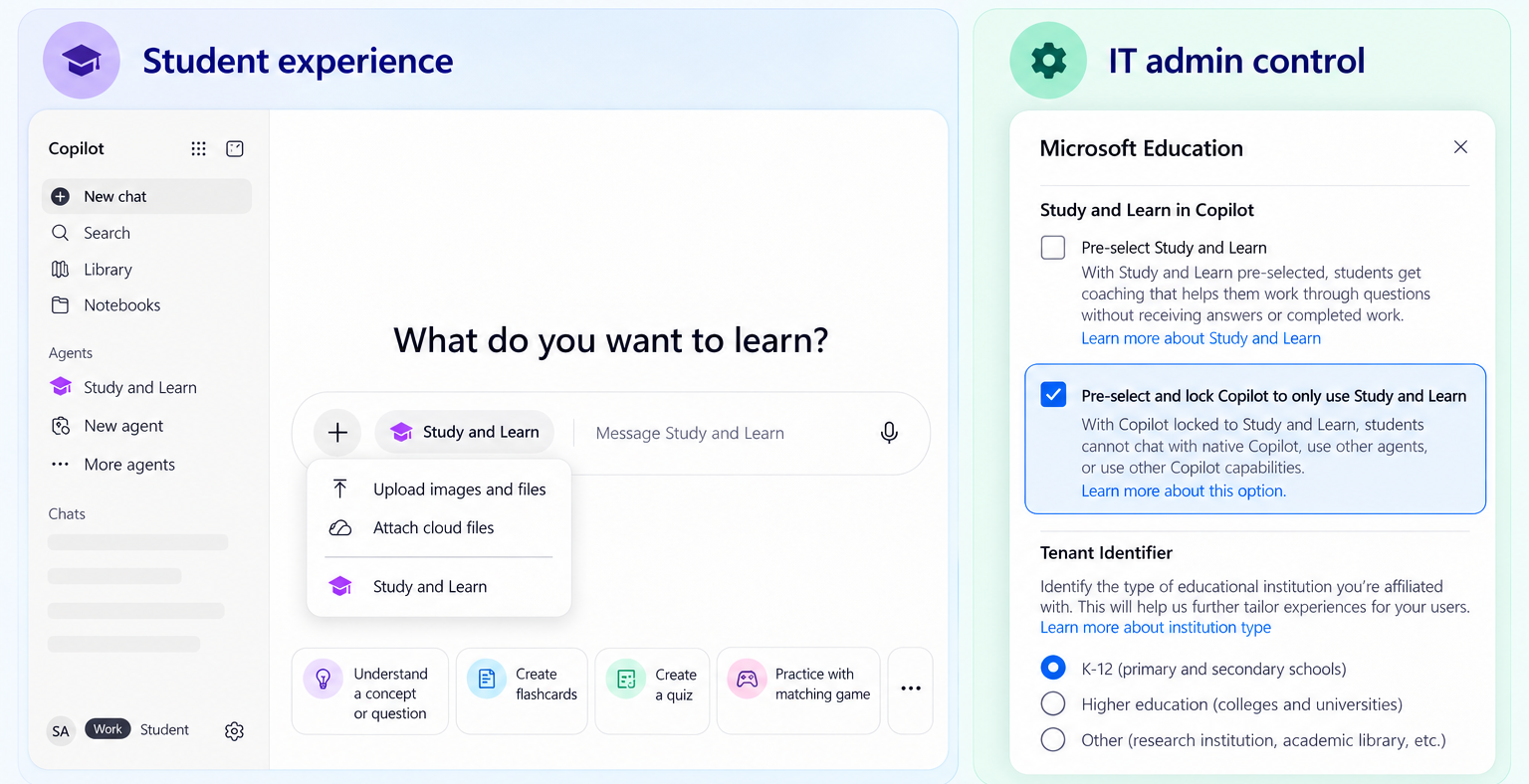
When an admin enables this setting:
- Students will use Study and Learn instead of general Copilot Chat.
- Students won't be able to select other agents.
- Students won't be able to select other skills or capabilities.
- Students can use Study and Learn with their existing Copilot chats.
- Existing chats with other agents will be read-only.
- Students can continue to add their own files as references.
Action required and recommendations
No action is required.
IT admins should consider whether to enable the limited Study and Learn experience for their organization.
Learn more
Compliance considerations
| Consideration | Assessment |
| Does the change introduce or significantly modify AI/ML or agent capabilities that interact with or provide access to customer data? | Yes. The change introduces an admin-controlled experience that restricts Copilot Chat to the Study and Learn agent. Students can continue to add their own files as references. |
| Does the change include an admin control? | Yes. IT admins can use a control in the Microsoft Education panel of the Microsoft 365 admin center to limit Copilot Chat to Study and Learn. |