What and why
We are updating scheduled prompts in Microsoft 365 Copilot to use native Copilot scheduling infrastructure instead of Power Platform. Users can continue scheduling one-time or recurring tasks using natural language, with Copilot executing tasks automatically and returning results to the associated conversation. The new experience operates independently of Power Platform, including where Power Automate is disabled, and processes and stores scheduled task data within the Microsoft 365 compliance boundary.
The existing Power Platform-based scheduled prompts experience will retire on December 31, 2026.
Rollout schedule
- Frontier/TAP: November 11, 2026
- Worldwide rollout: November 30 through December 31, 2026
- Retirement of Power Platform-based scheduled prompts: December 31, 2026
Rollout timing may change based on reliability and migration readiness.
Impact on your organization
Who is affected
- Users with a Microsoft 365 Copilot premium license who use scheduled tasks, subject to organizational controls
Platforms and services
- Microsoft 365 Copilot and Copilot Chat
- Tasks in the Microsoft 365 Copilot app
- Web and Windows desktop
What will happen
- Users can schedule one-time or recurring tasks that Copilot executes automatically, even when users are not present.
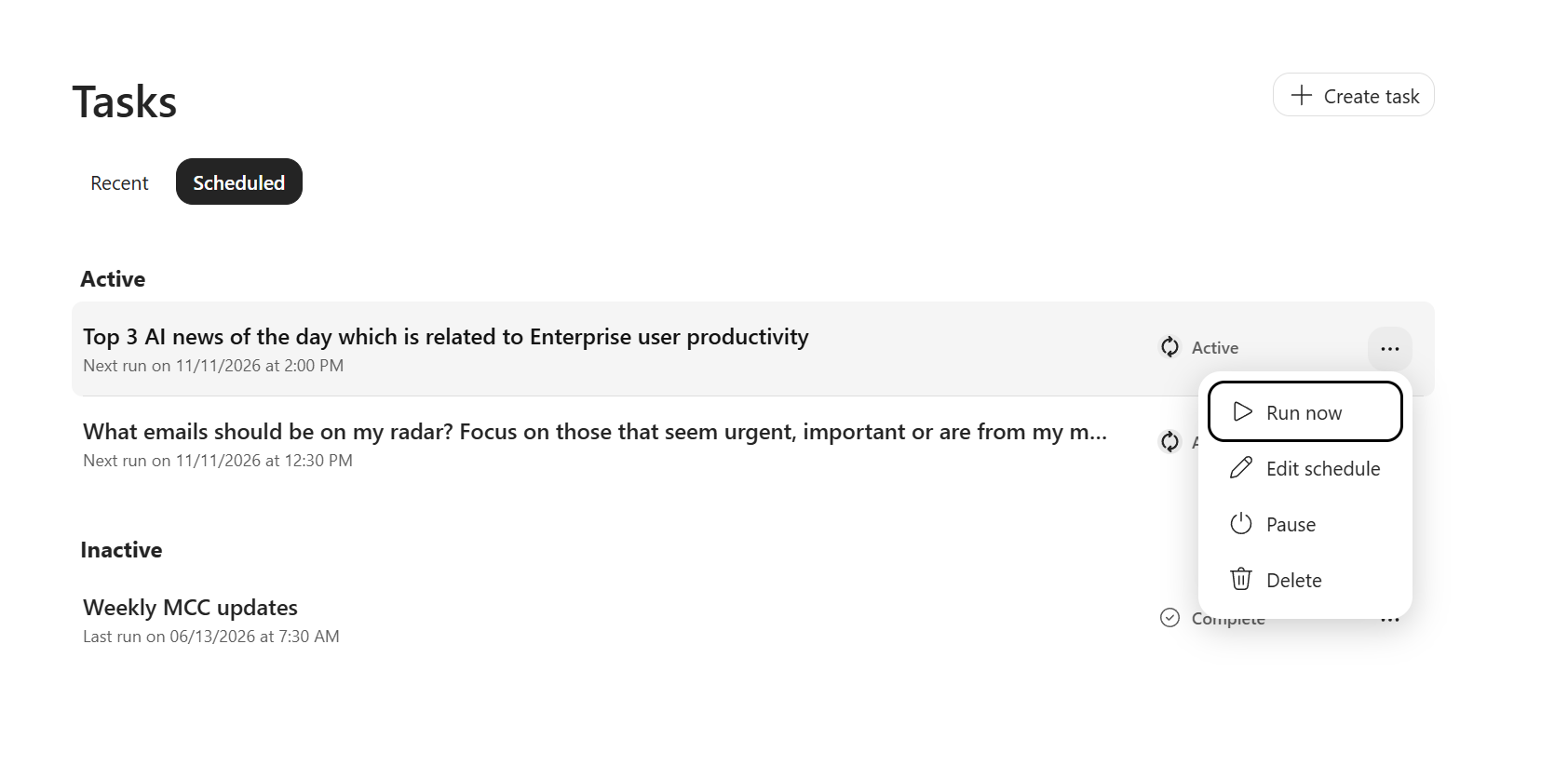
- Users can run, edit, pause, resume, or delete scheduled tasks, with limits of 10 active and 50 total schedules per user:
- Tasks requiring user approval will pause until the user responds in the associated conversation.
- Users will manage Copilot Chat schedules from Tasks > Scheduled in the Microsoft 365 Copilot app.
- For 30 days after the Scheduled tab becomes available to a user, scheduled tasks will be accessible from both the existing shared-header More options (...) menu and Tasks > Scheduled. After this period, the existing menu entry will be removed.
- Responses from previously completed scheduled runs will remain available.
- Power Platform-based scheduled prompts will retire on December 31, 2026.
Action required and recommendations
We recommend that administrators:
- Notify users who rely on scheduled prompts about the transition.
- Advise affected users to recreate schedules that will not migrate automatically before December 31, 2026.
- Inform users that management of Copilot Chat scheduled tasks is moving to Tasks > Scheduled.
- Update internal documentation and helpdesk guidance.
- Review applicable Microsoft 365 Copilot controls and organizational policies.
No action is required to preserve responses from completed scheduled runs.
Compliance considerations
| Question | Answer |
| Does the change alter how existing customer data is processed, stored, or accessed? | Yes. Scheduled tasks will execute through native Microsoft 365 Copilot scheduling infrastructure instead of the existing Power Platform-based scheduling path. Scheduled task data will be processed and stored within the Microsoft 365 compliance boundary. |
| Does the change introduce or significantly modify AI/ML or agent capabilities that interact with or provide access to customer data? | Yes. Copilot can execute one-time or recurring scheduled tasks without requiring users to be present and return results to the associated conversation. |
| Does the change provide end users with a new way of interacting with generative AI? | Yes. Users can delegate future or recurring tasks to Copilot for automatic execution at a specified time or frequency. |
| Does the change allow users to enable and disable the feature themselves? | Yes. Users can pause, resume, edit, manually run, or delete individual scheduled tasks, subject to applicable organizational controls. |