What and Why:
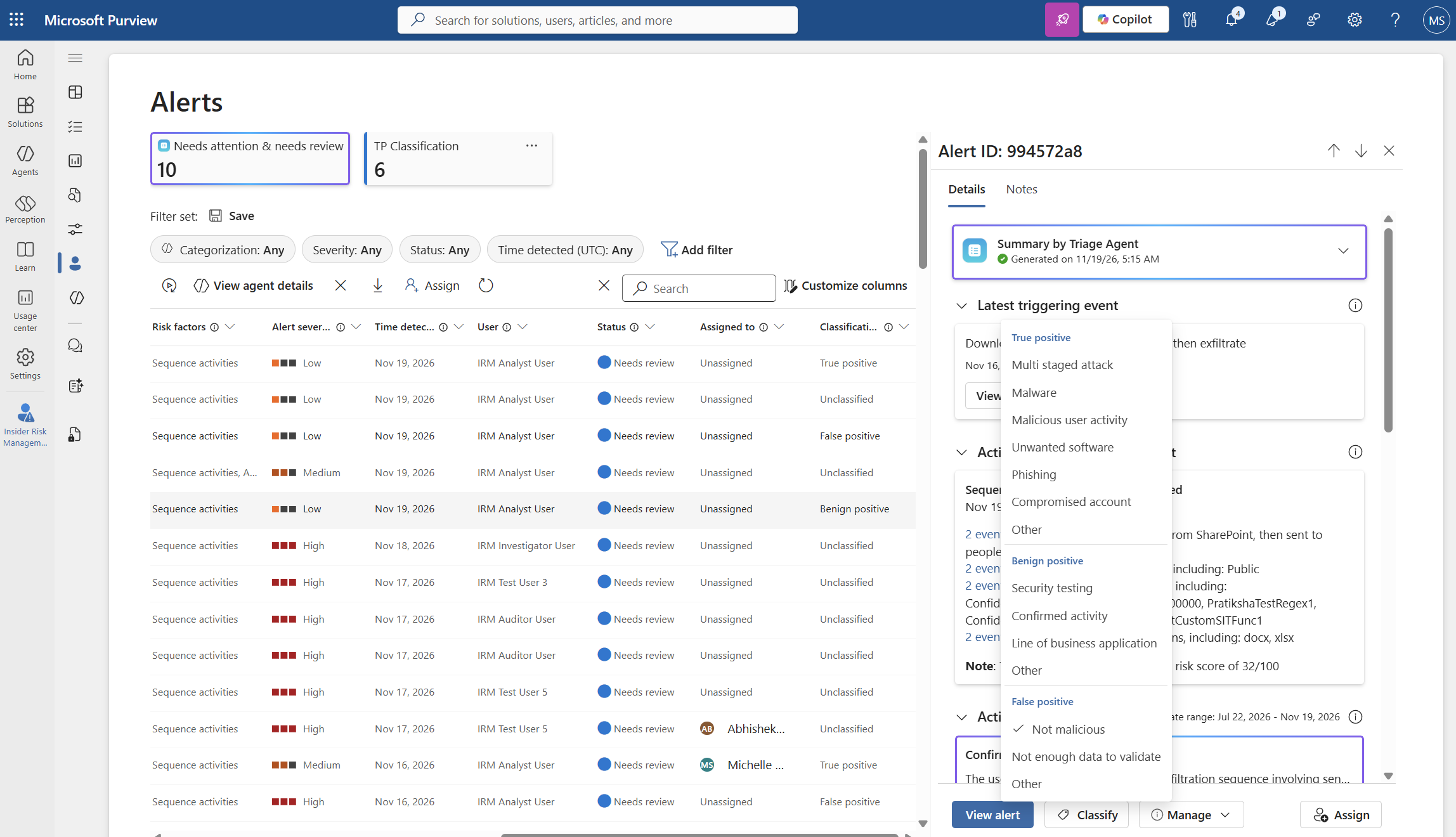
Insider risk management will be introducing the ability to classify alerts as True positive, Benign (operational), and False positive. This will be available on all alerts where analysts can choose from a list of predefined classification reasons. Alert classification will help tenants to better classify risk within alerts to support reporting and tuning needs. This will replace existing dismissal reason.
Microsoft Purview Insider Risk Management correlates various signals to identify potential malicious or inadvertent insider risks, such as IP theft, data leakage, and security violations. Insider Risk Management enables customers to create policies based on their own internal policies, governance, and organizational requirements. Built with privacy by design, users are pseudonymized by default, and role-based access controls and audit logs are in place to help ensure user-level privacy.
Rollout Schedule:
Public Preview: We will begin rolling out early December 2026 and expect to complete by mid-December 2026.
Global: We will begin rolling out on mid-January 2027 and expect to complete by late January 2027.
Impact on Your Organization:
Alert classification will be managed independently from the alert’s workflow status, such as Needs review, Confirmed, Dismissed, or Resolved. Changing an alert’s classification will not automatically change its status, and changing its status will not overwrite its classification. This provides more precise investigation outcomes and maintains classification consistency for alerts shared between Microsoft Purview and Microsoft Defender.
The alert action experience will also be updated. The existing Confirm and Dismiss actions will be consolidated under a Manage action, and a separate Classify action will allow analysts to add or update the alert classification.
Steps to view:
- In the Microsoft Purview portal, go to Insider Risk Management > Alerts.
- Review the new Classification column in the Alerts queue.
- Select an alert to open its details.
- Select Classify.
- Choose True positive, False positive, or Benign Positive, and select the applicable reason.
- Select Manage to access the existing alert workflow actions, including confirming, dismissing, or assigning the alert.
Action Required/Recommendations:
No configuration changes are required before this update rolls out. Admins should notify Insider Risk Management analysts and investigators about the new Classification field and the updated alert actions.
Organizations should also review their investigation procedures and internal guidance to define when analysts should use each classification:
- True positive: The detected activity occurred and the investigation determined that it represents meaningful business risk.
- Informational, expected activity: The activity occurred, but it was authorized, expected for the user's role, or otherwise supported by valid business context.
- False positive: The alert does not accurately represent the activity or risk, such as an incorrect attribution, duplicate alert, trusted automated process, or overly broad policy threshold.
Microsoft Purview Insider Risk Management alerts
Learn more about Insider Risk Management activities
Compliance considerations:
No compliance considerations identified, review as appropriate for your organization.