Metadata at Feb 26, 2024
Last Updated
Published Oct 7, 2023
Service
Tag
Platforms
MC679738 - Microsoft Teams: Automatic Updates for the Teams app on Android-based Teams Devices
Message Center
What changed since this version
Updated February 25,March 27, 2024: We have updated the rollout timeline below. Thank you for your patience.
Android-based Teams devices will start receiving automatic updates for Teams app, in addition to firmware.
This message is associated with Microsoft 365 Roadmap ID 163598
[When this will happen:]
General Availability (Worldwide and GCC) Rollout will begin in late October 2023 and is expected to be complete by mid-Marchearly April 2024 (previously mid-February)March).
[How this will affect your organization:]
The Android-based Teams devices (Teams Rooms on Android, Teams Phones, Panels, and Displays) will start receiving automatic updates of the Teams app. The overall internal guardrails and features to manage the updates remain similar to those for automatic firmware updates. Administrators can find them on pages under Teams devices in Teams admin center.
The following capabilities can be used to manage these updates:
Update phases can be found after selecting the Update option after selecting a device.
- You can assign devices to these phases and the updates will rollout adhering to these. You can select multiple devices and assign a phase to them together as well.
- These phase timelines are different from those for Firmware auto-updates. Since the Teams app versions contain smaller changes and are released much more frequently, the rollout is much faster.
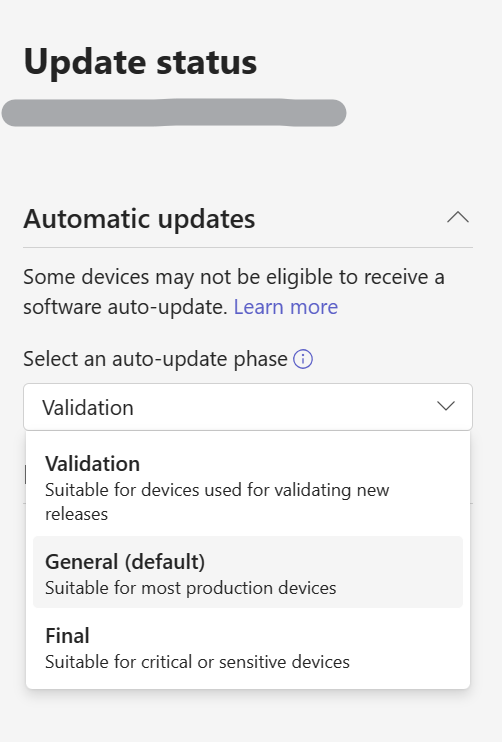
For Teams app automatic updates
- Validation phase - Updates start as soon as a new version is published.
- General phase - Updates start only 15 days after a new version is published.
- Final phase - Updates start only 45 days after a new version is published.
'Software auto-update' column in the device inventory table will indicate the phase assigned to the device. You can select the phase to quickly navigate to the Update section.
'Software auto-update' widget on device inventory pages shows any active updates that are going on and details for them.
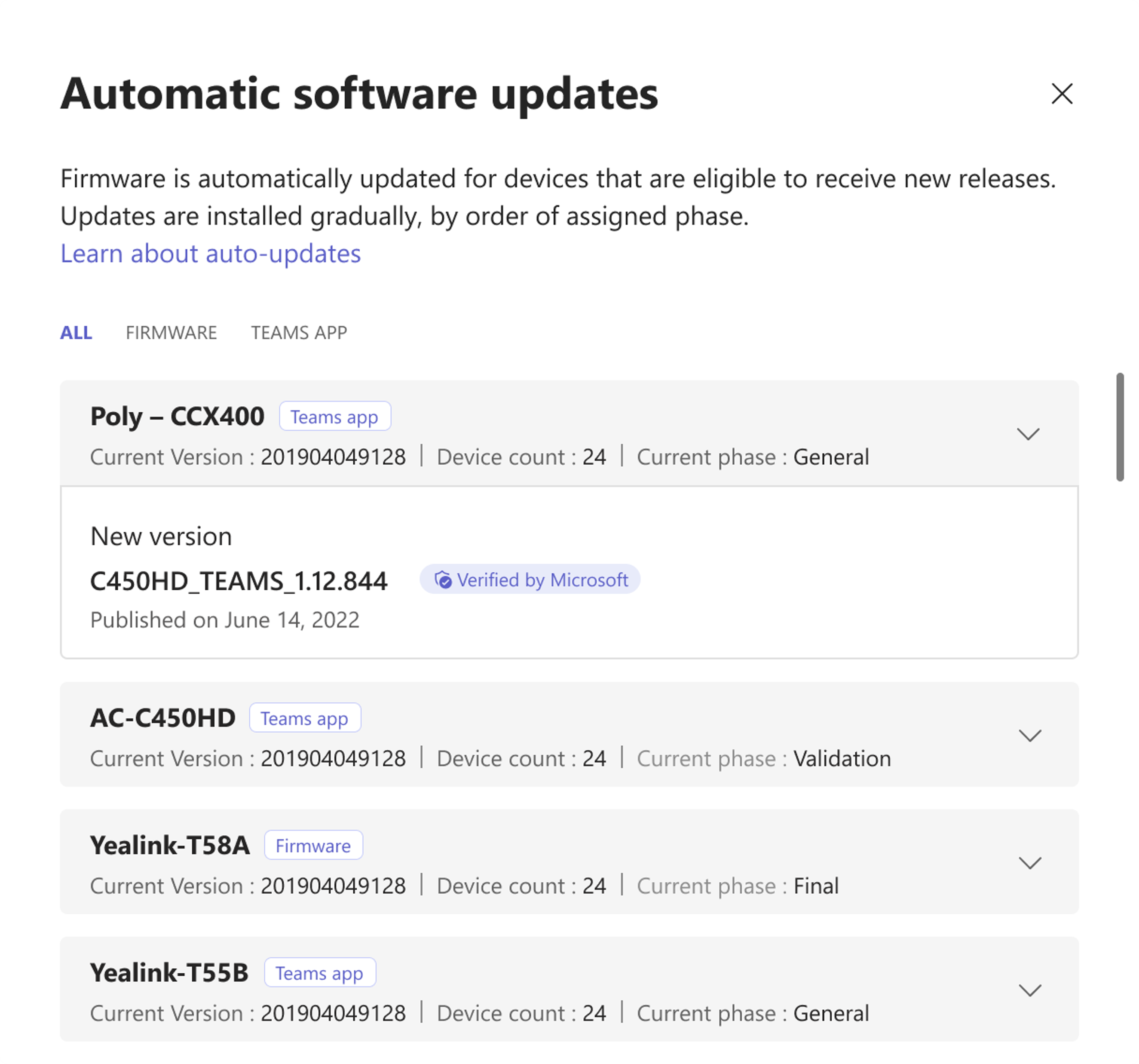
Temporarily Pause (and Resume) auto-updates - under the Actions menu
- Selecting Pause stops all auto-updates for the tenants for 15 days. If an automatic update is already scheduled, it will be cancelled.
- If selected, the auto-updates are paused for all the Android-based devices in the tenant.
- Admin can also choose to resume the auto-updates before the 15 days elapse.
- Manual updates are not impacted by this.
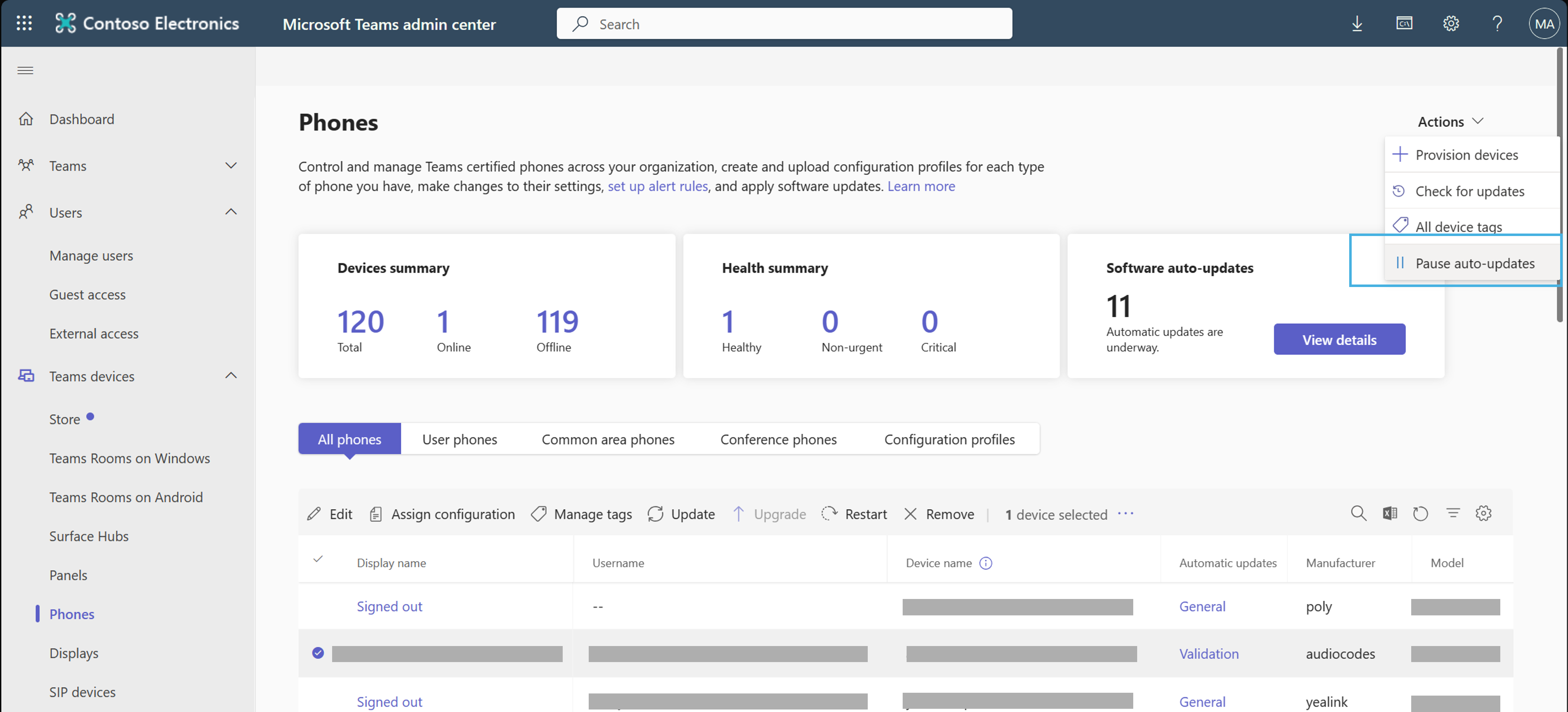
Software versions released by Microsoft are marked as "Verified by Microsoft".
- Preview versions will be marked as 'Microsoft Preview'. Automatic updates do not update devices to these versions.
Refer to Update Microsoft Teams devices remotely for more details about auto-updates.
[What you need to do to prepare:]
Before this change takes effect, administrators should ensure that their devices are assigned the Update Phase of their choice. When this change takes effect, auto-updates will start happening following the configured update phases. In case you need to validate something on the devices, you can choose to pause the auto-updates temporarily.
Snapshot from Feb 26, 2024
Updated February 25, 2024: We have updated the rollout timeline below. Thank you for your patience.
Android-based Teams devices will start receiving automatic updates for Teams app, in addition to firmware.
This message is associated with Microsoft 365 Roadmap ID 163598
[When this will happen:]
Rollout will begin in late October 2023 and is expected to be complete by mid-March 2024 (previously mid-February).
[How this will affect your organization:]
The Android-based Teams devices (Teams Rooms on Android, Teams Phones, Panels, and Displays) will start receiving automatic updates of the Teams app. The overall internal guardrails and features to manage the updates remain similar to those for automatic firmware updates. Administrators can find them on pages under Teams devices in Teams admin center.
The following capabilities can be used to manage these updates:
Update phases can be found after selecting the Update option after selecting a device.
- You can assign devices to these phases and the updates will rollout adhering to these. You can select multiple devices and assign a phase to them together as well.
- These phase timelines are different from those for Firmware auto-updates. Since the Teams app versions contain smaller changes and are released much more frequently, the rollout is much faster.
For Teams app automatic updates
- Validation phase - Updates start as soon as a new version is published.
- General phase - Updates start only 15 days after a new version is published.
- Final phase - Updates start only 45 days after a new version is published.
'Software auto-update' column in the device inventory table will indicate the phase assigned to the device. You can select the phase to quickly navigate to the Update section.
'Software auto-update' widget on device inventory pages shows any active updates that are going on and details for them.
Temporarily Pause (and Resume) auto-updates - under the Actions menu
- Selecting Pause stops all auto-updates for the tenants for 15 days. If an automatic update is already scheduled, it will be cancelled.
- If selected, the auto-updates are paused for all the Android-based devices in the tenant.
- Admin can also choose to resume the auto-updates before the 15 days elapse.
- Manual updates are not impacted by this.
Software versions released by Microsoft are marked as "Verified by Microsoft".
- Preview versions will be marked as 'Microsoft Preview'. Automatic updates do not update devices to these versions.
Refer to Update Microsoft Teams devices remotely for more details about auto-updates.
[What you need to do to prepare:]
Before this change takes effect, administrators should ensure that their devices are assigned the Update Phase of their choice. When this change takes effect, auto-updates will start happening following the configured update phases. In case you need to validate something on the devices, you can choose to pause the auto-updates temporarily.