Back to latest version
You're viewing a historical snapshot from Feb 7, 2024. This is not the latest version.

Metadata at Feb 7, 2024

Last Updated

Feb 7, 2024

Published Nov 20, 2023

Service

Microsoft Teams

Tag

Updated message
Feature update
User impact

MC692023 - Profile Card in Teams Mobile

Message Center

What changed since this version

removed textadded text

Updated February 7,May 8, 2024: We have updated the rollout timeline below. Thank you for your patience.

Introducing new Profile Cards in Teams Mobile.

[When this will happen:]

Targeted Release: We will begin rolling out in late November 2023 and complete by late December 2023.

Standard Release:General Availability: We will begin rolling out to production in early January 2024 and expect to complete by mid-March late FebruaryJune 2024 (previously late February)April).

[How this will affect your organization:]

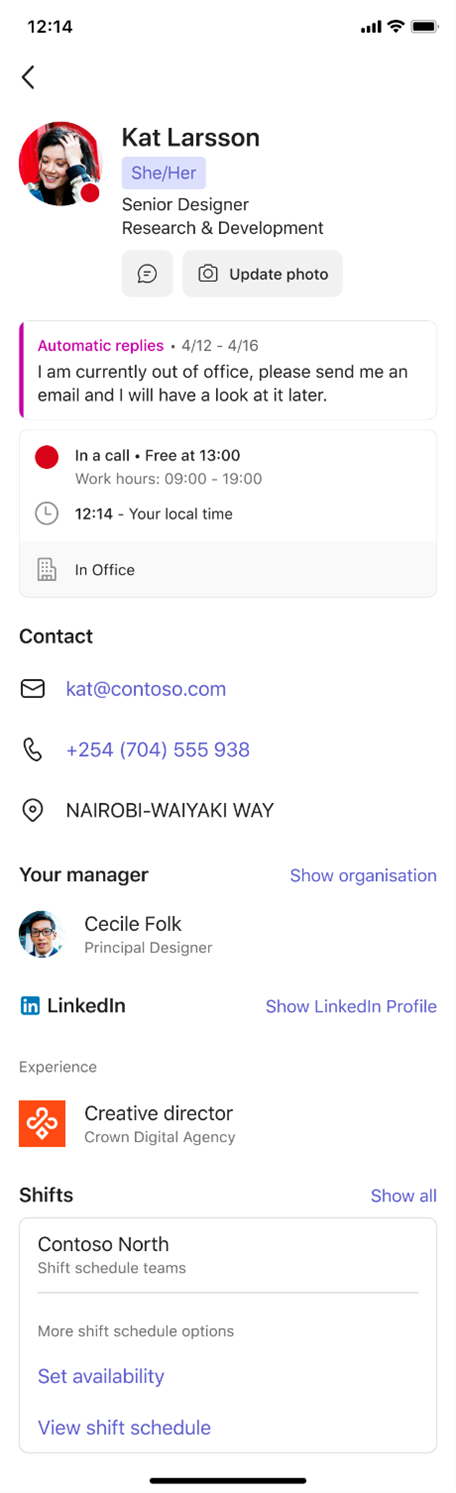
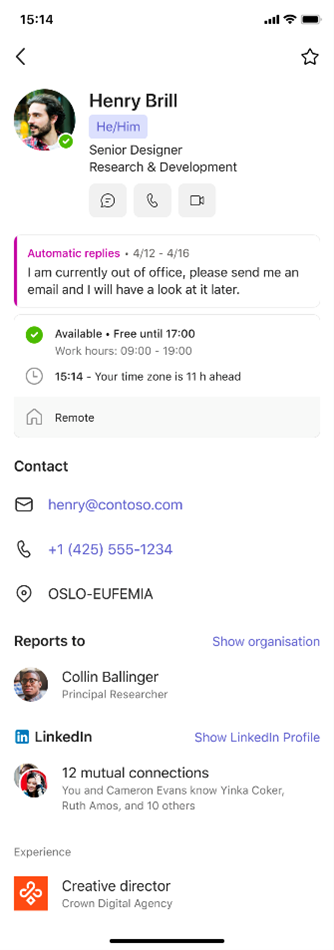
When you tap on someone’s name or picture in Teams mobile, you can find information related to them on their profile card. To see your own profile card, select your own name or profile picture.

This new profile card in Teams mobile has fresh experiences to help users contact and contextualize other users, as well as express themselves through setting their pronouns and profile picture.

Me card:

User card:
[What you need to do to prepare:]

You may consider updating your training and documentation as appropriate.

Snapshot from Feb 7, 2024

Updated February 7, 2024: We have updated the rollout timeline below. Thank you for your patience.

Introducing new Profile Cards in Teams Mobile.

[When this will happen:]

Targeted Release: We will begin rolling out in late November 2023 and complete by late December 2023.

Standard Release: We will begin rolling out to production in early January 2024 and expect to complete by mid-March late February 2024 (previously late February).

[How this will affect your organization:]

When you tap on someone’s name or picture in Teams mobile, you can find information related to them on their profile card. To see your own profile card, select your own name or profile picture.

This new profile card in Teams mobile has fresh experiences to help users contact and contextualize other users, as well as express themselves through setting their pronouns and profile picture.

Me card:


User card:

[What you need to do to prepare:]

You may consider updating your training and documentation as appropriate.