Updated March 29,October 3, 2024: Updated note: After further review we have decided not to proceed with this change at this time. We have updatedapologize for any inconvenience.
We will not be rolling this out to organizations in GCC High or DoD during the rollout timeline outlined below. We will communicate via Message center when we are ready to proceed. Organizations in GCC High and DoD can safely disregard this message. Thank you for your patience.
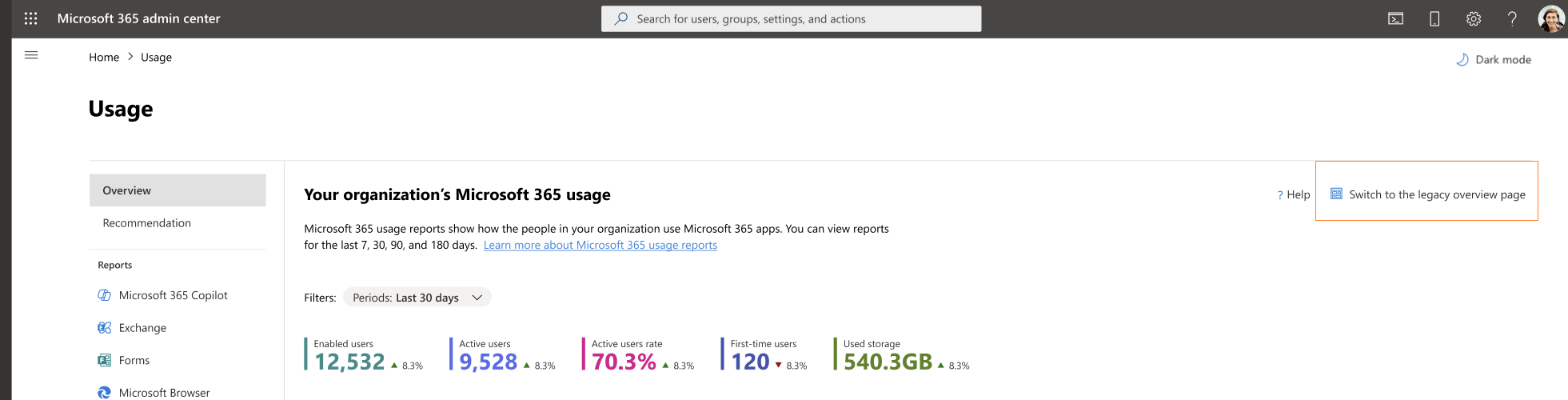
The Microsoft 365 admin center Usage report Overview page has been redesigned to better navigate the most important usage insights in your organization and provide a holistic view of Microsoft 365 apps usage. The redesign includes new engagement metrics such as enabled and active users, user state compositions (e.g. first time, returning users), and key usage metrics for Microsoft 365 apps.
This message is associated with Microsoft 365 Roadmap ID 185799
When this will happen:
Preview: We will begin rolling the report out starting in late Aprilmid-June 2024 (previously mid-March)late April) and the rollout is expected to be complete by early MayJuly 2024 (previously mid-April)early May). - We will not be proceeding with this change at this time.
General Availability (Worldwide, GCC, GCC High and DoD)GCC): We will begin rolling the report out starting in late JulySeptember 2024 (previously late-June)late July) and the rollout is expected to be complete by late AugustOctober 2024 (previously late-July)late August). - We will not be proceeding with this change at this time.
How this will affect your organization:
Admins with the correct permissions will have access to the Overview page redesign and can switch between the Overview page redesign and the legacy Overview page using the Switch button.
What you need to do to prepare:
To access the new reports, go to Reports -> Usage -> Overview.
For more information regarding these reports, please review the following documentation.