Updated April 25, 2024: We have updated theMay 19, 2025: After further review, we were not able to rollout timeline below.to DoD. Thank you for your patience.
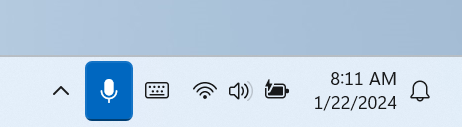
The Muting Teams with Windows Taskbar is now available. This feature, available in the new Teams experience on Windows, enables you to mute and unmute your audio by clicking the mic icon in Windows taskbar.
To control your call mic from the taskbar, do the following:
Select the mic icon on your taskbar or press Windows logo key + Alt + K to mute or unmute your microphone while using a calling app.
-OR- Click the volume icon in the hardware indicator for volume in Windows taskbar.

This message is associated with Microsoft 365 Roadmap ID 191528
When this will happen:
Targeted release: We will begin rolling out late Aprilearly June 2024 (previously mid-April)May) and expect to complete by mid-MayJune 2024 (previously late April)May).
Worldwide, GCC, & GCC High & DoD:High: We will begin rolling out late Maymid-June 2024 (previously early May)June) and expect to complete by early June 2024complete by late May 2025 (previously late May)April).
How this will affect your organization:
This enables a feature previously available in older version of Teams on Windows.
What you need to do to prepare:
To prepare, distribute updates on this rollout with your organization if applicable for your users.