Back to latest version

MC715427 - Microsoft Project for the web: New Assigned to Me view for Project tasks

Message Center

Metadata at Feb 13, 2024

Published

Feb 13, 2024

Service

Planner
Project for the web

Tag

Major change
New feature
User impact
Admin impact

Platforms

Web

Act by

Mar 6, 2024

Metadata changes

Tags
Admin impact, New feature, Updated message, User impactAdmin impact, New feature, User impact
End date
Jul 1, 2024Jun 14, 2024

Body changes

removed textadded text
Updated March 15, 2024: We have updated the rollout timeline below. Thank you for your patience.

The Assigned to me view in Microsoft Planner, Microsoft To Do, and the Microsoft Teams Task app currently displays all Microsoft 365 tasks assigned to the user, except for Project on the web tasks. With this release, users can access and edit their Project on the web tasks in the Assigned to me view of Planner, To Do, and the Teams task app.

This message is associated with Microsoft 365 Roadmap ID 382207.

[When this will happen:]

Standard Release: We will begin rolling out mid-early March 2024 (previously early March) and expect to complete by late mid-May 2024 (previously mid-May).2024. 

[How this will affect your organization:]

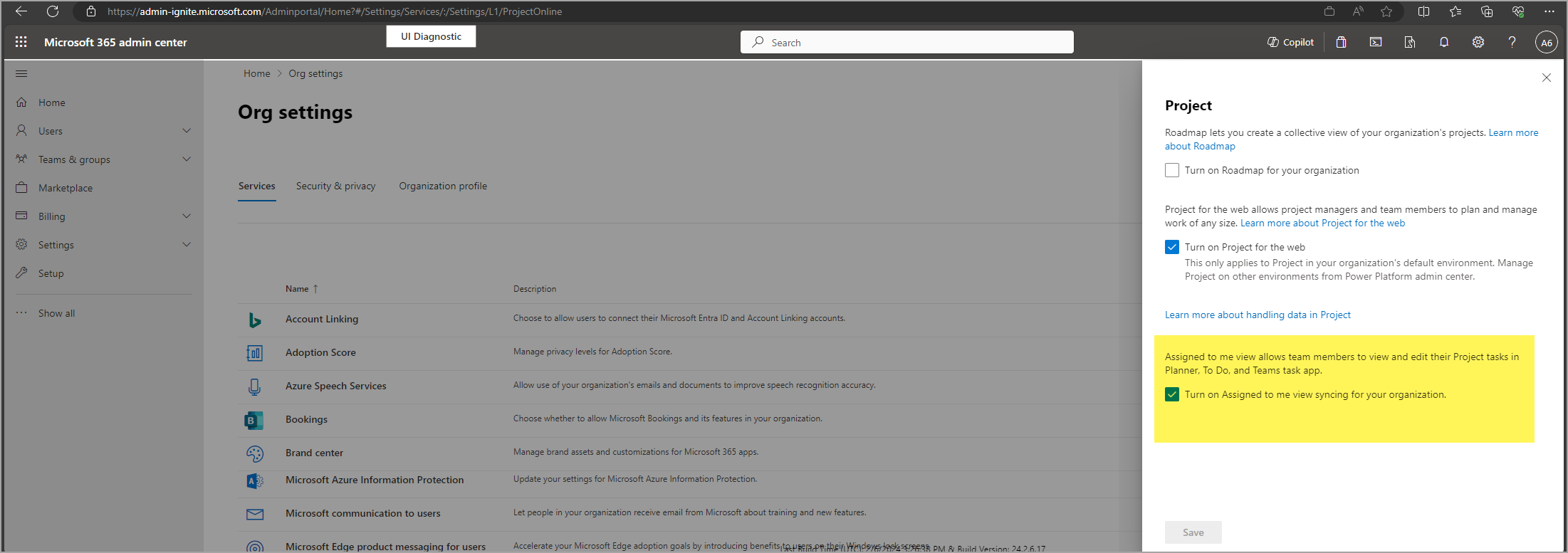
As part of this feature, Project on the web tasks will be synced with Planner. If your Project for web and Planner are in two different data boundaries and you don't want Project on the web data to cross the data boundary, you can choose to turn off this feature for your tenant.

[What you need to do to prepare:]

If you want to enable this feature for users in your tenant, you don't have to do anything. The feature will be on by default.

You can turn off this feature before March 6, 2024 by unchecking the box for Assigned to me in the Microsoft 365 admin center.

admin center settings