Metadata at May 21, 2024
Last Updated
Published Feb 13, 2024
Service
Tag
MC715431 - Microsoft Teams: Limit Presenter Role Permissions
Message Center
What changed since this version
Updated May 21,June 6, 2024: We have updated the rollout timeline below. Thank you for your patience.
Organizers who schedule meetings where attendees are presenters by default will now have a secured Microsoft Teams meetings experience. We are introducing a PowerShell, so admins can control the presenter role permissions in untrusted environments, such as EDU, where students assigned as presenters can remove other students from the meeting.
Key changes that apply to personal and work or school accounts excluding Microsoft Teams Rooms:
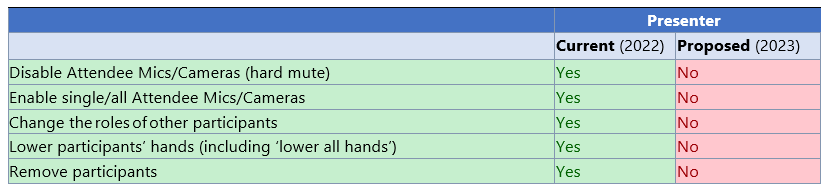
- Disable attendee mics/cameras (hard mute) - Educators no longer need to worry about being muted by students in the classroom.
- Enable single/all attendee mics/cameras - Educators no longer need to worry about students turning off their cameras or muting them during the meeting.
- Change the roles of other participants - Stop other students from being able to present by converting them into an attendee.
- Lower participants' hands (including 'lower all hands' from the participant roster in-meeting) - Stop other students from lowering other students' hands.
- Remove participants - Stop other students from removing participants in the meeting.
This message is associated with Microsoft 365 Roadmap ID: 319398
When this will happen:
Targeted Release: We will begin rolling out early March 2024 and expect to complete by end of March 2024.
Worldwide: We will begin rolling out early April 2024 and expect to complete by late Maymid-June 2024 (previously late April)May).
How this will affect your organization:
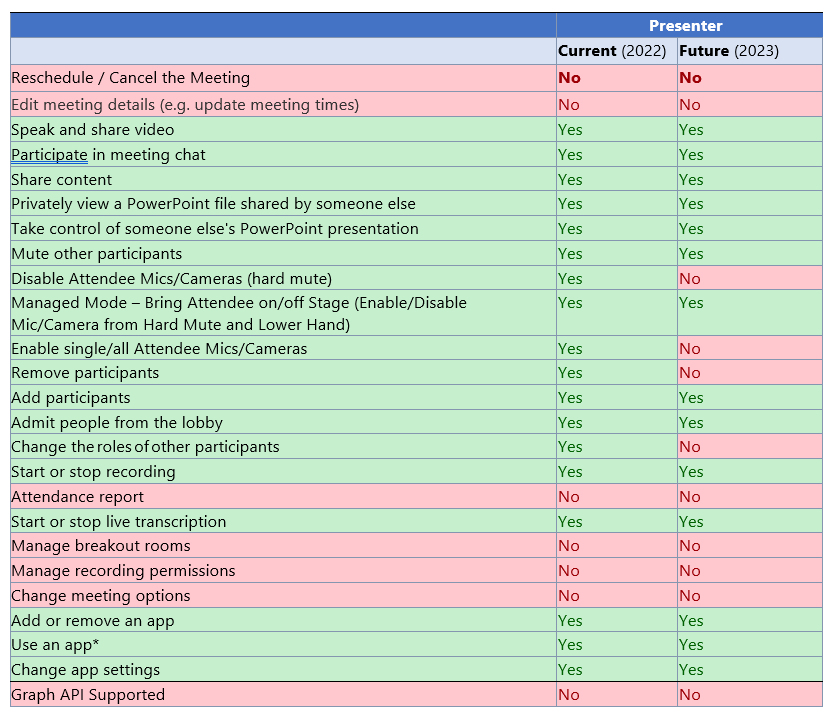
IT admins can manage this feature via PowerShell with:
Set-CsTeamsMeetingConfiguration -LimitPresenterRolePermissions (boolean)
You can read more about roles in Microsoft Teams meetings here.
What you need to do to prepare:
There is nothing you need to do to prepare.
Snapshot from May 21, 2024
Updated May 21, 2024: We have updated the rollout timeline below. Thank you for your patience.
Organizers who schedule meetings where attendees are presenters by default will now have a secured Microsoft Teams meetings experience. We are introducing a PowerShell, so admins can control the presenter role permissions in untrusted environments, such as EDU, where students assigned as presenters can remove other students from the meeting.
Key changes that apply to personal and work or school accounts excluding Microsoft Teams Rooms:
- Disable attendee mics/cameras (hard mute) - Educators no longer need to worry about being muted by students in the classroom.
- Enable single/all attendee mics/cameras - Educators no longer need to worry about students turning off their cameras or muting them during the meeting.
- Change the roles of other participants - Stop other students from being able to present by converting them into an attendee.
- Lower participants' hands (including 'lower all hands' from the participant roster in-meeting) - Stop other students from lowering other students' hands.
- Remove participants - Stop other students from removing participants in the meeting.
This message is associated with Microsoft 365 Roadmap ID: 319398
When this will happen:
Targeted Release: We will begin rolling out early March 2024 and expect to complete by end of March 2024.
Worldwide: We will begin rolling out early April 2024 and expect to complete by late May 2024 (previously late April).
How this will affect your organization:
IT admins can manage this feature via PowerShell with:
Set-CsTeamsMeetingConfiguration -LimitPresenterRolePermissions (boolean)
You can read more about roles in Microsoft Teams meetings here.
What you need to do to prepare:
There is nothing you need to do to prepare.