Updated July 5, 2024: We have updated the content below for clarity. Thank you for your patience.
In Microsoft Teams, we are providing manual settings to optimize screen sharing for video clips by reducing lag and improving the quality of video playback when sharing video clips in Teams meetings.
This message is associated with Microsoft 365 Roadmap ID 93483.
[When this will happen:]
Targeted Release: We will begin rolling out early MayMarch 2024 (previously mid-April) and expect to complete by mid-May 2024 (previously late April).March 2024.
Worldwide:Standard Release: We will begin rolling out mid-JuneMarch 2024 (previously mid-May) and expect to complete by early July 2024 (previously late June).March 2024.
[How this will affect your organization:]
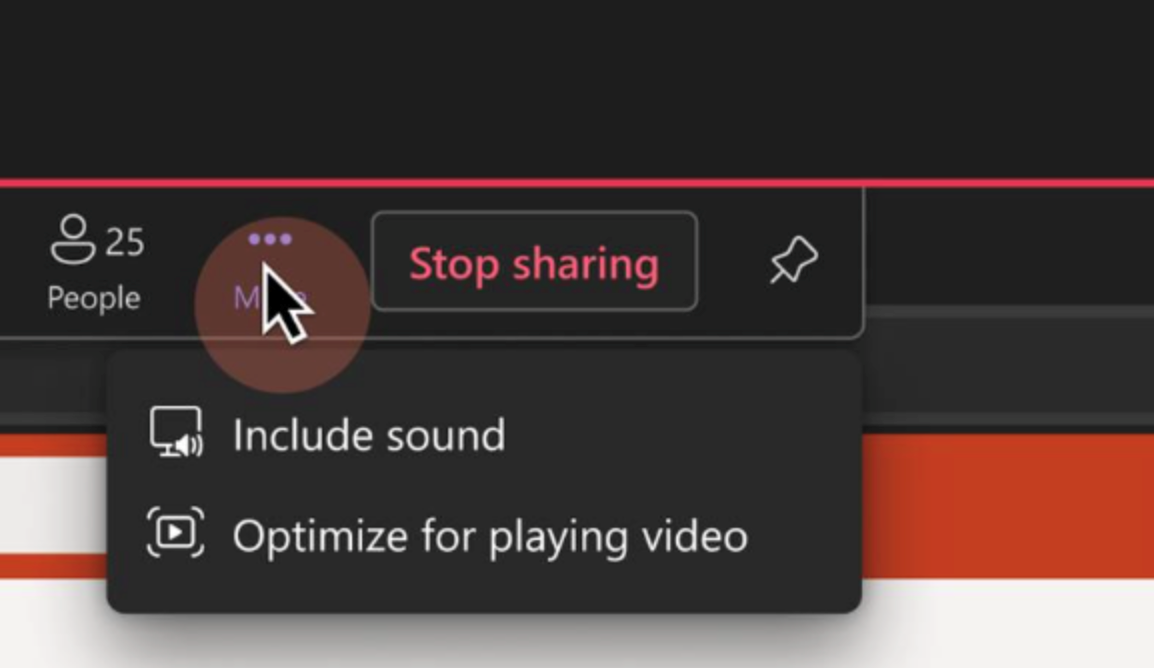
With the new feature you can manually optimize your screen sharing for video or motion content shared in Teams meetings. With this rollout, if automatic detection fails or is delayed, presenters can clickgo to the Optimize for playing video setting on the Optimize button on the Presenter toolbar overflow menu (the three-dot menu) to ensure their content is displayed as smoothly as possible.

[What you need to do to prepare:]
No action is needed to prepare for this change. You may want to notify your users about this change and update any relevant documentation as appropriate.