Back to latest version
You're viewing a historical snapshot from Mar 15, 2024. This is not the latest version.

Metadata at Mar 15, 2024

Published

Mar 15, 2024

Service

Microsoft Viva

Tag

New feature
Admin impact

MC740508 - Microsoft Viva Learning: Disable LinkedIn Learning premium content

Message Center

What changed since this version

removed textadded text

Updated June 28, 2024: We are evaluating the current rollout timeline and will communicate via Message center when we are ready to proceed. Thank you for your patience.

We are rolling out a feature for admins to turn off LinkedIn Learning premium content in Microsoft Viva Learning for all users in their tenant. (LinkedIn Learning premium content is on by default in Viva Learning for all tenants.)

When this will happen:

General Availability (Worldwide): We are evaluating the current rollout timeline and will begin rolling out late March 2024 and expectcommunicate via Message center when we are ready to complete by mid-April 2024. proceed. Thank you for your patience.

How this will affect your organization:

This rollout does not change any existing Viva Learning functionality or configuration. There is no impact for end users in Viva Learning. If hidden, end users will not be able to browse for LinkedIn Learning premium content.

To turn off LinkedIn Learning premium content: Viva Learning Admin > Manage Providers > LinkedIn Learning
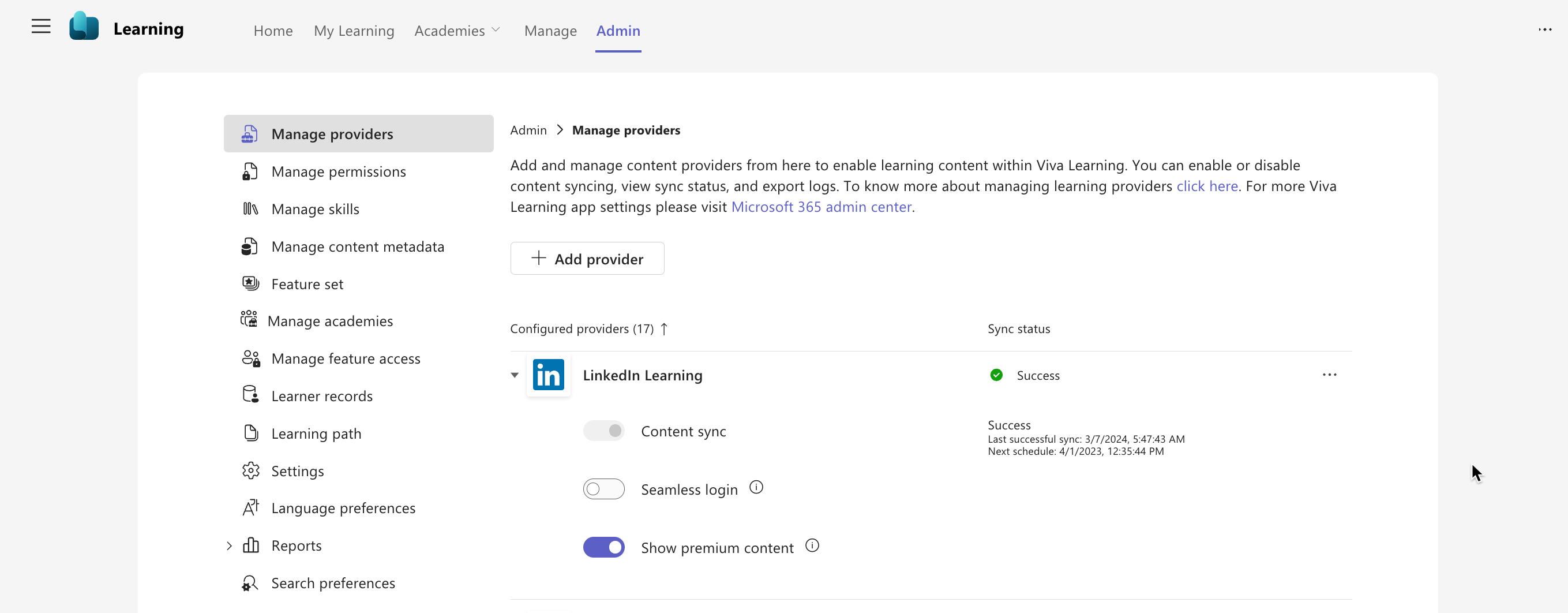
admin controls

What you need to do to prepare:

No action is needed from you to prepare for this rollout. You may want to notify your users about this change and update any relevant documentation as appropriate.

Snapshot from Mar 15, 2024

We are rolling out a feature for admins to turn off LinkedIn Learning premium content in Microsoft Viva Learning for all users in their tenant. (LinkedIn Learning premium content is on by default in Viva Learning for all tenants.)

When this will happen:

General Availability (Worldwide): We will begin rolling out late March 2024 and expect to complete by mid-April 2024.

How this will affect your organization:

This rollout does not change any existing Viva Learning functionality or configuration. There is no impact for end users in Viva Learning. If hidden, end users will not be able to browse for LinkedIn Learning premium content.

To turn off LinkedIn Learning premium content: Viva Learning Admin > Manage Providers > LinkedIn Learning

admin controls

What you need to do to prepare:

No action is needed from you to prepare for this rollout. You may want to notify your users about this change and update any relevant documentation as appropriate.