Updated June 6, 2024: We have updated the rollout timeline below. Thank you for your patience.
Note that if your organization does not use Microsoft Teams phone devices, you can disregard this message.
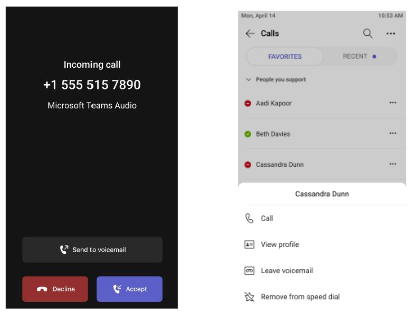
This feature update will allow you to redirect an incoming call to voicemail without having to accept or reject the call when receiving calls on a Microsoft Teams certified phone device.
This message is associated with Microsoft 365 Roadmap ID 169887
When this will happen:
General Availability (Worldwide, GCC): We will begin rolling out early May 2024 and expect to complete by late June 2024 (previously late May).May 2024.
General Availability (GCC-H): We will begin rolling out late June 2024 and expect to complete by late July 2024.
How this will affect your organization:
This feature update allows you to redirect incoming calls directly to voicemail on your Microsoft Teams certified phone device without having to accept or decline incoming calls. You can also select a Teams contact and choose to leave a voicemail directly for the contact.
Admins will be able to control the roll out of this option on selected accounts by configuring the 'AllowCallRedirect' parameter in the Teams calling policy associated with the account.

What you need to do to prepare:
Please ensure your Teams phone devices are updated with the latest application from the Teams admin center to get access to the new feature.
This rollout will happen automatically by the specified date with no admin action required. You may want to notify your users and admins about this change and update any relevant documentation as appropriate.