Metadata at Nov 19, 2024
Published
Service
Tag
Platforms
MC937920 - Microsoft Purview | Data Loss Prevention: Restrict Access action for semantic models in Microsoft Fabric (preview)
Message Center
What changed since this version
Updated March 26, 2026: We have updated the timeline below. Thank you for your patience.
Your organization can already apply Microsoft Purview Data Loss Prevention (DLP) policies to Microsoft Fabric, but soon you will also be able to restrict access to Fabric sematic models and lakehouses by applying DLP policies. After this rollout, admins will be able to configure DLP policies that automatically detect sensitive information in sematic models and lakehouses and then restrict access to this data to internal users or data owners.
owners
This message is associated with Microsoft 365 Roadmap ID 422501.
When this will happen:
Public Preview: DLP restrict access for sematic models is already available in Public Preview as of November 2024. For Fabric lakehouse, public preview of restrict access will begin rollout mid-April 2025 and is expected to complete by late April 2025.
General Availability: We will begin rolling out late November 2024October 2026 (previously June) and expect to complete by mid-December 2024.
We will update this message later to add the plan for General Availabilitylate November 2026 (previously end of June).
How this will affect your organization:
Before this rollout, you can configure DLP policies for Fabric workspaces to audit and notify users through Policy Tips based on sensitive content.
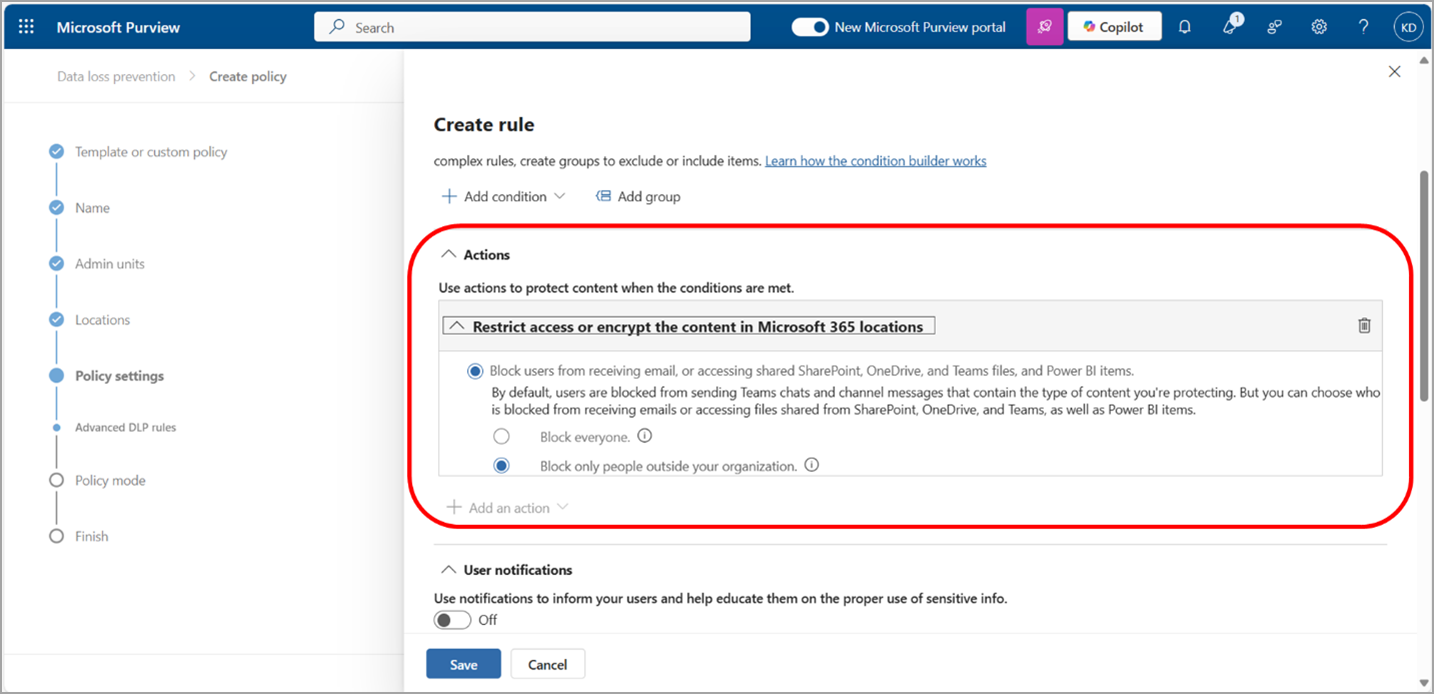
After this rollout, DLP policies can also be configured to block or restrict access to internal users or data owners. This action is especially valuable when your organization has guest users, and you want to enforce proper restrictions to ensure these users do not accidentally access sensitive information.
This change is available by default for admins to configure.
Configuring the Restrict access action in DLP policy for Fabric:
What you need to do to prepare:
This rollout will happen automatically by the specified date with no admin action required before the rollout. If your organization does not wish to start using the Restrict access action for Fabric, no additional action is required. If you would like to start restricting access to internal users or data owners, your security or compliance admin will need to update or create new DLP policies for Fabric to include the new Restrict access action.
Review your current configuration to determine the impact for your organization. You may want to notify your users about this change and update any relevant documentation.
Learn more
Snapshot from Nov 19, 2024
Your organization can already apply Microsoft Purview Data Loss Prevention (DLP) policies to Microsoft Fabric, but soon you will also be able to restrict access to Fabric sematic models by applying DLP policies. After this rollout, admins will be able to configure DLP policies that automatically detect sensitive information in sematic models and then restrict access to this data to internal users or data owners.
This message is associated with Microsoft 365 Roadmap ID 422501.
When this will happen:
Public Preview: We will begin rolling out late November 2024 and expect to complete by mid-December 2024.
We will update this message later to add the plan for General Availability
How this will affect your organization:
Before this rollout, you can configure DLP policies for Fabric workspaces to audit and notify users through Policy Tips based on sensitive content.
After this rollout, DLP policies can also be configured to block or restrict access to internal users or data owners. This action is especially valuable when your organization has guest users, and you want to enforce proper restrictions to ensure these users do not accidentally access sensitive information.
This change is available by default for admins to configure.
Configuring the Restrict access action in DLP policy for Fabric:

What you need to do to prepare:
This rollout will happen automatically by the specified date with no admin action required before the rollout. If your organization does not wish to start using the Restrict access action for Fabric, no additional action is required. If you would like to start restricting access to internal users or data owners, your security or compliance admin will need to update or create new DLP policies for Fabric to include the new Restrict access action.
Review your current configuration to determine the impact for your organization. You may want to notify your users about this change and update any relevant documentation.
Learn more