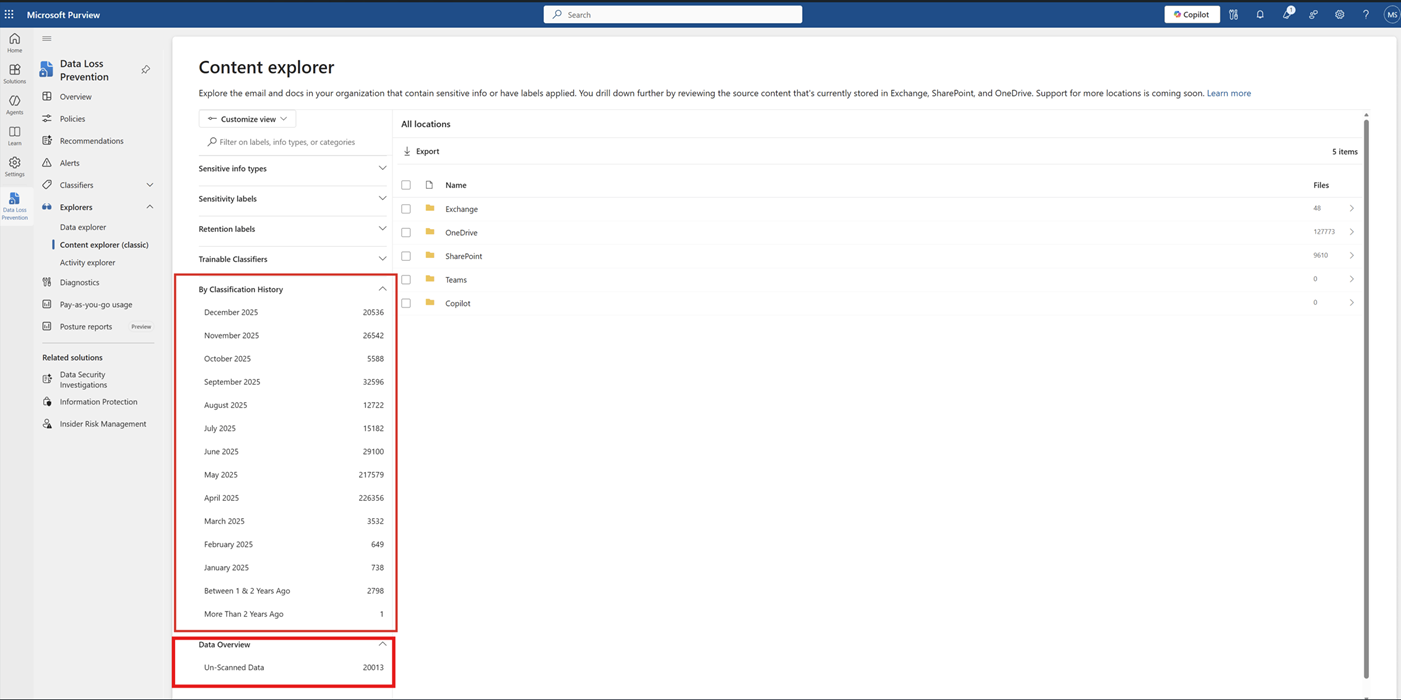
MC1217640 - Microsoft Purview | Information Protection - Content Explorer: Unscanned data and Classification History summary metrics

Service

Microsoft 365 suite
Microsoft Purview

Last Updated

Mar 11, 2026

Published Jan 14, 2026

Tag

Updated message
New feature
Admin impact

Platforms

Web

Summary

Microsoft Purview Content Explorer will add summary metrics showing unscanned files and classification history trends to help admins monitor data classification. The rollout begins mid-July 2026 for public preview and mid-August 2026 for general availability, with no required action or policy changes.

More information

Updated March 11, 2026: We have updated the timeline. Thank you for your patience.

Introduction

We’re enhancing Microsoft Purview Content Explorer with new summary metrics to improve visibility into scanning and classification activities. These updates will help admins identify unscanned files and monitor classification trends, enabling better data governance and informed decisions.

This message is associated with Roadmap ID 526796.

When this will happen:

  • Public Preview: We will begin rolling out mid-July 2026 (previously late January) and expect to complete by early August 2026 (previously mid-February). 
  • General Availability (Worldwide): We will begin rolling out mid-August 2026 (previously early March) and expect to complete by late August 2026 (previously late March). 

How this affects your organization:

  • Who is affected: Admins managing Microsoft Purview Information Protection and using Content Explorer.
  • What will happen:
    • A new Unscanned Files Summary will display the count and percentage of files not scanned for classification.
    • Classification History Insights will show trends and details of classification changes over time.
    • These metrics will appear in Content Explorer alongside existing Sensitive Information Types (SITs) and labels.
    • Admins can explore the new metrics to identify gaps and use on-demand classification capabilities to retrigger scans if needed.
    • No changes to existing policies or configurations; the feature is enabled by default.

      user settings

What you can do to prepare:

  • No action is required.
  • These metrics will automatically appear in Content Explorer.

Compliance considerations:

Question Explanation
Does the change alter how existing customer data is processed, stored, or accessed (e.g., documents, emails, chats, etc.)? The feature accesses existing classification metadata to display trends and scanning status in Content Explorer.