Back to latest version
You're viewing a historical snapshot from Apr 3, 2026. This is not the latest version.

Metadata at Apr 3, 2026

Published

Apr 3, 2026

Service

Exchange Online

Tag

Feature update
User impact

MC1269211 - Clearer RSVP selection in Outlook Mobile

Message Center

What changed since this version

removed textadded text

Updated April 29, 2026: We have updated the timeline. Thank you for your patience. 

Introduction

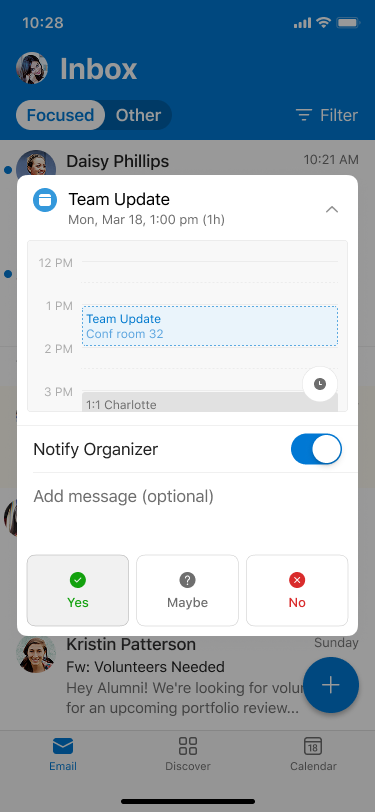
We’re improving the RSVP experience in Outlook Mobile by visually highlighting the response a user has selected (Yes, Maybe, or No). This makes it easier for users to quickly see how they’ve responded to a meeting invitation.

When this will happen:

General Availability (Worldwide, GCC, GCC High): Rollout begins inlate April early June 2026 (previously late April) and is expected to complete by end of June 2026 (previously early June 2026.June).

How this affects your organization:

Who is affected:

  • All users who access Outlook Mobile on iOS or Android
  • Applies to Worldwide, GCC, and GCC High tenants

What will happen:

  • The selected RSVP option (Yes, Maybe, or No) will be visually highlighted
  • user settings

  • Users can quickly confirm how they responded to a meeting invitation and edit as needed
  • user settings

  • The feature is enabled by default
  • No changes to existing meeting workflows or policies
  • No impact to Outlook on the web or Outlook desktop clients

What you can do to prepare:

  • No admin action is required; the update will roll out automatically
  • Consider notifying helpdesk staff of the visual change
  • Update internal documentation if needed

Compliance considerations:

No compliance considerations identified, review as appropriate for your organization.
Snapshot from Apr 3, 2026

Introduction

We’re improving the RSVP experience in Outlook Mobile by visually highlighting the response a user has selected (Yes, Maybe, or No). This makes it easier for users to quickly see how they’ve responded to a meeting invitation.

When this will happen:

General Availability (Worldwide, GCC, GCC High): Rollout begins in late April 2026 and is expected to complete by early June 2026.

How this affects your organization:

Who is affected:

  • All users who access Outlook Mobile on iOS or Android
  • Applies to Worldwide, GCC, and GCC High tenants

What will happen:

  • The selected RSVP option (Yes, Maybe, or No) will be visually highlighted
  • user settings

  • Users can quickly confirm how they responded to a meeting invitation and edit as needed
  • user settings

  • The feature is enabled by default
  • No changes to existing meeting workflows or policies
  • No impact to Outlook on the web or Outlook desktop clients

What you can do to prepare:

  • No admin action is required; the update will roll out automatically
  • Consider notifying helpdesk staff of the visual change
  • Update internal documentation if needed

Compliance considerations:

No compliance considerations identified, review as appropriate for your organization.