Back to latest version
You're viewing a historical snapshot from Jul 28, 2026. This is not the latest version.

Metadata at Jul 28, 2026

Last Updated

Jul 28, 2026

Published Apr 21, 2026

Service

Microsoft 365 apps

Tag

Updated message
New feature
User impact
Admin impact

MC1287365 - Microsoft 365 Copilot: Change in accessing additional agents in Excel

Message Center

What changed since this version

removed textadded text

Updated July 28,August 10, 2026: We have updated the content and timeline. Thank you for your patience. 

Introduction

We are updating the Chat-only Copilot experience in Excel to better align with the editing experience. As part of this update, users who want to access additional Copilot agents (such as Researcher or Analyst) can do so by selecting the “…” menu in the header and choosing M365 Copilot.

When this will happen

  • General Availability (Worldwide): We will beginbegan rolling out inearly August 2026 and expect to complete by end of August 2026.

How this affects your organization

Who is affected

All Excel users with Microsoft 365 Copilot licenses

What will happen

  • Users can continue to use the chat‑only Copilot experience in Excel to ask questions, analyze data, and receive insights without modifying workbook content.
  • However, users who want to access additional Copilot agents (such as Researcher or Analyst)Users can do so by selectingclick the "…"..." menu in the Excel header and choosing M365 Copilot:then can choose "All Agents"

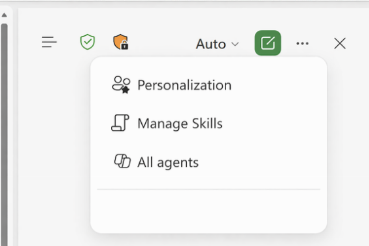
Screenshot - New All Agents button

  • The "All Agents" button will direct users to the Agent Store.
  • Existing Microsoft 365 Copilot licensing and policy controls are respected.
  • There is no change to workbook editing behavior or data permissions.

What you can do to prepare

No admin action is required.

  • Inform helpdesk and support teams about the new access path to Microsoft 365 Copilot from Excel.
  • Update internal documentation or training materials that describe Copilot experiences in Excel.
  • Review Microsoft 365 Copilot documentation if you want to understand available agents and licensing requirements.

Learn more: Edit with Copilot in Excel | Microsoft Support

Compliance considerations

No compliance considerations identified. Review as appropriate for your organization.

Snapshot from Jul 28, 2026

Updated July 28, 2026: We have updated the timeline. Thank you for your patience. 

Introduction

We are updating the Chat-only Copilot experience in Excel to better align with the editing experience. As part of this update, users who want to access additional Copilot agents (such as Researcher or Analyst) can do so by selecting the “…” menu in the header and choosing M365 Copilot.

When this will happen

  • General Availability (Worldwide): We will begin rolling out in August 2026.

How this affects your organization

Who is affected

All Excel users with Microsoft 365 Copilot licenses

What will happen

  • Users can continue to use the chat‑only Copilot experience in Excel to ask questions, analyze data, and receive insights without modifying workbook content.
  • However, users who want to access additional Copilot agents (such as Researcher or Analyst) can do so by selecting the "…" menu in the Excel header and choosing M365 Copilot:

  • Existing Microsoft 365 Copilot licensing and policy controls are respected.
  • There is no change to workbook editing behavior or data permissions.

What you can do to prepare

No admin action is required.

  • Inform helpdesk and support teams about the new access path to Microsoft 365 Copilot from Excel.
  • Update internal documentation or training materials that describe Copilot experiences in Excel.
  • Review Microsoft 365 Copilot documentation if you want to understand available agents and licensing requirements.

Learn more: Edit with Copilot in Excel | Microsoft Support

Compliance considerations

No compliance considerations identified. Review as appropriate for your organization.