Metadata at May 28, 2026
Published
Service
Tag
Platforms
MC1325441 - Microsoft Purview | Data Lifecycle Management - Archive OneDrive and SharePoint files under retention
Message Center
What changed since this version
Updated August 25, 2026: We have updated the timeline. Thank you for your patience.
What and Why
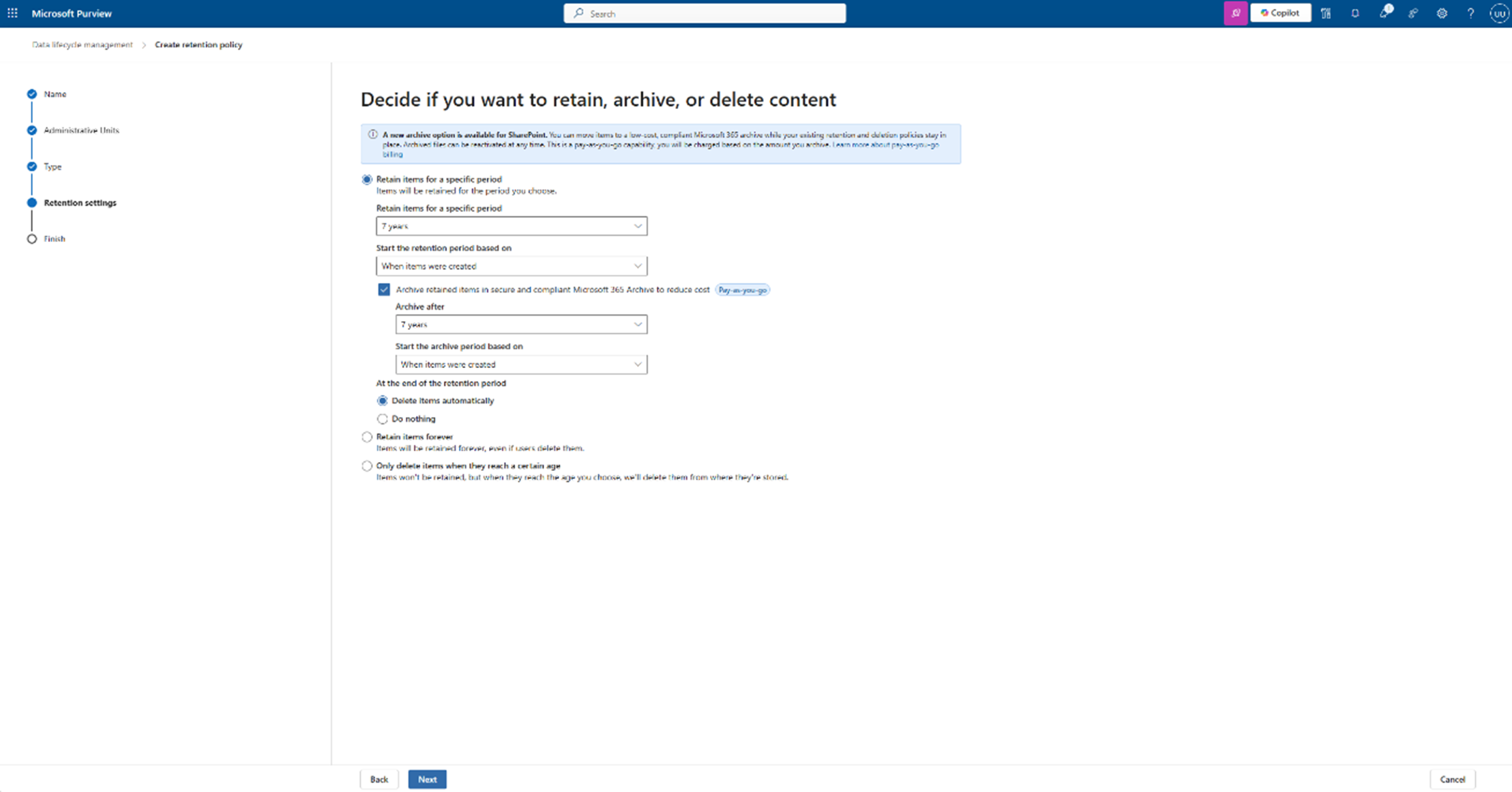
Microsoft Purview Data Lifecycle Management is introducing the ability to archive OneDrive and SharePoint files based on retention policies. This feature helps organizations reduce storage costs by moving inactive content to Microsoft 365 Archive while maintaining compliance and discoverability. By excluding archived content from Copilot indexing, organizations can also improve the relevance and quality of Copilot responses, ensuring users focus on current, active data.
This message is associated with Microsoft 365 Roadmap ID 561208.
Rollout Schedule
Public Preview: We will begin rolling out early September 2026 (previously mid-August) and expect to complete by early October 2026 (previously early September).
General Availability (Worldwide): Rollout will begin in late June early October 2026 (previously mid-September) and is expected to complete bymid-July early November 2026(previously late September).
Impact on Your Organization
Who is affected
- Admins managing Microsoft Purview Data Lifecycle Management
- Organizations using retention policies in SharePoint Online and OneDrive
Platforms/ServicesPlatforms/Services
- Microsoft Purview (Data Lifecycle Management)
- SharePoint Online
OneDrive for Business- Microsoft 365 Archive
- Microsoft Copilot
What will happen
- A new Archive option will be available within retention policy settings in Data Lifecycle Management.
- Admins can configure retention policies to move inactive files to Microsoft 365 Archive storage.
- Archived files remain available for compliance scenarios, including eDiscovery.
- Archived content will be excluded from Copilot indexing, helping improve answer relevance.
- This feature is not enabled by default and requires admin configuration.
- Existing retention policies and compliance configurations remain unchanged unless updated by admins.

Action Required / Recommendations
No immediate action is required.
To prepare and take advantage of this feature:
- Review your current retention policies in Microsoft Purview Data Lifecycle Management.
- Evaluate opportunities to reduce storage costs by archiving inactive content.
- Update retention policies to include the new Archive option where appropriate.
- Inform compliance and records management stakeholders about this new capability.
- Review internal documentation and processes related to data lifecycle and storage optimization.
Compliance Considerations
| Question | Answer |
| Does the change store new customer data? | Yes. Archived files are stored in Microsoft 365 Archive (low-cost storage tier). |
| Does the change alter how existing customer data is processed, stored, or accessed? | Yes. Files meeting retention criteria can be moved from active storage to archive storage while remaining discoverable. |
| Does the change introduce or modify AI/ML capabilities interacting with data? | Yes. Archived content is excluded from Copilot indexing, influencing how Copilot processes and retrieves organizational data. |
| Does the change modify Purview retention policies or workflows? | Yes. Adds a new Archive action within retention policy configuration in Data Lifecycle Management. |
| Does the change affect eDiscovery or Content Search? | Yes. Archived content remains discoverable for compliance workflows such as eDiscovery. |
| Does the change include an admin control? | Yes. Admins configure and enable the feature through retention policy settings in Purview. |
Snapshot from May 28, 2026
What and Why
Microsoft Purview Data Lifecycle Management is introducing the ability to archive OneDrive and SharePoint files based on retention policies. This feature helps organizations reduce storage costs by moving inactive content to Microsoft 365 Archive while maintaining compliance and discoverability. By excluding archived content from Copilot indexing, organizations can also improve the relevance and quality of Copilot responses, ensuring users focus on current, active data.
This message is associated with Microsoft 365 Roadmap ID 561208.
Rollout Schedule
General Availability (Worldwide): Rollout will begin in late June 2026 and is expected to complete by mid-July 2026.
Impact on Your Organization
Who is affected
- Admins managing Microsoft Purview Data Lifecycle Management
- Organizations using retention policies in SharePoint Online and OneDrive
Platforms/ServicesPlatforms/Services
- Microsoft Purview (Data Lifecycle Management)
- SharePoint Online
- OneDrive for Business
- Microsoft 365 Archive
- Microsoft Copilot
What will happen
- A new Archive option will be available within retention policy settings in Data Lifecycle Management.
- Admins can configure retention policies to move inactive files to Microsoft 365 Archive storage.
- Archived files remain available for compliance scenarios, including eDiscovery.
- Archived content will be excluded from Copilot indexing, helping improve answer relevance.
- This feature is not enabled by default and requires admin configuration.
- Existing retention policies and compliance configurations remain unchanged unless updated by admins.
Action Required / Recommendations
No immediate action is required.
To prepare and take advantage of this feature:
- Review your current retention policies in Microsoft Purview Data Lifecycle Management.
- Evaluate opportunities to reduce storage costs by archiving inactive content.
- Update retention policies to include the new Archive option where appropriate.
- Inform compliance and records management stakeholders about this new capability.
- Review internal documentation and processes related to data lifecycle and storage optimization.
Compliance Considerations
| Question | Answer |
| Does the change store new customer data? | Yes. Archived files are stored in Microsoft 365 Archive (low-cost storage tier). |
| Does the change alter how existing customer data is processed, stored, or accessed? | Yes. Files meeting retention criteria can be moved from active storage to archive storage while remaining discoverable. |
| Does the change introduce or modify AI/ML capabilities interacting with data? | Yes. Archived content is excluded from Copilot indexing, influencing how Copilot processes and retrieves organizational data. |
| Does the change modify Purview retention policies or workflows? | Yes. Adds a new Archive action within retention policy configuration in Data Lifecycle Management. |
| Does the change affect eDiscovery or Content Search? | Yes. Archived content remains discoverable for compliance workflows such as eDiscovery. |
| Does the change include an admin control? | Yes. Admins configure and enable the feature through retention policy settings in Purview. |