Metadata at Jun 22, 2026
Published
Service
Tag
MC1401303 - Microsoft Teams: New Events templates with "Optimize for large audience" and policy-based behavior
Message Center
What changed since this version
Updated July 20, 2026: We have updated the content. Thank you for your patience.
What and Why:
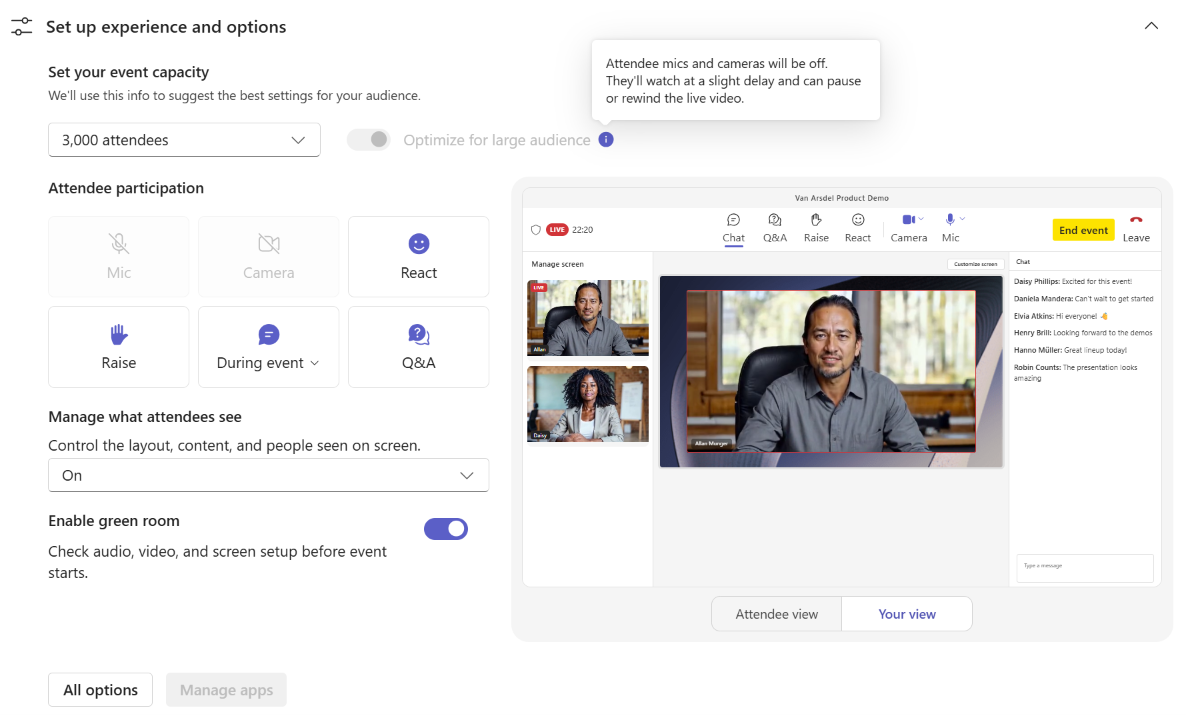
Microsoft Teams is updating the new Events scheduling experience to ensure that Events continue to respect the existing CsTeamsEventsPolicy. With new Events templates, organizers will see a new option called Optimize for large audience. When enabled, the event uses the familiar Teams town hall attendee experience—designed for large audiences—so events can scale beyond 1,000 attendees while continuing to follow your organization’s policy settings.
Rollout Schedule:
- Targeted Release (Worldwide): We will begin rolling out in early June 2026 and expect to complete by mid-June 2026.
- General Availability (Worldwide): We will begin rolling out in mid-July 2026 (previously late
June 2026June) and expect to complete by end of July 2026 (previously lateJune 2026June).
Impact on Your Organization:
Who is affected:
- Teams admins managing CsTeamsEventsPolicy
- Organizers scheduling Events, including town halls and webinars, using the new Events templates
- Any event over 1,000 attendees (Optimize for large audience will be automatically enabled) or any event where Optimize for large audience is enabled
Platforms/Services:
- Microsoft Teams (Events scheduling experience)
- Teams admin policies / PowerShell (CsTeamsEventsPolicy enforcement)
What will happen:
- A new Optimize for large audience option will be available in new Events templates.
- When Optimize for large audience = ON, organizers may scale their event beyond 1,000 and the attendee experience will be optimized for large audiences: attendees can pause and rewind live content, attendees cannot turn on their camera or mic on demand, and attendees will utilize the eCDN if applicable. This is similar to the current Town hall attendee experience today.
- Events over 1,000 attendees will have Optimize for large audience automatically turned ON.
- When Optimize for large audience = ON, the event will respect all town hall settings in
CsTeamsEventsPolicy, includingAllowTownhalls,TownhallEventAttendeeAccess,AllowedTownhallTypesForRecordingPublish,TownhallChatExperience,RecordingForTownhall,TranscriptionForTownhall,TownhallMaxResolution,HighBitrateForTownhall, andUseMicrosoftECDN. - When Optimize for large audience = OFF, the event will be governed by webinar policy settings.
- Town hall template events will follow town hall settings unless Optimize for large audience is turned OFF.
- Webinar template events will follow webinar policy settings unless Optimize for large audience is turned ON.
- All other non–town hall / non-webinar policy settings will continue to apply to Events, including the Registration setting.
Screenshot - New 'Optimize for large audience' toggle
Action Required/Recommendations:
No action is required if you want Events to behave the same way your organization currently uses town halls and webinars.
- Review CsTeamsEventsPolicy to ensure town hall and webinar settings align to your organization’s intended experience—especially if you run events near or above 1,000 attendees.
- Notify helpdesk and event support teams of the policy enforcement behavior to reduce scheduling-related tickets.
Learn more: Set-CsTeamsEventsPolicy | Microsoft Learn (will(will be updated before GA rollout)
Compliance considerations:
No compliance considerations identified, review as appropriate for your organization.
FAQ:
Question: Will this feature effect regular meetings?
Answer: No. This will only affect Events created via the Teams Calendar or the Events App. This will also affect events created via the Webinar and Town hall templates.
Question: Can an organizer enable 'Optimize for large audience' for their event if the town hall policy is Disabled? Can they enable that option if they use the Webinar template?
Answer: No. Only organizers who have the town hall policy setting enabled can optimize an event for scale and hold events above 1,000 users. Even if the user attempt to schedule the event via the Webinar template, they may not optimize their event for a large audience (and subsequently have over 1,000 participants) if their town hall policy setting is disabled.
Question: Is the 'Optimize for Large Audience' available on the Events scheduling form?
Answer: Yes. If the user has their town hall policy setting enabled, they may enable the 'Optimize for Large Audience' toggle when scheduling an Event (note that this does not include meetings).
Snapshot from Jun 22, 2026
What and Why:
Microsoft Teams is updating the new Events scheduling experience to ensure that Events continue to respect the existing CsTeamsEventsPolicy. With new Events templates, organizers will see a new option called Optimize for large audience. When enabled, the event uses the familiar Teams town hall attendee experience—designed for large audiences—so events can scale beyond 1,000 attendees while continuing to follow your organization’s policy settings.
Rollout Schedule:
- Targeted Release (Worldwide): We will begin rolling out in early June 2026 and expect to complete by mid-June 2026.
- General Availability (Worldwide): We will begin rolling out in late June 2026 and expect to complete by late June 2026.
Impact on Your Organization:
Who is affected:
- Teams admins managing CsTeamsEventsPolicy
- Organizers scheduling Events, including town halls and webinars, using the new Events templates
- Any event over 1,000 attendees (Optimize for large audience will be automatically enabled) or any event where Optimize for large audience is enabled
Platforms/Services:
- Microsoft Teams (Events scheduling experience)
- Teams admin policies / PowerShell (CsTeamsEventsPolicy enforcement)
What will happen:
- A new Optimize for large audience option will be available in new Events templates.
- When Optimize for large audience = ON, organizers may scale their event beyond 1,000 and the attendee experience will be optimized for large audiences: attendees can pause and rewind live content, attendees cannot turn on their camera or mic on demand, and attendees will utilize the eCDN if applicable. This is similar to the current Town hall attendee experience today.
- Events over 1,000 attendees will have Optimize for large audience automatically turned ON.
- When Optimize for large audience = ON, the event will respect all town hall settings in
CsTeamsEventsPolicy, includingAllowTownhalls,TownhallEventAttendeeAccess,AllowedTownhallTypesForRecordingPublish,TownhallChatExperience,RecordingForTownhall,TranscriptionForTownhall,TownhallMaxResolution,HighBitrateForTownhall, andUseMicrosoftECDN. - When Optimize for large audience = OFF, the event will be governed by webinar policy settings.
- Town hall template events will follow town hall settings unless Optimize for large audience is turned OFF.
- Webinar template events will follow webinar policy settings unless Optimize for large audience is turned ON.
- All other non–town hall / non-webinar policy settings will continue to apply to Events, including the Registration setting.
Action Required/Recommendations:
No action is required if you want Events to behave the same way your organization currently uses town halls and webinars.
- Review CsTeamsEventsPolicy to ensure town hall and webinar settings align to your organization’s intended experience—especially if you run events near or above 1,000 attendees.
- Notify helpdesk and event support teams of the policy enforcement behavior to reduce scheduling-related tickets.
Learn more: Set-CsTeamsEventsPolicy | Microsoft Learn (will be updated before GA rollout)
Compliance considerations:
No compliance considerations identified, review as appropriate for your organization.