MC1426716 - Neutral-themed SharePoint UI in page editing and property panes
Message Center
Metadata at latest
Published
Service
Tag
Metadata
No tracked metadata fields changed between these versions.
Body changes
What and Why:
We are updating the SharePoint page editing experience with a neutral-themed UI for system controls, including web part toolbars and property panes.
With this change, editing tools will use standard, neutral colors instead of inheriting site branding. This creates a clearer distinction between system controls and user-authored content, improving usability, accessibility, and consistency across light and dark themes as part of the SharePoint visual refresh.
This message is associated with Roadmap ID 566698.
Rollout Schedule:
- Targeted Release (Worldwide): Beginning late July 2026; expected to complete by early August 2026
- General Availability (Worldwide, GCC, GCC High, DoD): Beginning late August 2026; expected to complete by early September 2026
Impact on Your Organization:
Who is affected: Users who create or edit SharePoint pages and developers/admins managing custom or third-party SharePoint Framework web parts.
Platforms/Services: SharePoint (Web)
What will happen:
- Page editing tools (such as web part toolbars and property panes) will display using a neutral-themed UI instead of site theme colors.
- Site branding will continue to apply to page content, but not to editing controls.
- Users will see a clearer separation between editing UI and page content.
- The update improves consistency across light and dark modes.
- The change is enabled by default and requires no configuration.
- Third-party and custom web parts may show visual-only differences (for example, contrast or color mismatches), but functionality is not expected to be impacted.
Screenshot 1: Before: The System Control inherits the site's Custom Theme colors, including the light-yellow background and purple accent color:
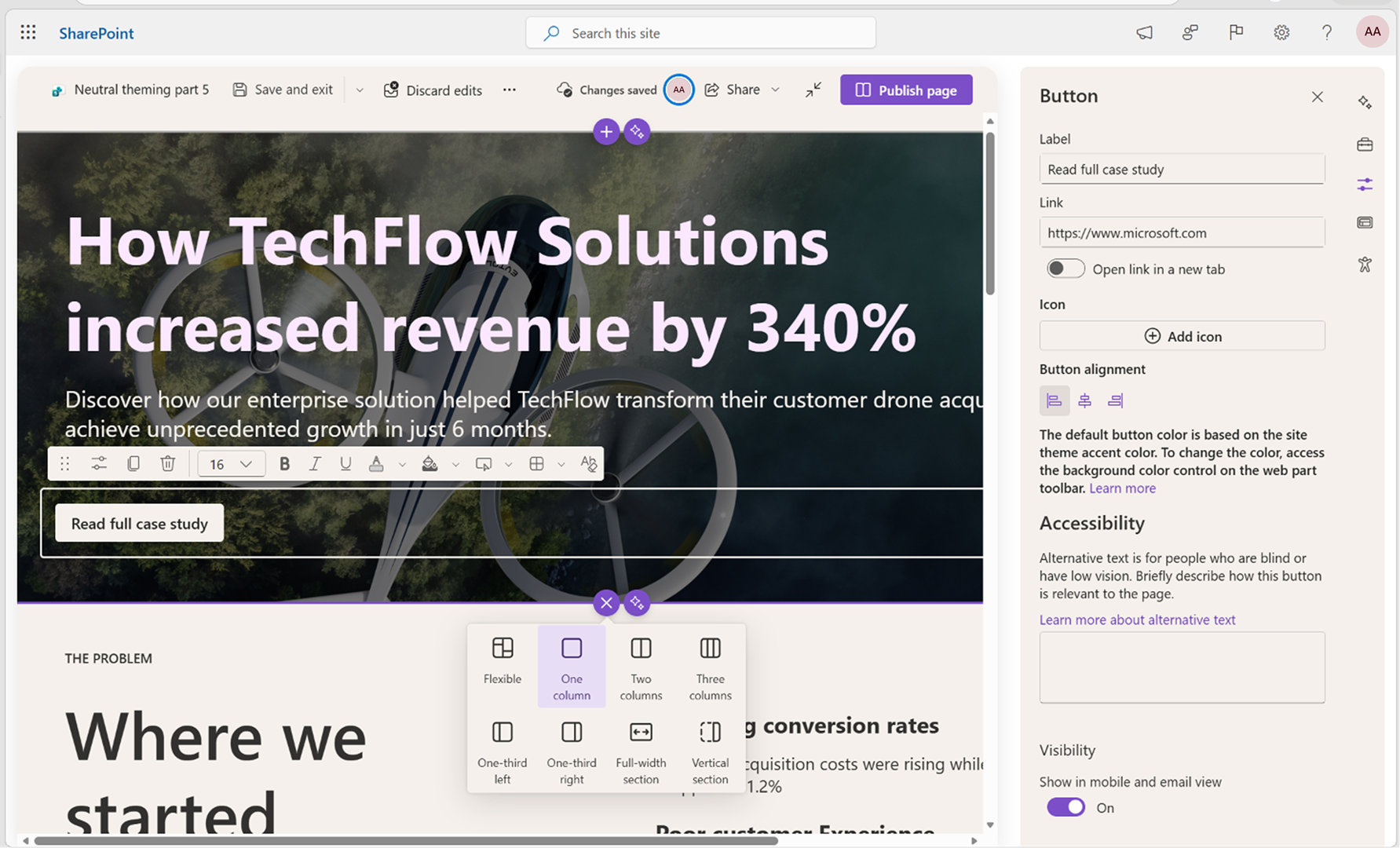
Screenshot 2: After: The System Control now uses neutral theme colors. The previously applied Custom Theme colors (light yellow and purple accents) have been replaced:
Action Required/Recommendations:
No admin action is required for Microsoft-provided SharePoint experiences.
If your organization uses custom or third-party web parts, we recommend:
- Validate third-party and custom SPFx web parts in page editing and property pane scenarios before general availability (GA).
- Test web parts in both light and dark themes to identify potential contrast or theming issues.
- Review custom property pane controls for visual consistency with neutral theming.
- Engage your web part provider or internal developers if updates are needed.
- Share updated guidance with development teams.
- Update internal documentation or helpdesk scripts if needed.
Learn more:
- Property pane theming guidance | Microsoft Learn
- Use theme colors in customizations | Microsoft Learn
- A new SharePoint Look and Feel: What’s Changing and Why It Matters | Microsoft Community Hub
Compliance considerations:
No compliance considerations identified, review as appropriate for your organization.