MC688930 - Teams admin center: App centric management and changes to app permission policies
Message Center
Metadata at Oct 25, 2024
Last Updated
Published Nov 11, 2023
Service
Tag
Platforms
Metadata changes
- End date
- Sep 1, 2025→Dec 30, 2024
Body changes
Updated April 18, 2025: We have completed Phase 1. Phase 3 (auto-migration) has begun and is updated to define the rollout timeline and cohorts. Phase 2 (self-migration) is also updated and extended to mid-May for the customers who are not in the first round of auto migration. See below for details.
October 24, 2024: The migration to app-centric management using the Migration Wizard (Phase 2) started rolling out(referenced as Phase 2 in late this post) is expected to resume by mid-November 2024 and completed rolling out in mid-December 2024. Administrators are nowAt that time, administrators will be able to startself-initiate the migration themselves using the wizard. The automatic migration for customers with only a global permission policy (Phase 1) will complete by end-March 2025 and those with multiple permission policies (Phase 3) will beginbe postponed until early 2025. Further updates, including the details for Phase 3 auto-migration, will be provided in April 2025a future MC post update and public documentation.
App centric management (ACM) is on hold as of August 14, 2024, and will restart in mid-October (previously mid-September). Your experience during this hold will fall under one of the following, with Phases defined in detail below.
- If your tenant has already been migrated to ACM, it will remain on ACM. The rest of this MC post is not applicable to your tenant.
- If your tenant fell under the Phase 1 criteria of using only the Global app permission policy and no custom app permission policies, it will resume auto migration in mid-September.
- If you do not have a draft currently saved, you will not be able to access ACM migration until the roll out restarts.
What is in Phase 2?
- Migration wizard: a step-by-step guide to help you migrate the permission policies. You will be able to select which polities to migrate and designate users groups or individuals who should have access to the apps.
- Testing and Validation: before finalizing the migration, you will have the opportunity to test and export your staged changes. You can use this to make side-by-side comparison with your current setup, ensuring everything is perfect before you proceed.
- Duration: The migration process is designed to have no downtime for the end users and can take a few hours to complete. During the migration, your existing permission policies will remain in effect until the transition to app centric management completes.
Detailed documentation for the migration process is available at App centric management to manage user access to Teams apps - Microsoft Teams | Microsoft Learn.App centric management to manage user access to Teams apps - Microsoft Teams | Microsoft Learn.
App centric management introduces new admin settings to control who in the tenant can install Teams apps. First, admins can set a default value for new apps that are published to the Teams app store. Second, admins can manage apps for users, groups, or everyone in the organization. This feature replaces the existing app permission policies and provides admins with the ability to manage access to the app individually. The app permission policies for existing customers are migrated to maintain existing app availability in the tenant.
This message is associated with Microsoft 365 Roadmap ID 151829 151829
When this will happen:
This feature will gradually roll out across three major phases.
Phase 1 (Complete): Auto-migration for (from late November 2023 to early November 2024 (previously late September) affects the tenants that use only singlethe Global app permission policy customers - This is applicable for customer with only a global permission policy. The roll-out has started and will be complete by end of March 2025.
Phase 2: Self-migration – admins of our customers can do self-migration using the Migration Wizard. This is the preferred way for customers to have tenant admin to be in the loop of migration. The migration Wizard is extended until mid-May (previously end of March 2025) for customers with one or moreno custom app permission policies with users assigned to them. Therepolicies. The app status from the permission policy and tenant settings will be no further exceptions granted.
Phase 3: Auto-migration for all customers – This is for customers who have not completed self-migration in Phase 2. This has started in mid-April and will complete by mid-May 2025 for customers with custom permission policies, but no users assignedmigrated to them. All other customers will be auto-migrated starting in mid-May until end of June 2025 (previously starting April 2025). Auto-preserve the admin intent. The migration will maintainnot affect the same access definedend users and their ability to use the apps. Admins may see the Manage apps page in a read-only mode for a short time.
Phase 2 (from late May 2024 to early November 2024 (previously late September)) affects the tenants that use both global and custom app permission policies. This phase will let the admin choose to migrate to app centric management by following a migration process that will change the existing app permission policies whenever there is no conflict between a user’sto app assignments in the new app centric model. The admins will have the choice to modify the apps that are assigned policies. If a user’susing the custom permission policies conflict by allowing and blockingto be accessible to groups, if they want.
Phase 3 (early 2025) applies to the same app for them, we will auto-migrate their app as allowed. After auto-migration, theretenants that skipped the migration in phase 1 or 2. These tenants will be migrated automatically in this phase. More details to come as a security group created for each set of users assigned to each app permission policy. These groups will be assigned to each app they are allowed in their respective policy, maintaining their app access. Groups Administrators can manage these groups like any others to customize the app centric management assignments, such as adding and removing users, or removing the group and replacing it with another.follow up MC post.
How this will affect your organization:
Starting with this release, you can:
1. Manage Teams apps for selected set of users, groups or all users in the organization.
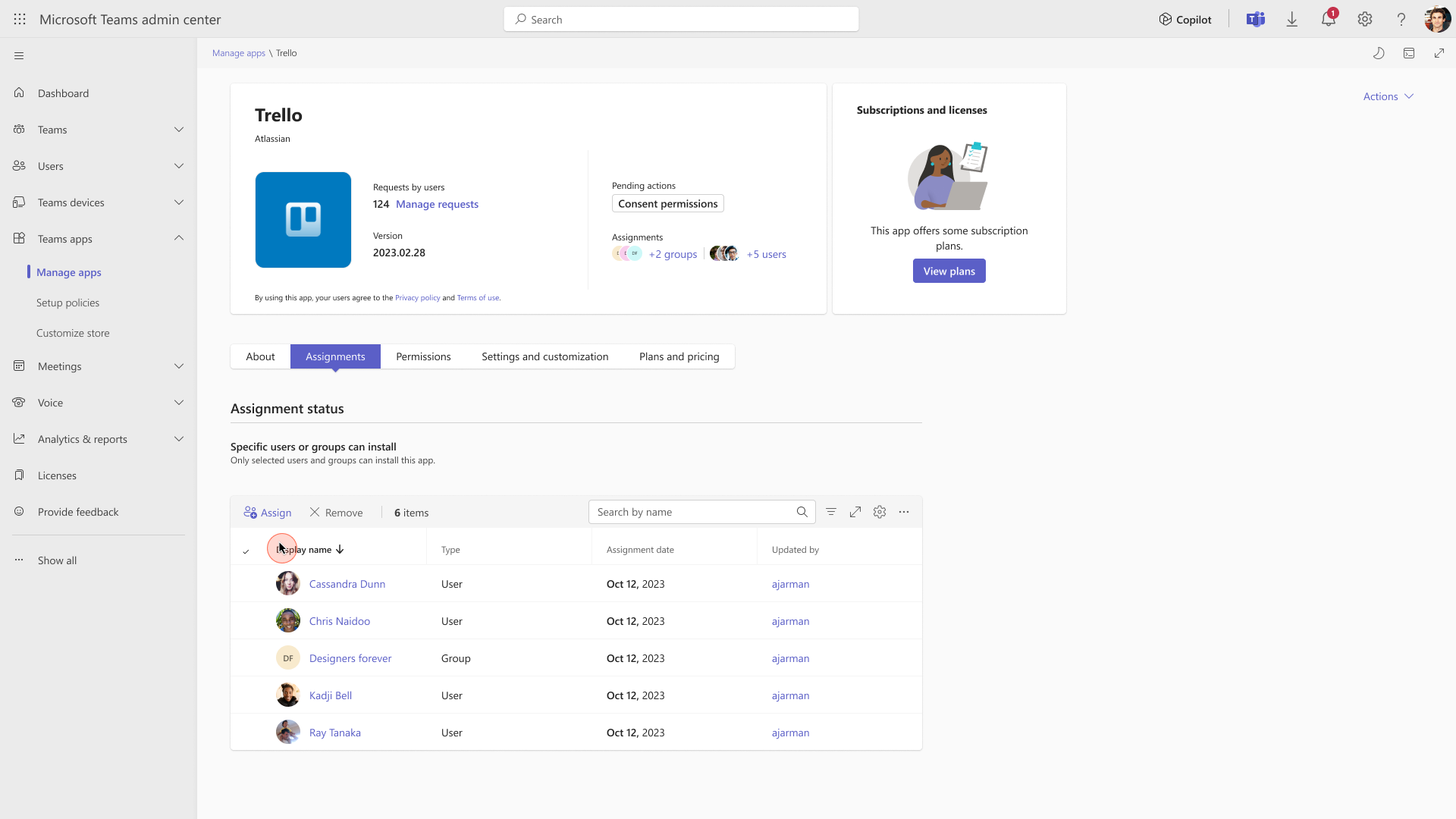
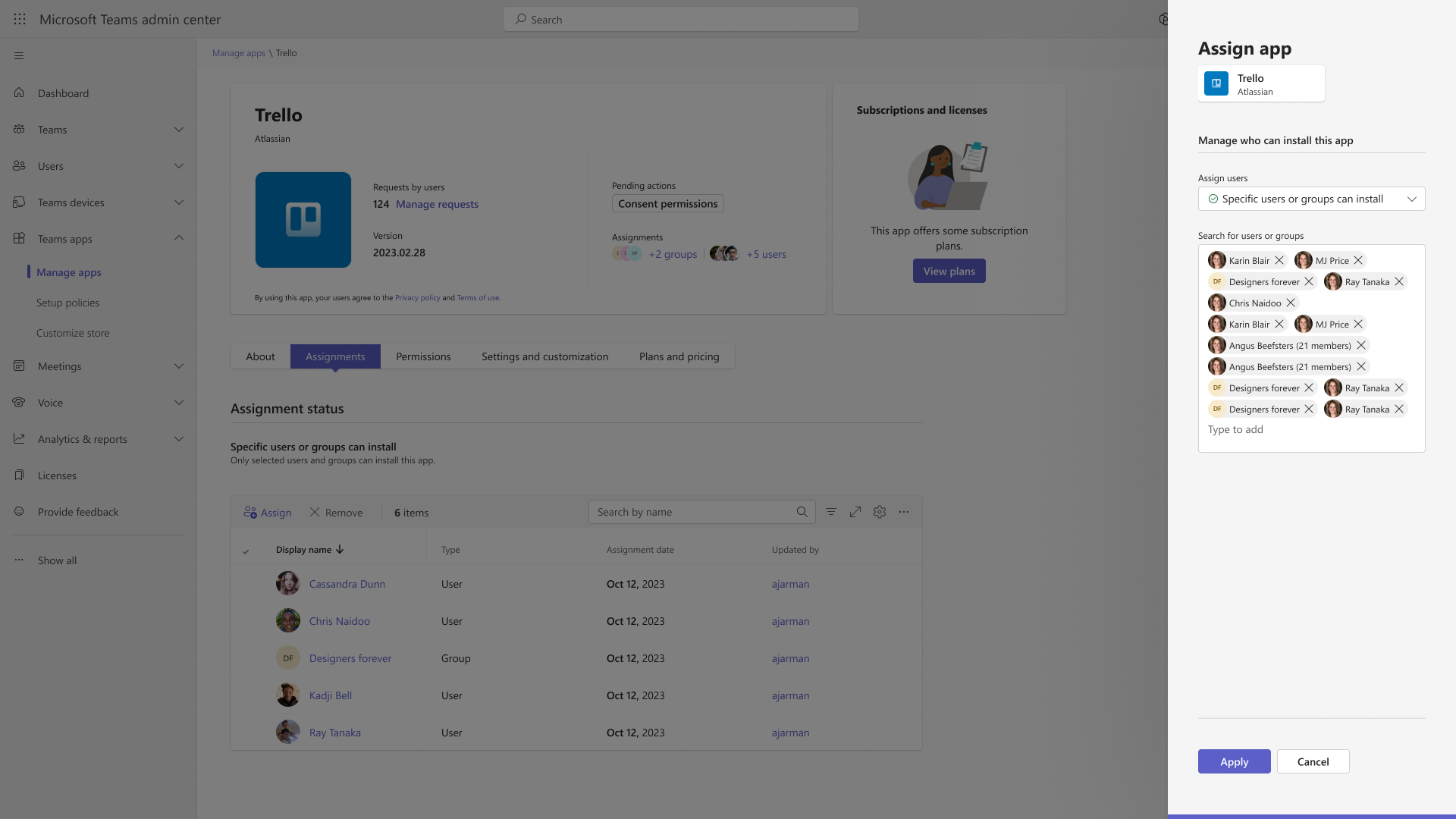
2. Set the default value for new apps published to Teams app store for each of the app types: Microsoft, third-party and custom apps.
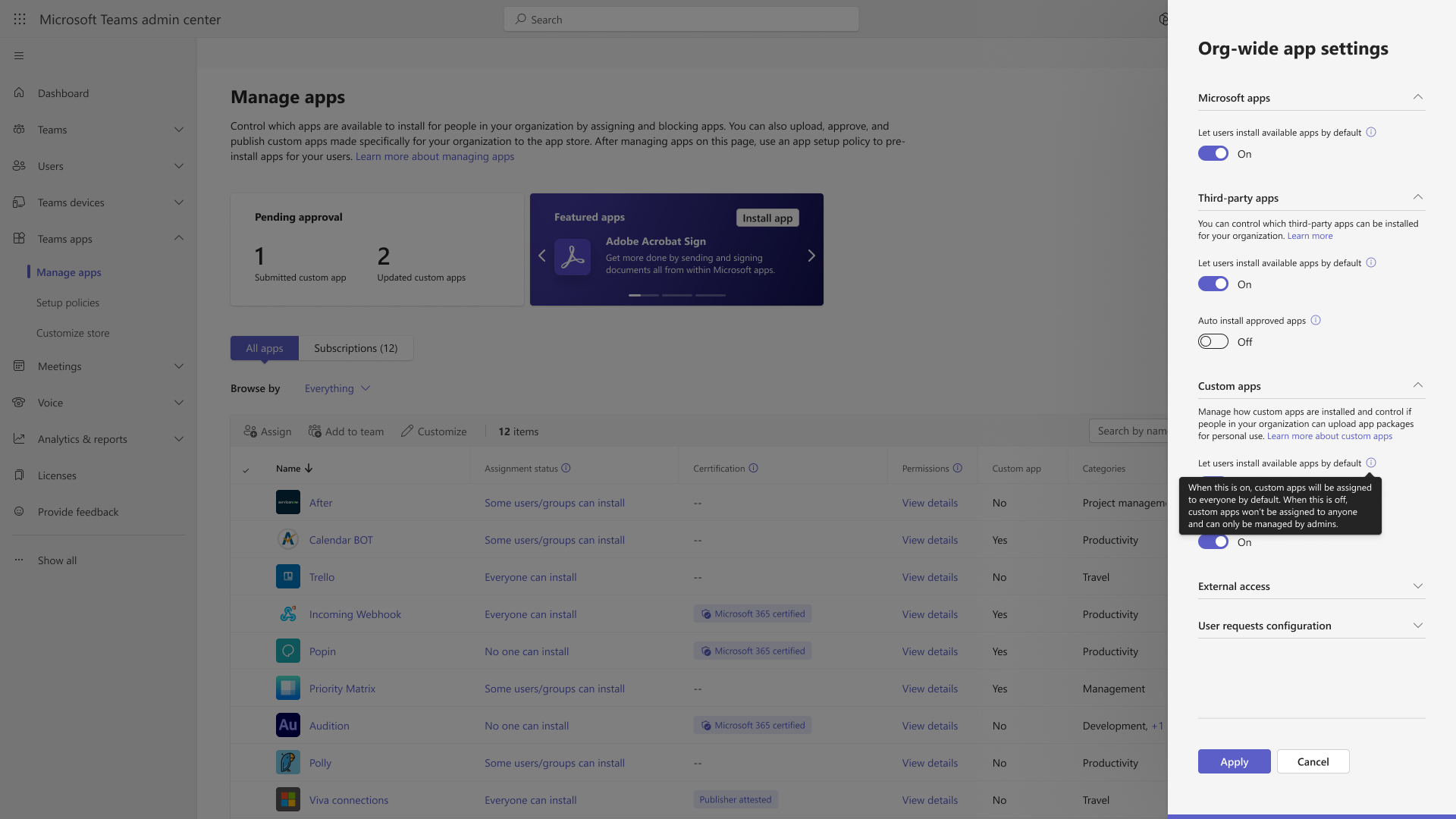
What you need to do to prepare:
No action needed for phase 1 tenants with Global permission policy only. . Migrate to app centric management manually via the Migration WizardMore information will be provided for phase 2 and 3 tenants in Phase 2 by mid-May 2025 (previously the end of March 2025) if you do not want to be auto-migrated during Phase 3.a follow-up communication before launch.