Updated February 2,May 21, 2024: We have updated the rollout timeline below. Thank you for your patience.
Currently with webinars, you are unable to duplicate a webinar and create a new webinar based off an existing one. This can be time consuming if organizers would like to schedule multiple events that are similar to one another. To simplify event creation Microsoft Teams is introducing the ability to create a new webinar by duplicating the information for an existing scheduled one. Information includes a webinar's details, presenters, theming, and more. The organizer can also choose to edit and update the information as needed for their new webinar.
This message is associated with Microsoft 365 Roadmap ID 375177
[When this will happen:]
Targeted Release: We will begin rolling out mid-March 2024 (previously late February) and expect to complete by late March 2024 (previously early March).
Standard ReleaseWorldwide and GCC: We will begin rolling out late March 2024 (previously early March) and expect to complete by late AprilMay 2024 (previously late March)April).
[How this will affect your organization:]
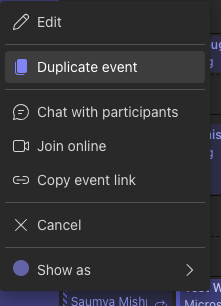
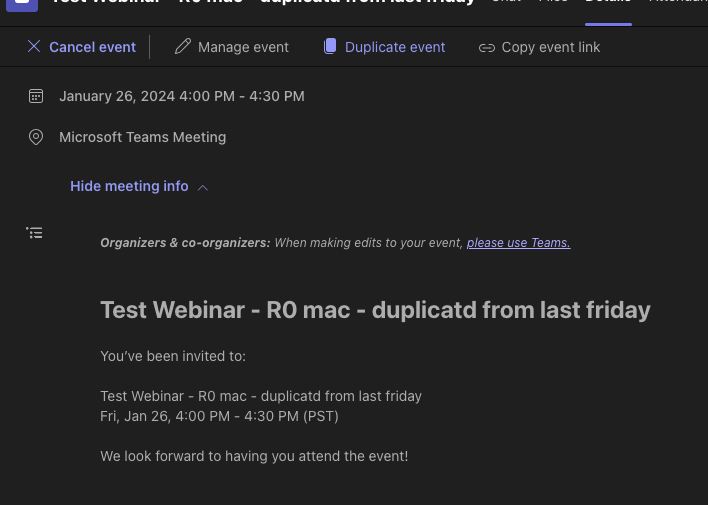
Webinar organizers in your tenant can now duplicate webinars from existing scheduled webinars. Organizers can do this by right clicking on the webinar object in the Teams Calendar and then clicking on "Duplicate event." Organizers can also duplicate an event by clicking "Duplicate event" in the details page when a user double clicks on the webinar in the calendar.
[What you need to do to prepare:]
You do not need to do anything to prepare; however, we do recommend updating your existing internal documentation on webinars to include this new update.