Back to latest version
You're viewing a historical snapshot from Jan 24, 2024. This is not the latest version.

Metadata at Jan 24, 2024

Published

Jan 24, 2024

Service

Microsoft 365 apps

Tag

New feature
Admin impact

Platforms

Android

MC709662 - Announcing Updated Settings in Microsoft Outlook for Android

Message Center

What changed since this version

removed textadded text

Updated March 20, 2024: We have updated the rollout timeline below. Thank you for your patience.

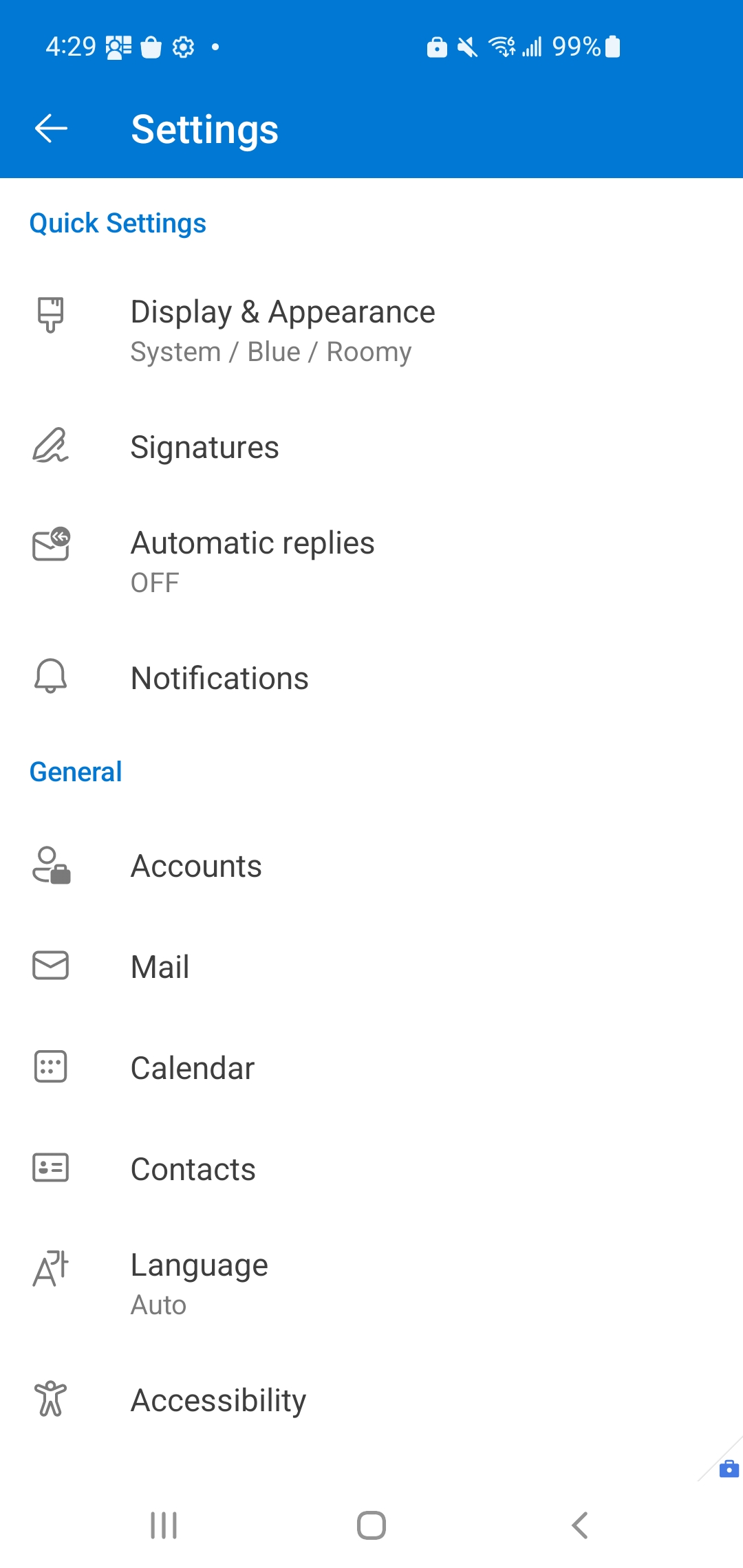
The Outlook for Android Settings page is being updated so that you can find the settings you need more efficiently.

This message is associated with Microsoft 365 Roadmap ID 185387

[When this will happen:]

Standard Release: We will begin rolling out in mid-February 2024 and expect to complete by the end of February 2024.late March 2024 (previously late February).

[How this will affect your organization:]

With this update, only the placement of various settings within the Settings page will change. However, there will be no changes to the functionality of these settings.

Notable changes include:

  • Help & Feedback is moving from the top of the Settings page to the bottom.
  • You will now have to select Accounts on the top-level Settings page to see all of your accounts. In that account list, storage accounts have been merged with their associated mail account. So, if you have both your Microsoft 365 email account and your OneDrive account connected to the Outlook app, you will now just see one entry in the account list that includes both the email and storage account settings.

[What you need to do to prepare:]

There is no action needed to prepare for this change. You may want to notify your users about this change and update any relevant documentation as appropriate.

Snapshot from Jan 24, 2024

The Outlook for Android Settings page is being updated so that you can find the settings you need more efficiently.

This message is associated with Microsoft 365 Roadmap ID 185387

[When this will happen:]

Standard Release: We will begin rolling out in mid-February 2024 and expect to complete by the end of February 2024.

[How this will affect your organization:]

With this update, only the placement of various settings within the Settings page will change. However, there will be no changes to the functionality of these settings.

Notable changes include:

  • Help & Feedback is moving from the top of the Settings page to the bottom.
  • You will now have to select Accounts on the top-level Settings page to see all of your accounts. In that account list, storage accounts have been merged with their associated mail account. So, if you have both your Microsoft 365 email account and your OneDrive account connected to the Outlook app, you will now just see one entry in the account list that includes both the email and storage account settings.


[What you need to do to prepare:]

There is no action needed to prepare for this change. You may want to notify your users about this change and update any relevant documentation as appropriate.