Back to latest version
You're viewing a historical snapshot from Dec 17, 2025. This is not the latest version.

Metadata at Dec 17, 2025

Last Updated

Dec 17, 2025

Published Feb 7, 2025

Service

Microsoft Purview

Tag

Updated message
New feature
Admin impact

Platforms

Web

MC999442 - Microsoft Purview | Data Lifecycle Management: Retention based on “last accessed” for OneDrive and SharePoint files

Message Center

What changed since this version

removed textadded text

Updated December 17, 2025:September 23, 2026: We have updated the timeline.content. Thank you for your patience.

Coming soon for Microsoft Purview | Data Lifecycle Management: Admins will be ableEnable admins to apply a retention policy or retention label in Microsoft OneDrive and Microsoft SharePoint for files that have not been accessed by anyone in yourthe organization forafter a specified period of time. This message appliesIn this release, users will be able to retention for Microsoft 365set up delete policies based on Last Accessed Date of Office file types. We will support otherNon-office file types (non-Microsoft 365)are not supported in a future rollout.this release.

This message is associated with Microsoft 365 Roadmap ID 472030.

When this will happen:

Preview: We will begin rolling out late MayNovember 2026 (previously late January)end of October) and expect to complete by late Juneend of December 2026 (previously late February)end of November)

General Availability (Worldwide): We will begin rolling out late June 2026early January 2027 (previously mid-Januaryend of December 2026) and expect to complete by late July 2026early February 2027 (previously mid-July)end of January)

How this will affect your organization:

This feature will help delete obsolete data, which will improve the quality and relevance of Microsoft 365 Copilot responses.

This feature will be available by default.

After the rollout, admins can use the retention control When items were last accessed when configuring labels and policies.

Retention settings page in Purview with the new “last accessed” option for retention policies:

admin controls admin controls

What you need to do to prepare:

This rollout will happen automatically by the specified date with no admin action required before the rollout. Review your current configuration to determine the impact for your organization. You may want to notify your users about this change and update any relevant documentation.

Before rollout, we will update this post with new documentation.

Snapshot from Dec 17, 2025

Updated December 17, 2025: We have updated the timeline. Thank you for your patience.

Coming soon for Microsoft Purview | Data Lifecycle Management: Admins will be able to apply a retention policy or retention label in Microsoft OneDrive and Microsoft SharePoint for files that have not been accessed by anyone in your organization for a specified period of time. This message applies to retention for Microsoft 365 file types. We will support other file types (non-Microsoft 365) in a future rollout.

This message is associated with Microsoft 365 Roadmap ID 472030.

When this will happen:

Preview: We will begin rolling out late May 2026 (previously late January) and expect to complete by late June 2026 (previously late February)

General Availability (Worldwide): We will begin rolling out late June 2026 (previously mid-January 2026) and expect to complete by late July 2026 (previously mid-July)

How this will affect your organization:

This feature will help delete obsolete data, which will improve the quality and relevance of Microsoft 365 Copilot responses.

This feature will be available by default.

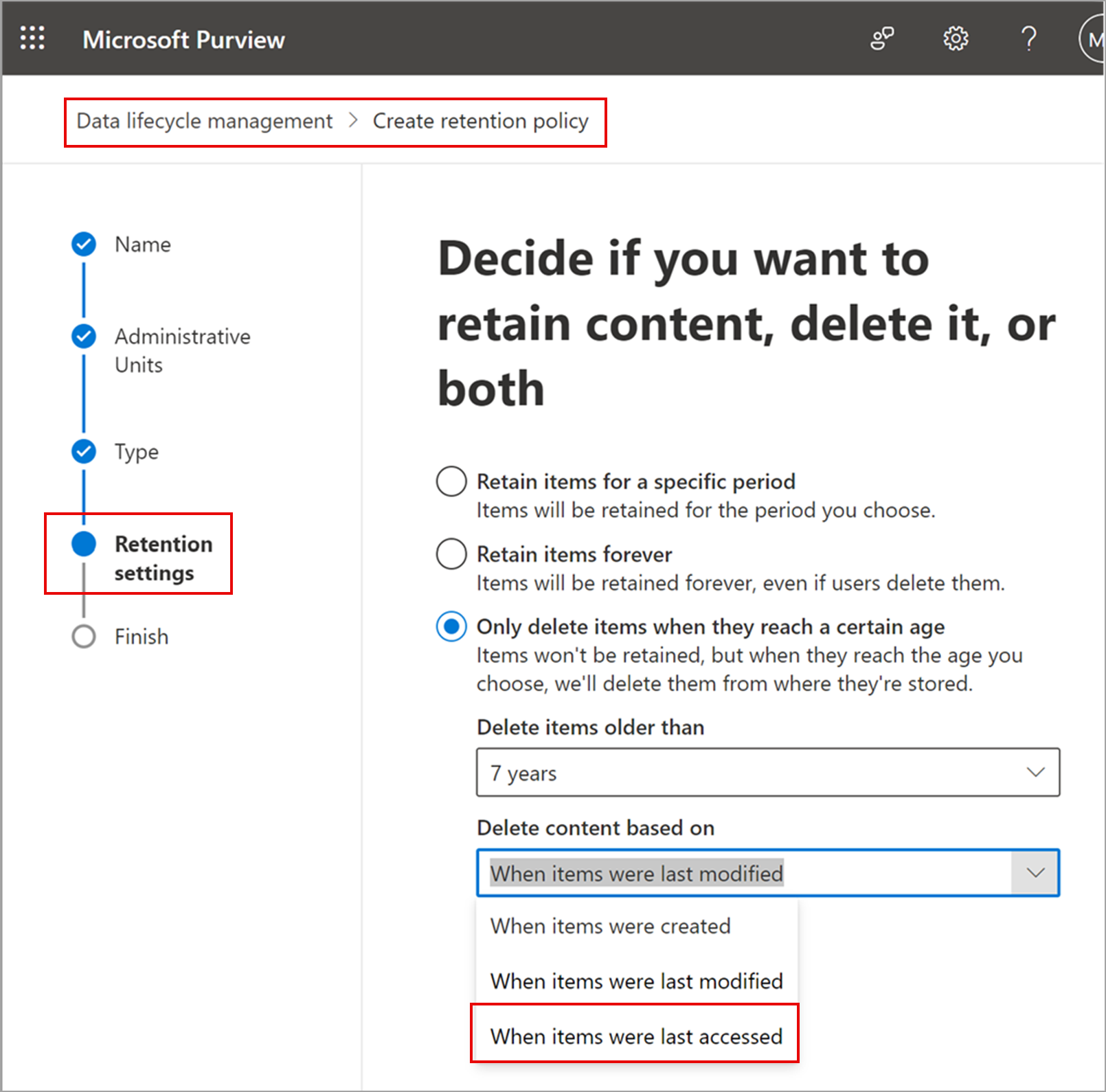
After the rollout, admins can use the retention control When items were last accessed when configuring labels and policies.

Retention settings page in Purview with the new “last accessed” option for retention policies:
admin controls

What you need to do to prepare:

This rollout will happen automatically by the specified date with no admin action required before the rollout. Review your current configuration to determine the impact for your organization. You may want to notify your users about this change and update any relevant documentation.

Before rollout, we will update this post with new documentation.