Back to latest version
Comparing Feb 21, 2024 latest (May 31, 2024) Swap

MC718246 - Defender for Office 365: Block Sender in Quarantine notification will require signing in to security portal

Message Center

Metadata at latest

Last Updated

May 31, 2024

Published Feb 21, 2024

Service

Exchange Online
Microsoft Defender XDR

Tag

Updated message
Feature update
Admin impact

Metadata changes

Title
Microsoft Defender for Office 365: Block Sender in Quarantine notification will require signing in to security portalDefender for Office 365: Block Sender in Quarantine notification will require signing in to security portal
Tags
Admin impact, Feature updateAdmin impact, Feature update, Updated message
End date
May 15, 2024Aug 5, 2024

Body changes

removed textadded text
Updated May 31, 2024: We have updated the rollout timeline below. Thank you for your patience.

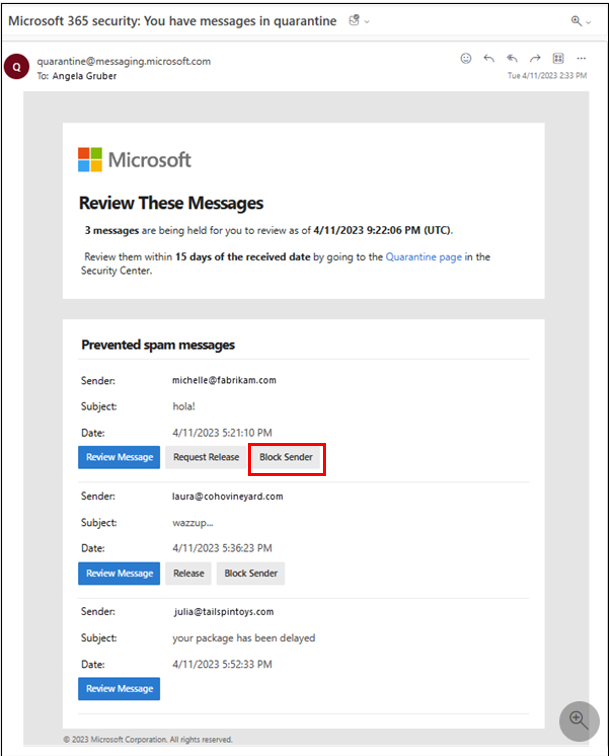
Following the feature update described in Message Center post MC711335 - Microsoft Defender for Office 365: Quarantine End User Allow and Block list management, published January 31st, 2024, sign in to the security portal will be required for the Block Sender action in Quarantine notifications. 

This message is associated with Microsoft 365 Roadmap ID 380185

[When this will happen:]

Worldwide: We will begin rolling out late April 2024 (previously early March 2024March) and expect to complete by late June 2024 (previously mid-March 2024.May).

GCC, GCC High, and DoD Release: We will begin rolling out mid-MarchMay 2024 (previously mid-March) and expect to complete by late March 2024.June 2024 (previously late June).

[How this will affect your organization:]

When the user clicks on the Block Sender button in the Quarantine notification, the user will now be required to sign in to the security portal at https://security.microsoft.com/quarantine.  


Previously, signing in was not required, and the Block Sender action was carried out automatically.

[What you need to do to prepare:]

There is no action needed to prepare for this change. You may want to notify your users about this change and update any relevant documentation as appropriate.